
 Deutsch
 Dansk
Dansk Svenska
 Nederlands
 Español
 Lietuvos
As I have been at Morningscore for +7 years now and in SEO for +9 years, I have advised a decent amount of business owners on this exact question.
If you find yourself asking, “Why am I not getting traffic to my website?” you are dealing with the most common headache for new websites.
You publish your website, and refresh your analytics dashboard. Zero traffic registered. You refresh again a few days later, but it’s still zero.
This moment hits almost every website owner, and it hits harder than it should, because the internet sold you a lie: publish good content and traffic follows. It doesn’t. Not automatically.
This guide walks you through the exact diagnosis: what to check first, what actually causes flat traffic graphs, and what you can do while you wait for Google to catch up.
TLDR:
Don’t touch your content yet, and don’t rewrite your homepage before you have run these checks first and know exactly what causes the missing traffic.
Search for your site. Open Google and type site:yourdomain.com. Pages show up? Google has found you. Nothing shows up? Something is blocking you completely, or your site is too new for Google to have noticed yet. Check out our diagnostics guide to figure out why your site is not showing up on Google.
Watch your real-time data. Open Google Analytics 4 or whatever tracking setup you have and find your real-time report. Take your phone, visit your own site, and watch for your visit to register. Nothing happens? Your tracking code is either broken or a filter is quietly eating your organic traffic.
Check your property in Search Console. Confirm you’re viewing the right version of your domain. Mix up http and https, or www and non-www, and Search Console will show you a flat zero even while real visitors actually land on your website.
Test your mobile speed by running your homepage through PageSpeed Insights. A score under 50 on mobile is very low, and Google won’t send visitors to a page that makes them wait. Your target should be an LCP benchmark of less than 2.5 seconds.
Look at your domain’s age. A 2-week-old site with zero traffic isn’t unusual, and your website is probably in the Google sandbox. Give it time and keep grinding before you panic.
Go through this list before you change a single word of your content. Most zero-traffic mysteries end here. And if they don’t, feel free to send me an e-mail or write to me on LinkedIn, and let’s find the issue together.
Before you make excessive changes to your content or technical setup, you need to isolate the problem to know what to fix.
Traffic vs. ranking: Understanding the distinction
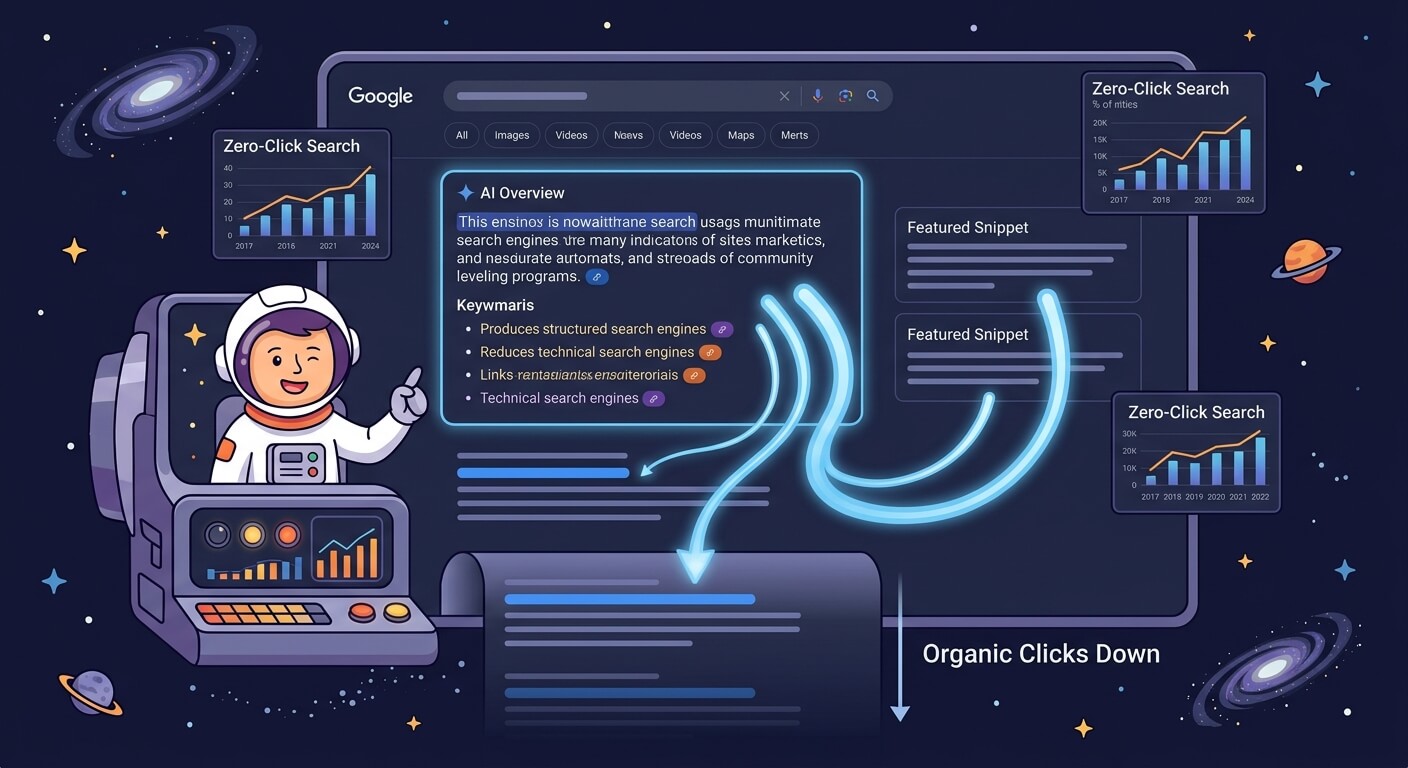
Ranking on the first page of Google does not guarantee visitors. You can hold a top position for a keyword and still see zero clicks in your analytics dashboard. This happens because search behavior has changed.
Search engines now answer many questions directly on the results page. AI Overviews and featured snippets provide immediate answers, leading to zero-click searches. A user searches for a term, reads the AI-generated summary, and leaves without ever clicking a link. According to Seer Interactive, AI Overviews absorbing clicks at the top of the SERP is an increasingly common reason for traffic drops.
You can check if this is happening to you by looking at Google Search Console. If your impressions are high and your average position is stable, but your clicks are near zero, users are getting their answers directly from the search results. You will need to learn how to grow organic website traffic even when AI eats away at it by targeting keywords that require deep reading, personal opinions, or specific products.
Search volume matters too. Ranking #1 for a term nobody searches will not lead any traffic. A keyword with ten monthly searches will never fill your analytics dashboard, no matter how well you rank for it.
And sometimes the ranking is real, the volume is real, but your page fails to earn the click. Your title and meta description are your storefront window, and they need to be interesting, selling, and have a hook that attracts the click from users – alternatively, a competitor will have a better hook and get the visit.
Top 6 causes of zero website traffic
If your basic tracking works and your site is indexed, you need to look at the specific reasons holding your pages back. There are a lot of different things that can result in missing or low traffic, but the following are some of the primary things that I find when I look into websites with no traffic.
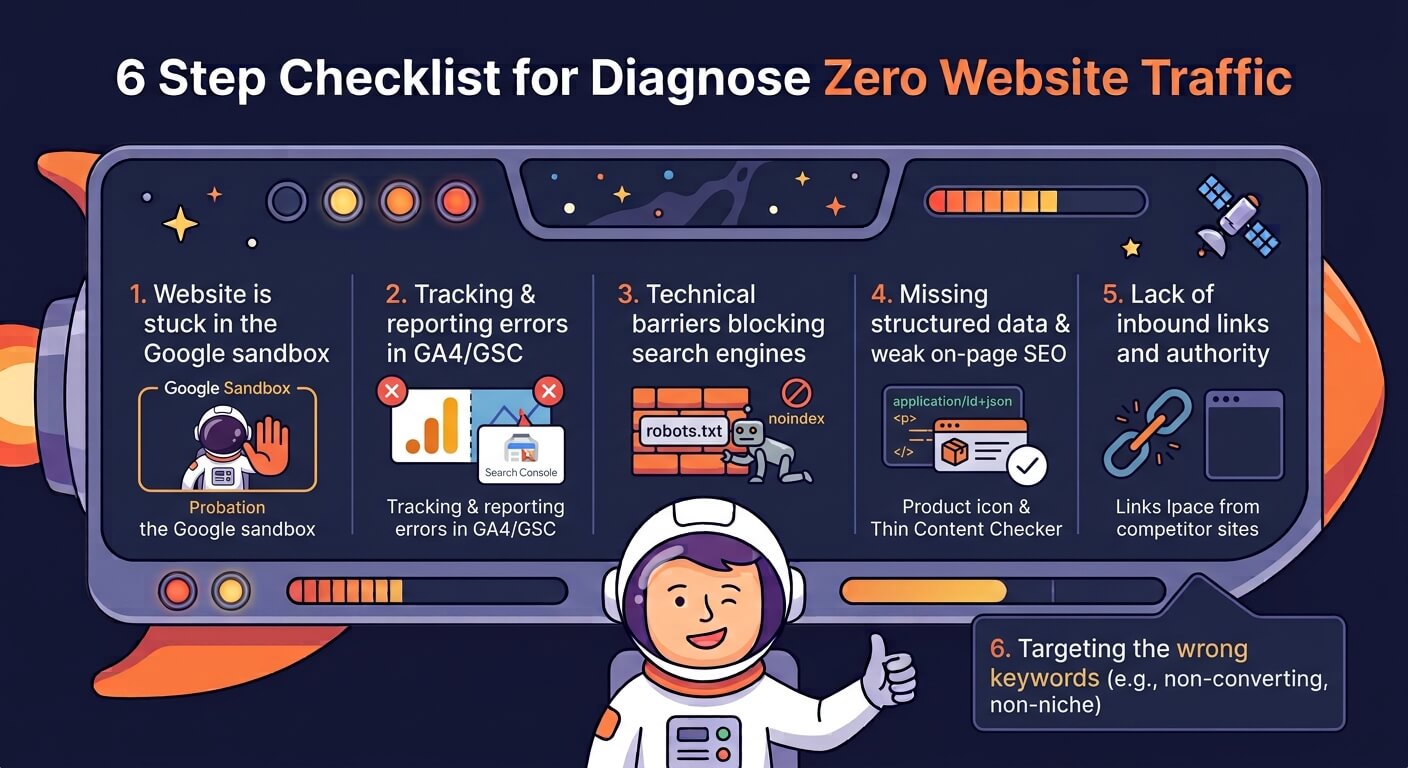
1. Your website is stuck in the Google “sandbox”
New websites don’t get traffic immediately. Search engines place new domains in a probationary period often called the “sandbox” as they need time to verify that your business is legitimate and your content is safe for users.
It’s important to say that Google themself never confirmed that a “sandbox” exists. However, in the 2024 Google leak, an interesting attribute showed up labelled “HostAge” that is to prevent new spam websites and content from ranking.
For a new small business site, month one usually brings zero organic traffic. You might start seeing your first impressions in Google Search Console around month three or four.
Actual clicks typically begin between six and nine months. Looking at new sites in Morningscore, reaching 500 to 1500 monthly visits in your first year is a success, unless you are either an experienced SEO – and then you wouldn’t be reading this post – or working very aggressively on SEO, with a decent budget for link building and maybe even hiring external help.
If your site is only a few months old, you do not have a traffic problem yet. You just need to wait – and while you’re waiting, you should keep publishing quality content for your categories, and informational blog posts worth citing for other businesses or even media.
That’s the way to speed up the time in the “sandbox”. Deliver high-quality, original content that is hard to replicate for AI models (for example, using original data that you have, personal opinions or experiences, cases, and real customer reviews). If you manage to get others to speak about your business, you’ll also speed things up as your site will earn trust and authority fast and create a reason for Google to show it.
We asked 75 experts how long SEO takes, and the results may be relevant for you to look at to set realistic expectations for yourself or your team.
2. Tracking and reporting errors in GA4 or Search Console
Sometimes visitors end up on your website, click through, and read your content, and your tracking tools never notice it. A migration, a certificate update, a stray filter- any of these can blind your analytics while your actual traffic keeps flowing.
The classic trap is that you verify the HTTP version of your property in Search Console, but every visitor lands on HTTPS. The mismatch zeroes out your reports even though nothing is actually wrong, other than you set up the wrong property, which is easy to fix by just adding the right one instead.
Google Analytics 4 also has strict filtering options. You might have a filter set up that accidentally excludes organic traffic. To check your GA4 filters, open your admin panel and navigate to Data Streams. Click your active web stream, then select Configure tag settings. Click Show all, then select Define internal traffic. Review the rules to verify you are not accidentally blocking normal user IP ranges.
Always run a live test by visiting your site from a different network and watching the real-time GA4 dashboard.
3. Technical barriers blocking search engines
Search engines use automated bots to read your website, and if the bots hit a wall, your pages will not rank because they won’t be indexed, meaning you get zero traffic. The most common wall is the robots.txt file. A single line of code in this file can tell Googlebot to ignore your entire website. Developers often use this code while building a site and forget to remove it when the site goes live.
Another common issue is the noindex tag. This HTML tag tells search engines specifically not to include a page in their database. You can use an SEO checker tool to scan your pages for accidental noindex tags. You should also check for broken links that stop bots from crawling from one page to another. If a bot cannot navigate your site structure, it will leave before indexing your content. Finding how to find broken internal links and how to find broken external links will keep your site architecture clean.
You can detect sites that are disallowed for crawling directly in Morningscore under the “health” tab. Open the “dead landing pages” tab to see if any pages are disallowed, redirected, or have another status code that causes the page to not show up in search results and get traffic.
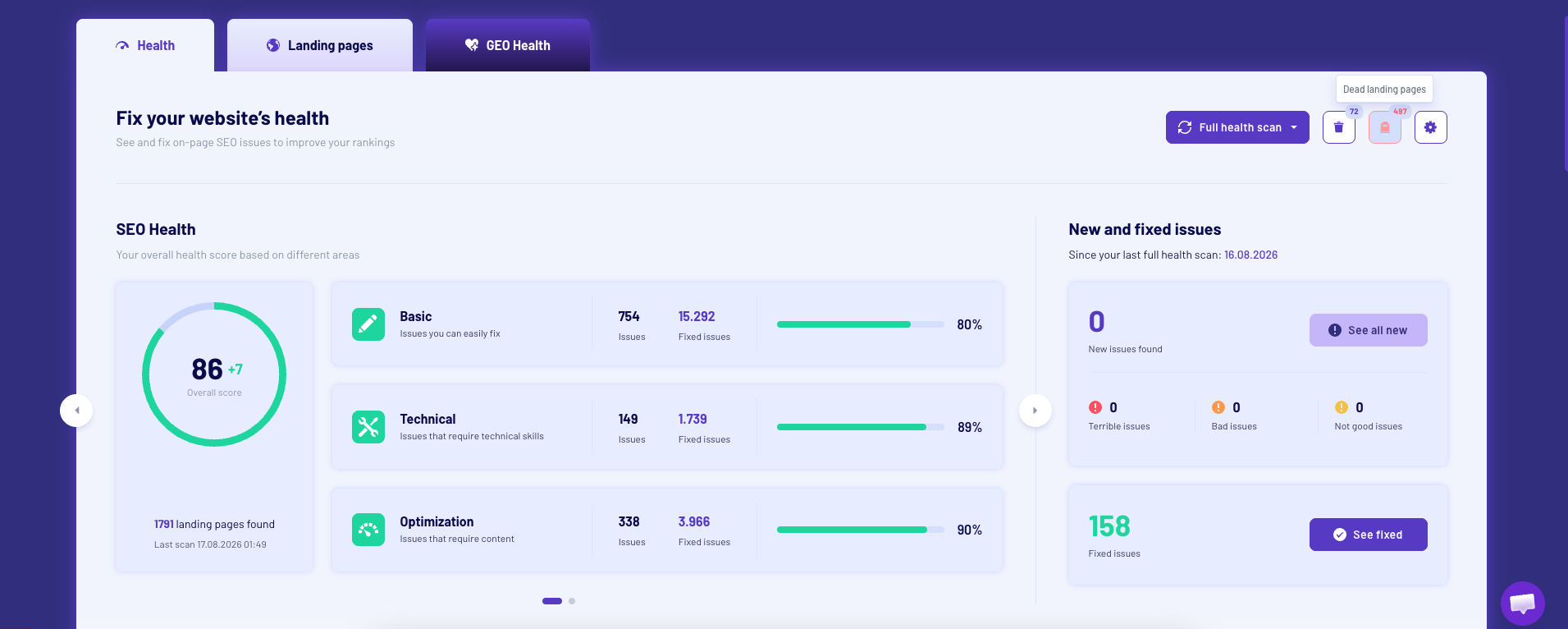
Oh, and you can also get a full overview of broken internal and external links directly from the health overview and even fix it automatically with our plugin for automated Wordpress and Shopify SEO app.
4. Missing structured data and weak on-page SEO
Search engines are smart, but they still need context to rank your site for relevant queries. If you don’t tell them exactly what your page is about, they will guess – often, they guess wrong. This is where structured data comes in. Structured data is a specific code format, usually application/ld+json, that feeds direct facts to search engines.
Structured data won’t make you do super jumps in the search results alone, but it definitely will help search engines understand the content and structure of your pages and increase the chances of being shown to the right users on the right search queries.
For example, if shop XYZ forgets to add application/ld+json code to their product pages, Google can’t display their prices or availability in search results. Users will click on competitors who have rich, detailed listings instead.
Beyond code, you need strong basic on-page SEO. If your titles are missing or your content is too brief, search engines will ignore you. You can use our thin content checker to find pages that need more depth and detail.
If your on-page SEO elements aren’t in place, the reason that your site is not getting any traffic is most likely because of this. Create better content, more originality, more personal opinions and experiences, better content structure, readability, and internal linking are the basics of SEO, and you need to master on-page SEO to attract – and not least – convert traffic.
Don’t know how? Just check out the on-page SEO guide that I made for the same purpose – or save the compressed checklist in the image below. But don’t share it with your competitors. 😉
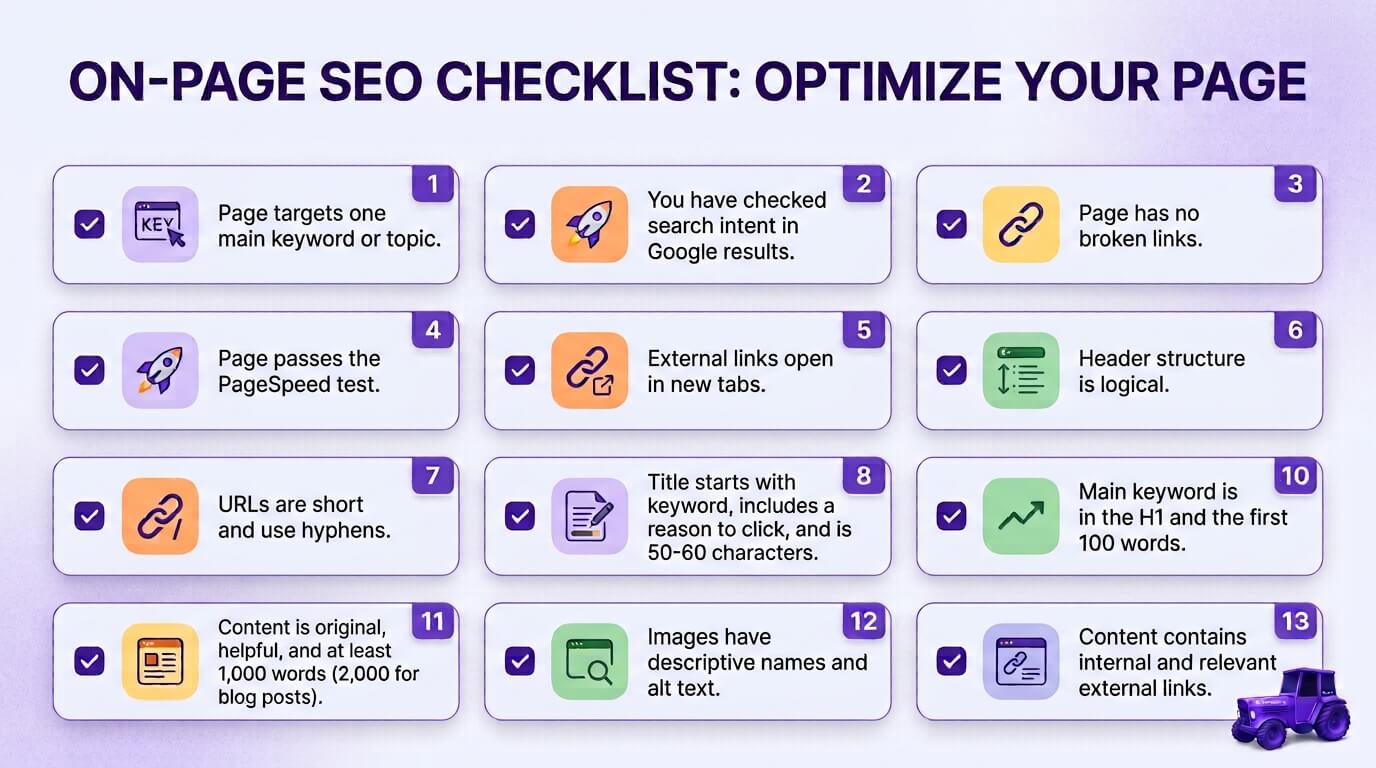
5. Lack of inbound links and authority
Content alone is rarely enough to secure top positions for competitive keywords. Search engines use links from other websites as votes of confidence. If no other websites link to yours, Google assumes your content is not highly valued by the community.
Building inbound links is a slow process, but it is necessary to grow website traffic. When a reputable site links to you, they pass along some of their authority – not in the sense that they give up some of theirs to give to you, but their link (recommendation) to you, it will pass authority.
You can use tools like Morningscore, Ahrefs, or Semrush to analyze your backlink profile and identify where your competitors get their links. You can learn how backlinks work to start planning an outreach strategy. Without these external votes, your site will struggle to outrank older, more established competitors.
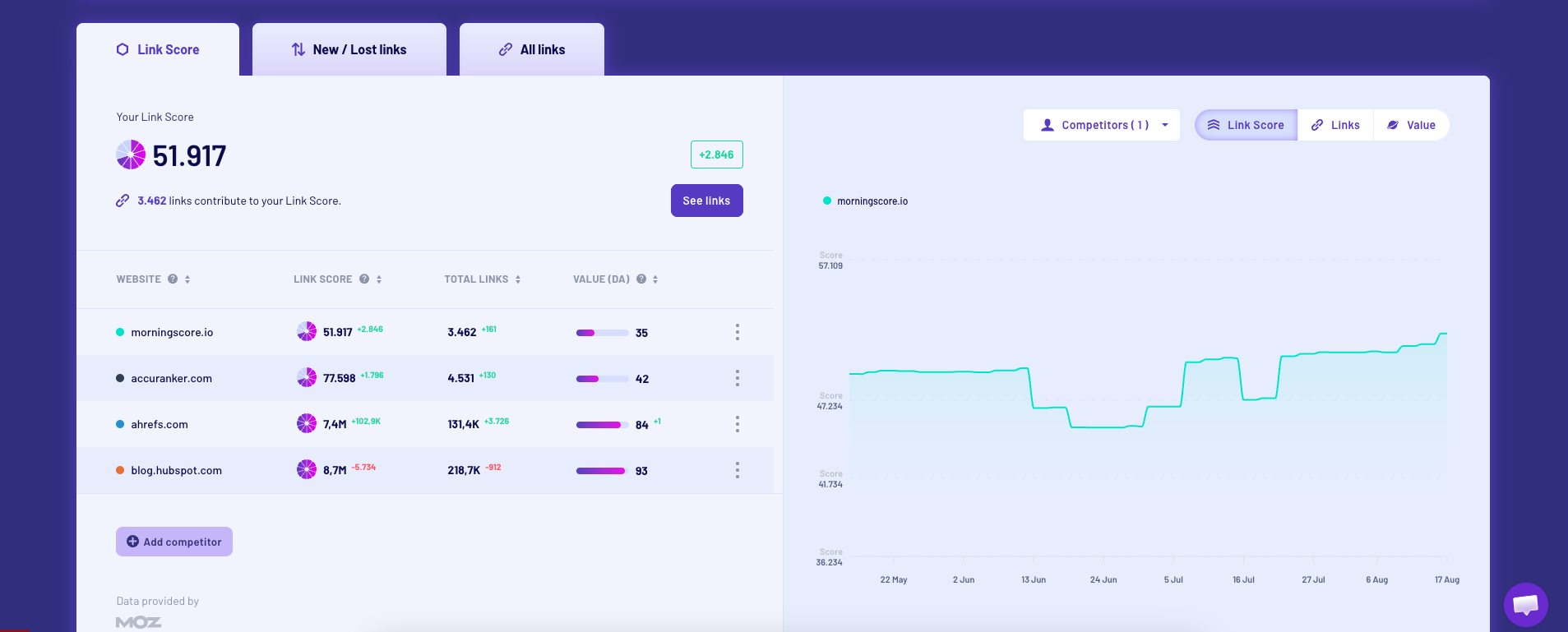
To move on from here, I’ll guide you on how to do it inside Morningscore.
Log in and type in a competitor’s domain to add them as a competitor, and Morningscore crawls their entire backlink profile in about a minute. Check the Morningscore and Linkscore to see how much authority that competitor has built.
Then open the backlink overview and browse All Links to see exactly who links to them and how valuable each link is. Run the same scan against two or three competitors, then export all link profiles to Sheets/Excel and cross-reference the list (or use smart filters) to display websites that link to your competitors but not you. That list is your outreach plan. Export it, prioritize the strongest links first, and start reaching out to build authority to your site and ultimately start getting traffic.
6. You’re targeting the wrong keywords
This one is very common for new websites as well as for established ones.
If there are no technical blocks, your website is not new and is already ranking for some keywords, your tracking is working, your content is good, and you have a decent amount of links, then you are most likely targeting the wrong keywords.
No matter how great your content is, you will never get any traffic if you are aiming for the wrong keywords.
After +7 years working at Morningscore, this one is probably the problem that I have seen and advised the most. Until recently, I even had it written in my Morningscore member page: “don’t go generic” (seriously, just check the Wayback Machine if you don’t believe me😉). That’s how much I have been preaching against it.
Beginners and even intermediate SEOs fall into this trap again and again – hence, we actually teach this on our basic SEO course.
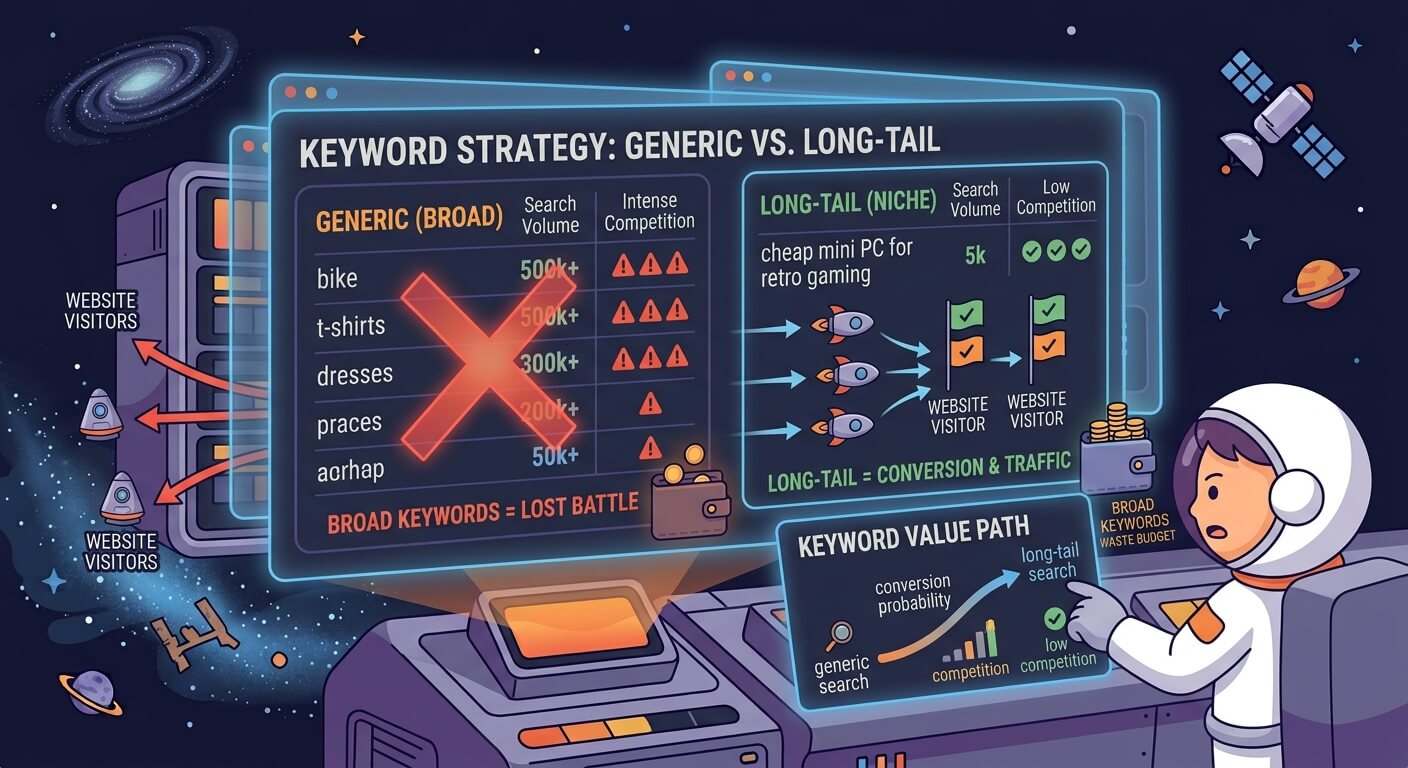
Reaching for broad, competitive, high search volume keywords is WRONG. Going head-to-head with publishers, e-commerces, etc. who have years of authority, tons of content and complete keyword clusters, and thousands of high-quality backlinks for broad keywords is a lost battle.
Websites targeting keywords like “bike”, “t-shirts”, “dresses”, and similar broad keywords will never get a single visitor. It will take years and years plus a crazy amount of money to become visible on keywords like that.
Long-tail keywords change the math. A phrase like “cheap mini PC for retro gaming” has fewer searches than “mini PC,” but it also has less competition and attracts visitors who already know what they want. Match your content to how buyers actually search and go for the niche keywords with higher buy intent instead of the broad, non-converting keywords that will just empty your bank account.
How to get traffic while waiting for global organic rankings
You do not have to sit idle while waiting for the Google sandbox period to end if you ended there with a new site. You can generate immediate visitors using alternative channels and local search features.
If you have a physical location or serve a specific geographic area, claim your Google Business Profile to get started. Local search results operate on a different algorithm than global organic results, and you can appear in the local map pack within weeks of verifying your address.
You should also distribute your content directly to your target audience. Share your articles on social media platforms where your customers spend their time, and build an email list from day one.
When you publish a new post, send it to your subscribers. This guarantees a baseline of traffic regardless of what search engine algorithms do.
If you are running a commercial website and not just a personal or hobby site, you basically need traffic to survive and can’t wait for search engines to index and show your site to relevant users.
So what do you do while waiting for search engines?
- Run paid ads via Google Ads, Meta, LinkedIn, X, or wherever your audience spends their time. This method requires an ad budget but will bring immediate, targeted traffic.
- Build a brand on social media with updates, stories, shorts, and of course links to your website and other channels.
- Publish guest posts on relevant websites to get your brand out there. This tactic is not as valuable as it used to be SEO-wise, but if you find the right websites and start partnerships that allow you to guest post, you might not get much SEO value from it, but you do get relevant traffic and maybe even customers.
For more tactics like these, check out our SEO tips for small businesses.
Frequently asked questions
Website owners frequently face the same roadblocks when trying to build an audience. At Morningscore, we have a lot of small businesses as customers, which also leaves us a lot of questions about this topic specifically – and to our luck, also a lot of golden gems in terms of what content our audience needs, just like this one on why a website is not getting any traffic.
Below are some of the questions we regularly get on our chat that you might have as well.
Why did my website traffic drop suddenly?
A sudden drop in traffic usually points to a specific event rather than a gradual decline in content quality. According to Google Search Console Help, drops in position are often caused by technical errors, manual actions, or algorithm updates. You should check your Search Console for security warnings or manual penalty notices. If the site is healthy, investigate why keyword rankings fluctuate to see if a recent core update shifted the search experience. Sometimes, keyword cannibalization causes two of your own pages to compete and drop in rankings.
Also, AI Overviews are eating more and more traffic – especially informational queries. If AI Overviews started to appear on the keyword, then you already found the explanation. As for other mentionable reasons, you could start to investigate if a Core algorithm update happened, the SERP experience changed, if your tracking is intact, if your content is still relevant, up to date, and fits the search intent, and lastly, check if you received a manual action in Google Search Console.
How do I know if my traffic is actually zero?
Cross-reference your data. Check Google Analytics 4 for user sessions, Google Search Console for clicks and impressions, and a third-party SEO traffic checker for estimated search volume. If all three show zero, you have a genuine traffic problem. If Search Console shows clicks but GA4 shows zero, you have a broken tracking script.
Does website speed really affect traffic?
Yes. Search engines prioritize the user experience. If your site takes longer than three seconds to load on a mobile device, users will hit the back button. Search engines track this behavior. If they see users constantly abandoning your site, they will stop sending traffic your way.
How long until a new site gets traffic?
Expect three to six months before your first meaningful impressions. Real growth tends to start between months nine and twelve. Patience matters more than any single tactic here. However, the early signs and the first traffic will start to accumulate from month 3-4 according to the 75 experts that we asked.
Is high traffic better than high conversion?
No. Fifty visitors converting at 5% will outperform a thousand visitors converting at 0.1%. Chase the right audience, not the biggest number.
Can broken links hurt my traffic?
Yes. A broken link stops a visitor mid-click and stops a bot mid-crawl – both will likely leave your site. Run an SEO health check every few months, fix what it finds, and keep the navigation through your site clear and without obstacles.
Does my domain age actually matter, or is that a myth?
It matters, but not as a direct ranking factor. Age buys you the time to build backlinks, publish consistent content, and earn trust. A ten-year-old domain with no activity ranks worse than a six-month-old domain that’s been building steadily. The age itself does make a site rank, but the trust and authority it has been building make it rank.
Why do Search Console and Google Analytics show different numbers?
Search Console counts clicks from Google’s own search results. GA4 counts sessions, which include direct visits, referrals, and traffic from other search engines. Expect the numbers to differ. On top of that, users can have tracking prevention set up, plus all the privacy concerns that mask data – and also leave out data.
How often do I need to publish new content to see traffic growth?
A site that publishes one solid, well-researched page a week will usually outgrow a site that dumps ten thin pages a month. Set a schedule you can actually keep, and match each piece to a keyword worth targeting. There is no magic number, but consistency is key, and quality beats quantity.
Will switching my URL structure or redesigning my site hurt my traffic?
It can, if you handle it carelessly. Every old URL needs a 301 redirect to its new address, or the links and rankings tied to it disappear. Map every redirect before launch, and watch Search Console closely for a few weeks after.