
 Deutsch
 Dansk
Dansk Svenska
 Nederlands
 Español
 Lietuvos
Your website isn’t showing up on Google for one of four reasons: it’s too new and hasn’t been crawled yet, a technical block like a misconfigured robots.txt file or a noindex tag is hiding it, it lacks backlinks from other sites, or its content is too thin or duplicated to meet Google’s quality bar.
You type your exact domain into the search bar. You hit enter. Zero results stare back. Continue and follow the approach to find out what reason applies to your site and how to fix it.
TLDR: The short answer to your visibility problem
Sites fail to appear in search results for a handful of common reasons.
Your site might simply be too new. Google needs time to discover and crawl a fresh domain. A technical block might sit in place. One stray line in your robots file or a misplaced meta tag can hide your entire site from the web. You might lack the authority to rank without other sites linking to yours, Google struggles to trust what you publish.
Or your content might miss the quality bar. Pages with barely any text, or text copied elsewhere, tend to get ignored. Run the diagnostic test below first. Once you know your index status, you can move straight to the fix that actually applies.
I recently published 3 large webshops for a client. Same pages, same products, same content structure across the board. Site 1 got indexed, no problem. Site 2 also got indexed, and that one actually had some unique content going for it. Site 3? Discovered, but never indexed. Why? Low quality, duplicate content. Same setup, three different outcomes.
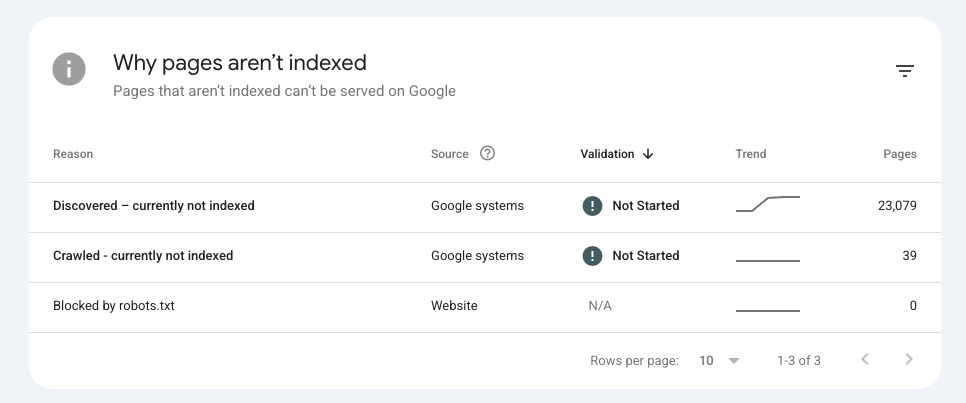
Diagnostic checklist for why is my website not showing up on google
Before you touch any code or rewrite a single page, run this simple manual test. Open your browser. Type site:yourdomain.com into the search bar, swapping in your real domain. Hit enter.
A list of your pages appears? Google indexed your site. You don’t have a discovery problem. You have a ranking problem. Sharpen your content, build authority, tighten your on-page SEO. A keyword rank checker will show you exactly where each page sits today.
Zero results? Google hasn’t indexed your site. Something blocks it, or nobody’s found it yet. That calls for technical troubleshooting. And don’t confuse a ranking slump with a full deindexing. A SERP checker take away your personal browsing history and hands you the neutral answer.
Technical errors that block search engines
When a site is completely missing from the index, technical errors are the most common culprit. Developers often use specific commands to hide websites while they are being built. If these commands are not removed before launch, the site remains invisible even after launching it.
Misconfigured robots files
Every website has a text file called robots.txt sitting in its root directory (the main top-level folder of your site). This file gives instructions to web crawlers (the automated bots, like Google’s, that scan websites to index them for search results).
During development, it’s standard practice to block crawlers completely. This stops search engines from indexing an unfinished site, so visitors don’t stumble across a half-built page full of placeholder text before you’re ready to launch.
The code snippet:
User-agent: *
Disallow: /
tells all search engines to stay away. Here, the asterisk (*) means “this applies to every crawler,” and the forward slash (/) refers to the root directory. So together, this line says “don’t crawl anything on this site, starting from the homepage.”
If you recently launched a new site or migrated to a new server, check this file immediately. If it’s still set to block crawlers after launch, your site becomes invisible to Google. No traffic, no search rankings, even if everything else is working perfectly.
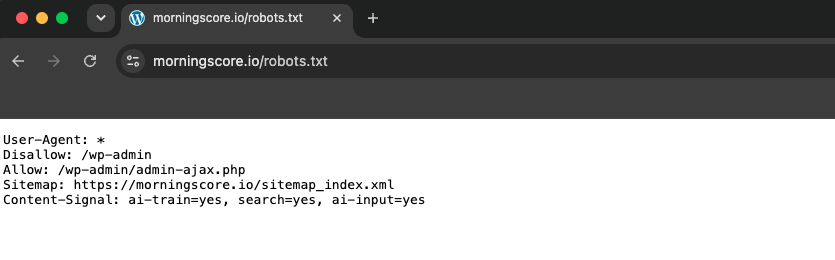
To fix it, remove the forward slash (or the entire Disallow line) so it reads Disallow: with nothing after it. This tells crawlers they’re free to explore and index your site.
And if you find this on your own site after launch, try not to lose it at your developer or agency. It’s a tiny detail that’s easy to miss on launch day, and even large companies have slipped up on it. That said, it’s still a real mistake with critical consequences, so treat it as one and get it fixed 5 minutes ago.
We had a freelancer redesign the website for a large, international SaaS that noticed drops in keyword rankings on their Morningscore account. Naturally, he reached out to me to find out if something was wrong with the Morningscore data.
Due to the description of the issue and the sudden decrease in rankings and even lost keywords, I checked the robots.txt-file as the first thing. And I was right. The robots.txt-file was still blocking search engines from crawling. He immediately allowed search engines to crawl the new website, and luckily, it only went on for few days and we avoided the total crisis and big economic losses.
Accidental noindex meta tags
Another common technical block is the noindex meta tag. A meta tag is a snippet of code that gives instructions to search engines and browsers. It’s invisible to visitors, but readable by bots. This one sits in the header of a web page, meaning the <head> section of the code itself, not anything visitors actually see.
The snippet:
<meta name=”robots” content=”noindex”>
tells search engines not to include the page in their database. Here, name=”robots” targets all search engine crawlers, and content=”noindex” is the actual instruction telling them not to add this page to search results.
This tag overrides almost everything else. Even if your page has great content, backlinks, and is linked from your homepage, this one tag alone can keep it out of Google entirely. Even if you submit your pages manually by requesting indexing through Google Search Console, this tag will still prevent them from appearing.
You must inspect your page source code to ensure this tag is not present on your public pages. You can do this by right-clicking the page and selecting “view page source,” then searching (Ctrl+F / Cmd+F) for “noindex.”
The WordPress visibility checkbox
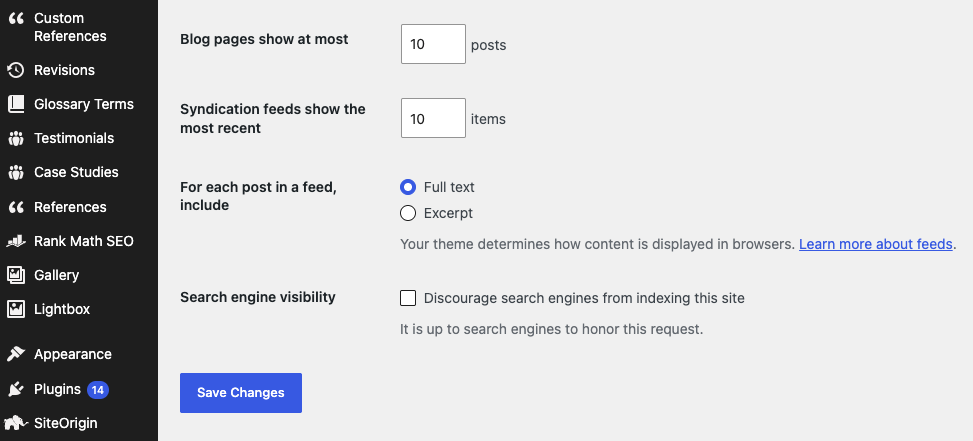
If you use WordPress, there is a specific setting that causes massive indexing problems. Under the Settings and Reading menu, there is a checkbox labeled Discourage search engines from indexing this site. When checked, WordPress automatically adds the noindex tag to every single page on your domain. This is incredibly common after a site redesign. Changing WordPress themes or launching a new design often involves checking this box temporarily, and site owners simply forget to uncheck it.
Evaluating content and authority issues
If your technical foundation is solid but you still cannot find your pages, the issue likely stems from content quality or domain authority. Search engines do not automatically index every page they find. They evaluate the value of the page before adding it to their database.
Your website is simply too new
Patience is a requirement in search optimization (SEO). If you launched your website a few days ago, it is completely normal for it to be missing. According to official documentation, Google may not have discovered it yet if the site is very new.
Google normally finds new sites by following links from other pages it already knows about, or through a sitemap you submit. If neither has happened yet, your site is essentially invisible to it and not broken, just undiscovered.
It typically takes anywhere from one to four weeks for a new domain to be crawled and indexed naturally. You can speed this up by submitting your site manually:
- Create a free Google Search Console account and verify ownership of your site.
- Submit your sitemap (usually found at yourwebsite.com/sitemap.xml) under the “Sitemaps” section.
- Use the “URL Inspection” tool to submit your homepage (and any key pages) for indexing directly.
This won’t guarantee instant indexing, but it puts your site on Google’s radar faster than waiting alone. After submitting, a waiting period is still expected. Check back in a week or two before assuming something’s wrong (obviously, this only applies if you have already confirmed that there is no technical issues or blocks).
A lack of backlinks
Search engines discover new websites by following links from existing websites. A backlink is simply a link on someone else’s website that points to yours. If no other website on the internet links to your domain, crawlers have a very hard time finding you.
Backlinks act as pathways and votes of confidence. The more (quality) sites that link to you, the more trustworthy your site looks to search engines. Without them, your site exists on an isolated island, disconnected from the web crawlers already travel.
Building a few initial links gives crawlers the pathways they need to discover your pages. Some easy places to start:
- Social media profiles: Add your website link to your bio on platforms like Instagram, LinkedIn, or Facebook.
- Local directories: List your business on Google Business Profile, Yelp, or industry-specific directories relevant to your niche.
- Partner or supplier websites: Ask any business partners, suppliers, or clients you work with to link to your site from theirs.
They don’t need to be high-authority sites to help at this stage. Even a handful of simple, relevant links can give crawlers their first path to your new site.
As my colleague, Christian, tells users on the Morningscore Academy courses, “links are like likes on FB. The more others interact with your comment – like it – the more the algorithms will reach the conclusion that you have something relevant to say, which ultimately means that your comment ends up in the “most relevant” pile.
If users skip past your comment, it moves to the bottom of the pile.
Links are social capital, and without “likes” your website will never end up among the “most relevant.”
If you’re not running a large company and want the full picture beyond not showing up in Google at all, our SEO tips for small businesses guide will get you started doing SEO yourself.
Thin content and quality issues
Search engines actively filter out low-quality pages to protect their users. If your pages contain very little text, duplicate content (text copied from another site, or repeated across your own pages), or auto-generated filler (spun or AI-generated text with no real substance), they will be ignored. This is often called thin content – pages that are technically live but don’t offer enough value to be worth showing in search results.
A recent study that analysed the indexing data of 1.7 million pages found that 88 percent of unindexed pages were excluded from Google’s search results due to quality concerns. Not deleted, just left out of the results people see.
Fixing thin content requires expanding your pages with original, helpful information that directly answers user questions. For example, instead of a product page with just a name and price, add details like sizing, materials, use cases, or answers to common customer questions.
To check where you stand, skim through your own pages and ask honestly: does this page tell a visitor anything a competitor’s page doesn’t? If the answer is no, it’s a candidate for expansion.
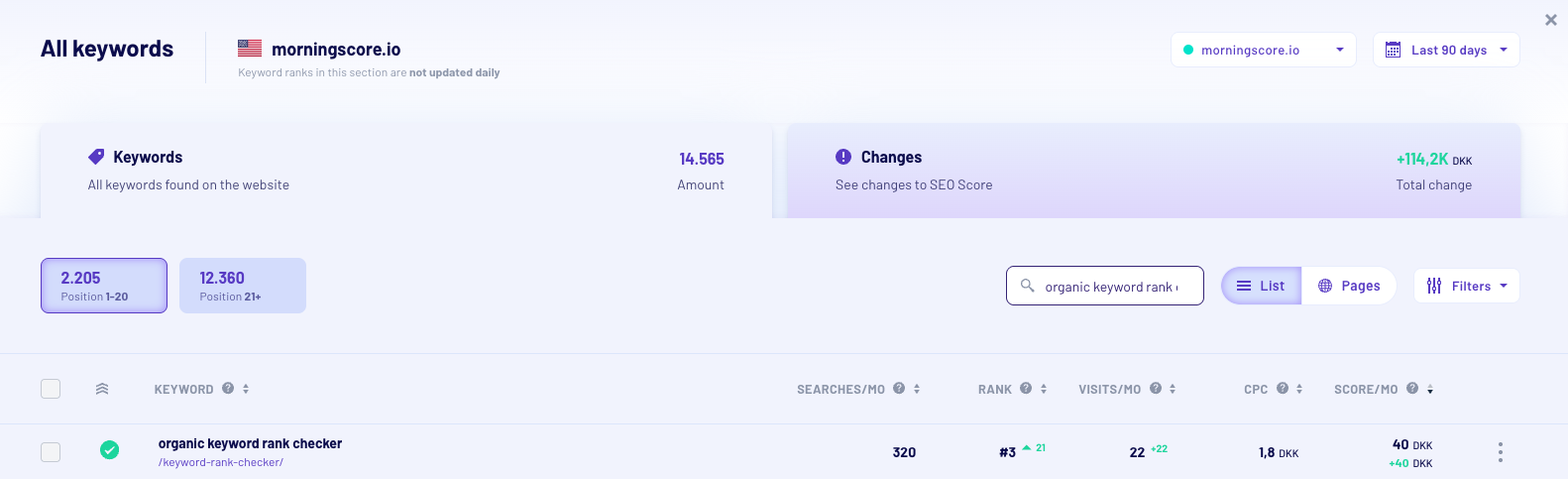
A recent example of quality issues we had at Morningscore was for the keyword “organic keyword rank checker”. We were ranking +20. Totally invisible for users.
Why?
We simply focused on keyword TRACKING on our rank tracker feature page. Not because of thin content but for THAT specific query we had thin content, because we didn’t offer anything of value in terms of rank checking which is different from tracking.
I decided to make a dedicated page for keyword rank checking to offer something valuable for users looking for exactly that. The result speaks for itself as we went from ranking #24 to #3 within 90 days.
How to check why is my website not showing up on google yourself
You do not need to be a developer to diagnose these issues. The best way to find the exact problem is to use the official tools provided by search engines. Google Search Console is the primary diagnostic platform for website owners.
First, you need to set up Search Console and verify your domain ownership. A common mistake here is verifying the wrong property prefix. Make sure you verify the exact version of your site (for example, the https version instead of the http version). Once logged in, use the URL Inspection tool at the top of the dashboard. Paste your exact page URL into the bar and hit enter.
The tool will return a specific status. You need to check three specific fields. First, look at Crawl allowed to ensure your robots file is not blocking the bot. Second, check Page fetch to ensure the server is responding correctly. Third, check Indexing allowed to confirm there are no rogue noindex tags. If all these look good but the page is still missing, you can click the Request Indexing button to force a manual review.
You should also review the Page indexing report in the left sidebar. This report categorizes every page on your site and explains exactly why certain pages are excluded. Finally, be aware that your own browser settings can create false negatives. If you have SafeSearch turned on, it might filter out your site, making you believe it is deindexed when it is actually just hidden from your specific browser session.
To get a comprehensive view of your site health, you should perform an SEO audit using a dedicated platform. Running a full SEO test will scan your pages for technical errors automatically. Oh, and by the way, you can even let Morningscores build in AI fix the errors for you (fully automated via plugin/app for Wordpress and Shopify).
Frequently asked questions (FAQ)
Website owners often face the same recurring issues when dealing with visibility drops. Here are the most common questions regarding indexing and search presence.
Why did my site suddenly disappear from search?
If your site was ranking well and suddenly vanished, you likely face a manual penalty, a severe technical error, or a security breach. Official guidelines state that Security issues can lower your page ranking or remove your site entirely to protect users from malware. Check the Security Issues report in Search Console immediately. If that is clear, check if a developer accidentally pushed a noindex tag during a recent update.
Why are my specific page titles wrong in the results?
Sometimes your site is indexed, but the text displayed in the search results does not match your actual code. Search engines will rewrite your titles if they believe your original text is misleading, stuffed with keywords, or irrelevant to the user query. You can use a title tags tool to ensure your text meets length and quality guidelines.
Do I need a sitemap to get indexed?
Small websites can usually be indexed without one, but submitting a sitemap is the most efficient way to tell search engines about your pages. A sitemap acts as a direct directory of your important URLs. If you are struggling with visibility, generating and submitting an XML sitemap should be your first step.