 Deutsch
 Dansk
Dansk Svenska
 Nederlands
 Español
 Lietuvos
Key takeaways
- An SEO audit is a complete analysis of your website to find issues that hurt your search engine rankings.
- You can perform an SEO audit by following a 16-step checklist that covers technical health, on-page SEO, and backlinks.
- It is recommended to run regular audits every three to six months to keep your site optimized and competitive.
SEO audits are essential for keeping your website competitive and performing at its best. Performing regular SEO audits improves search rankings and user experience. Audits help find problems before they negatively impact your visibility.
Neglecting SEO audits results in missed opportunities and declining traffic. The April 2026 Google core update stresses content quality, relevance, and E-E-A-T signals. Staying proactive makes sure your site remains aligned with search engine guidelines and user expectations.
Want to know how to perform a complete SEO audit and stay ahead of competitors? Read on to discover how SEO audits save time, money, and effort while driving your website to success.
What is an SEO audit?
An SEO audit is a complete analysis of all factors that affect a website’s visibility in search engines. It identifies issues that impact visibility, rankings, and user experience. An SEO audit examines technical factors, content quality, backlinks, and on-page and off-page factors.
A thorough SEO audit shows how well a site follows best practices. It highlights errors that prevent a website from reaching its full potential in search rankings. Doing an audit helps website owners create a plan for improvement, supporting long-term success in organic search results.
If you want your website to rank high on Google, an SEO audit is a detailed review of your performance and visibility to help you improve.
How to perform an SEO audit
An SEO audit is essential for maintaining and improving a website’s search engine performance. By systematically analyzing technical and content-related aspects, you can identify issues that hinder your rankings. This guide walks you through the key steps of performing an SEO audit to make sure your website is optimized for search engines.
1. Run a crawl and check if your website appears on Google
A crawl is when Google’s bots scan and index a website’s pages to understand its content. Before performing an SEO audit, it is important to confirm that your website is indexed by Google. To do this, type “site:yourdomain.com” into Google’s search bar.
If your website does not appear in the search results, there may be an issue preventing it from being indexed. This could be due to problems such as a robots.txt file blocking search engines, a noindex meta tag, or technical errors in Google Search Console.
Google Search Console now includes AI integration for clearer insights. Use it to check for errors such as crawl issues, indexing problems, and security concerns. Fixing errors reported in Search Console is crucial to maintaining your site’s visibility.
2. Identify organic traffic drops and content decline
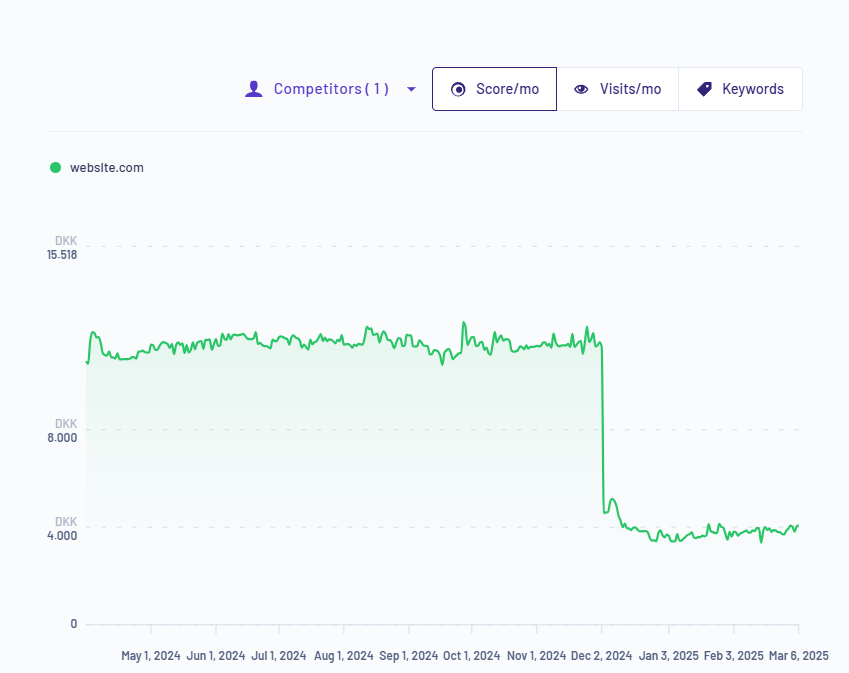
Spotting a sudden drop in traffic is crucial. Google updates its algorithms all the time. The April 2026 core update focused on relevance, content quality, and user intent. A sudden traffic drop can happen for many reasons.
Organic search now accounts for approximately 50-53% of website traffic in 2026. This is a decline from 62% in February 2025. Regularly analyzing your website’s traffic helps you spot declines that indicate underlying issues. Use Google Analytics 4 and Google Search Console to identify pages that have lost rankings.
Do you notice a decline with specific content, such as a blog post or category page? Consider updating and optimizing it to reclaim your rankings. Refreshing outdated content is one of the highest-impact actions you can take – pages that match current search intent consistently outperform stale ones. Look at competitors who have overtaken your positions and analyze what improvements they made.
See in Morningscore how you and your competitors have ranked historically. This helps you spot sudden traffic drops and identify the issue.
3. Analyze your site with an SEO tool
By analyzing your site with an SEO tool, you gain a clear understanding of what needs to be done to improve your ranking on Google. Many tools are out there, and they help you with different elements of the SEO audit at different levels of expertise. Make sure to find the best match for you and your business.
Read the article about the best SEO tools.
4. Check for duplicate versions of your website
It’s important to make sure your website does not have multiple accessible versions, such as “http://yourdomain.com”, “https://yourdomain.com”, “www.yourdomain.com”, and “(non-www).yourdomain.com”. If these versions exist without proper redirects, search engines might treat them as separate websites, causing duplicate content issues. Make sure that all variations properly redirect to a single preferred version using 301 redirects.
5. Test your website’s speed and optimize performance
Page speed is a crucial ranking factor that directly affects user experience. Test your website’s loading speed by using Google PageSpeed Insights or with Morningscore’s website speed test. Check if your pages are too slow.
If your site is slow, consider optimizing images by compressing file sizes and using tools like TinyPNG. Minimize HTTP requests, leverage browser caching, and use a Content Delivery Network (CDN) to improve load times.
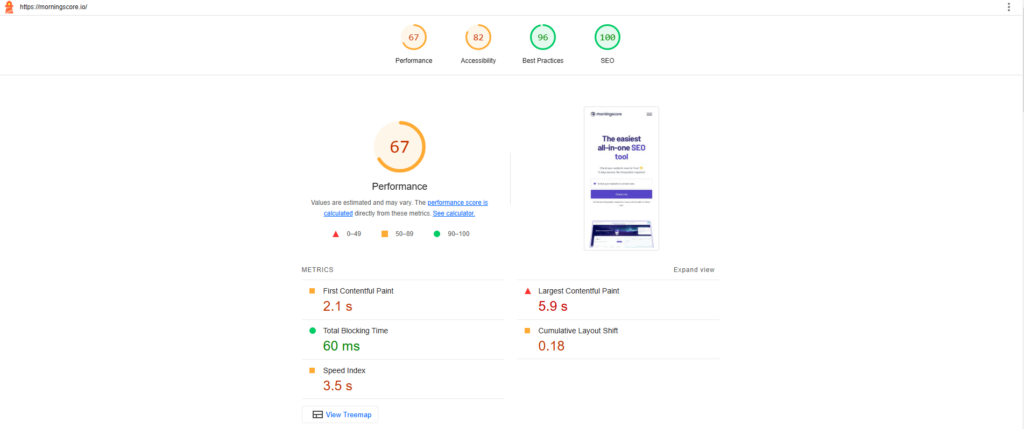
Perform a page speed test with Google PageSpeed Insights. Insert your website and see the results.
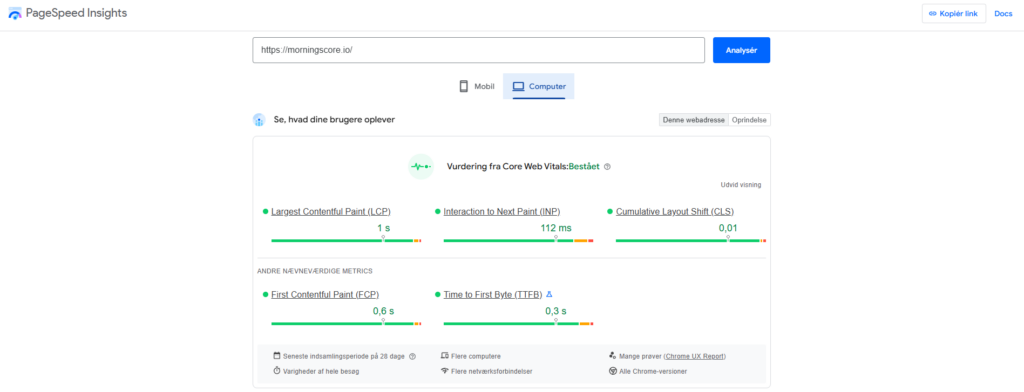
A fast website lowers your bounce rate and provides better engagement. Google treats page speed as a direct ranking signal, so slow pages can cost you visibility even if your content and links look fine.
6. Make sure your website is mobile-friendly
Mobile devices account for a significant portion of internet traffic. Organic search accounts for approximately 50-53% of website traffic in 2026. It is essential to make sure your website is mobile-friendly. Responsive design, touch-friendly buttons, and properly scaled images all contribute to a better mobile experience.
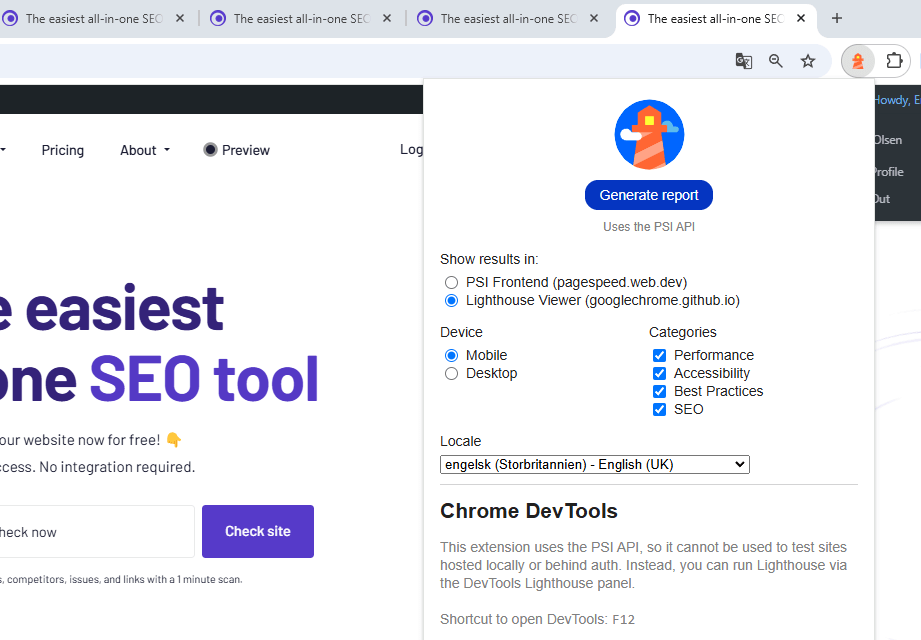
Google uses mobile-first indexing by default, meaning your mobile experience is the version Google primarily evaluates. This improves your rankings and user satisfaction. You can read more about this in Google’s SEO starter guide. See how to use Google’s Lighthouse tool to check for issues.
- Access Lighthouse through Chrome DevTools or the official tool site.
- Go to the website you want to check.
- Run an audit to generate a performance report.

- Check how mobile-friendly your website is and identify fixes.
7. Verify a secure connection with HTTPS
Security is another critical factor for SEO, as Google prioritizes safety for its users. Make sure your site uses HTTPS, which encrypts data and protects user information. If your site is still running on HTTP, install an SSL certificate and update all internal links accordingly.
Websites without an SSL certificate appear as “Not Secure” in browsers, which deters visitors. It is important to make sure your site is safe for both users and search engines.
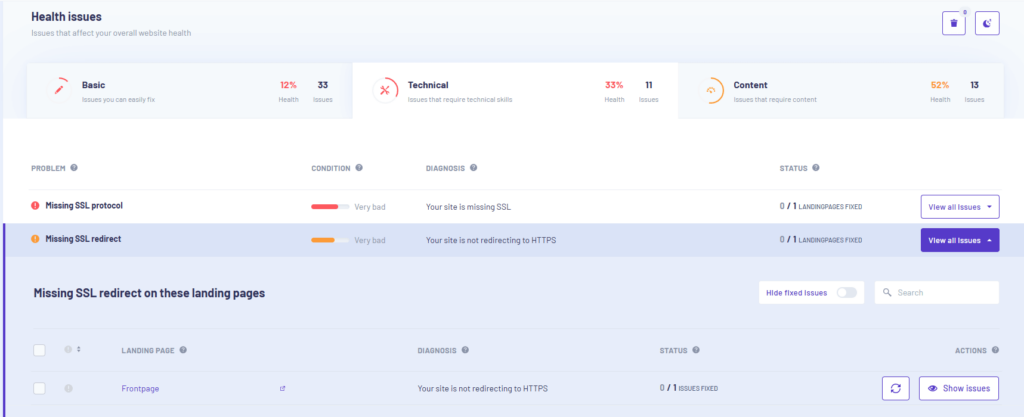
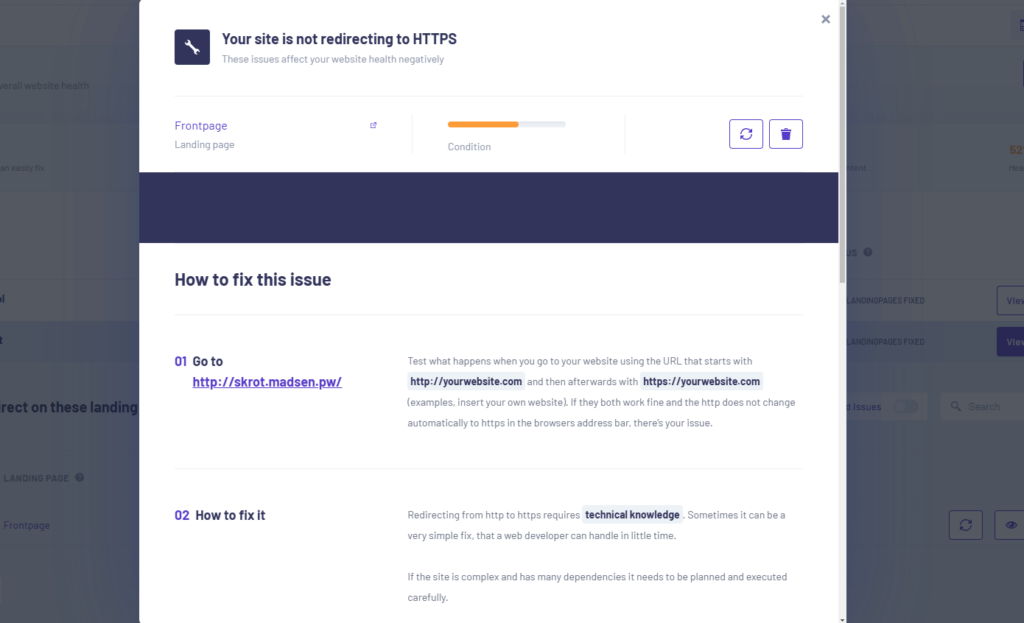
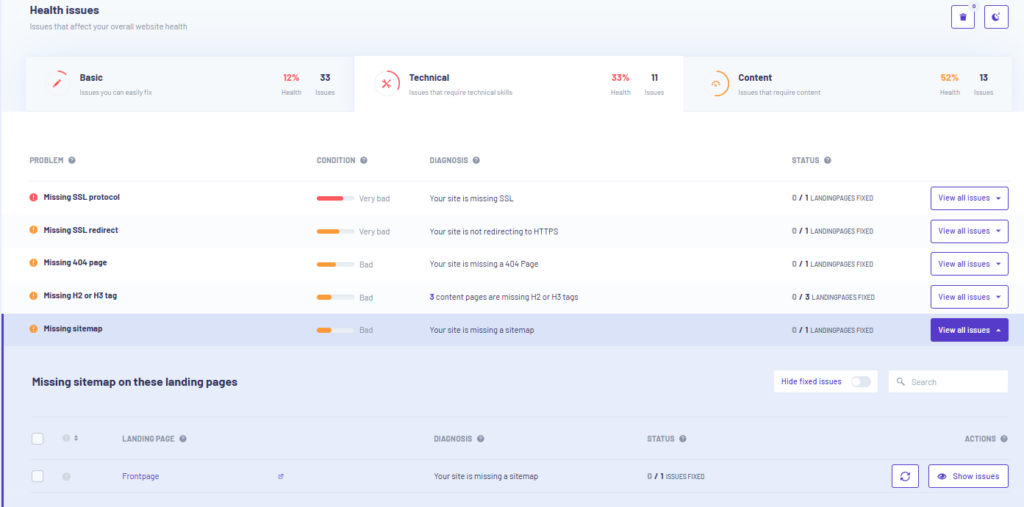
Check for missing SSL protocols or missing SSL redirects in Morningscore.
- Identify the landing pages with issues.
- Get a guide to fix the issue.
8. Analyze your sitemap and make sure it’s error-free
A sitemap is a structured list of a website’s pages and content hierarchy for easy navigation. Sitemaps help search engines understand your website’s structure. However, they should not contain broken links, redirected pages, or non-canonical URLs. Inspect your sitemap in Google Search Console to make sure it’s correctly configured and free of errors.
A well-structured sitemap improves indexing efficiency so all important pages are discoverable.
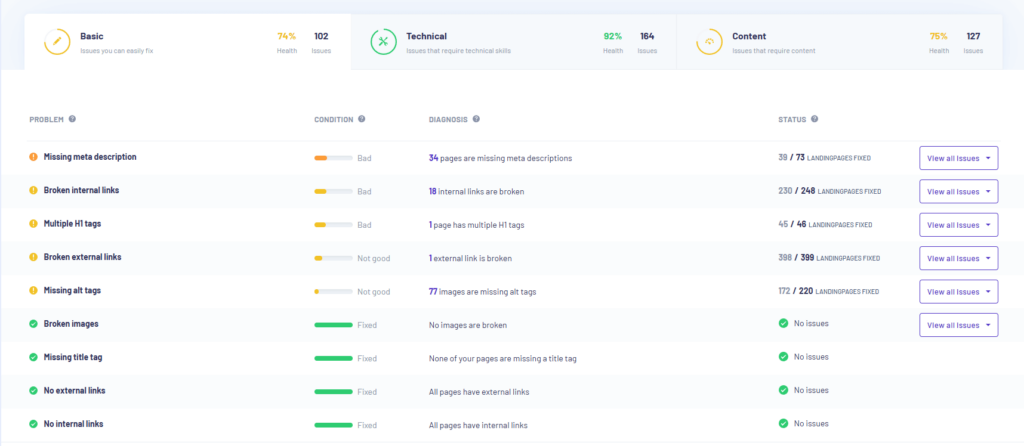
Morningscore shows you which landing pages are missing a sitemap or SSL redirect, as well as 404 pages and more. You also get a practical guide on how to fix the issues.
9. Optimize your on-page SEO
On-page SEO optimizes individual web pages to improve search visibility and user experience. The goal is to make the page more search engine-friendly. On-page SEO elements significantly impact your rankings.
The following on-page elements are important:
- A unique and descriptive title tag (within 50-60 characters).
- A compelling meta description (around 150-160 characters).
- Use of headings (H1, H2, etc.) to structure content logically.
- Natural inclusion of relevant keywords.
- Use of internal links to distribute link equity, guide users, and help search engines understand your site’s structure.
- Use of external links to relevant and authoritative sites.
- Original, helpful, and valuable content for readers.
- Alt tags to provide context for images.
- A meaningful and relevant URL structure.
Read more about on-page SEO in the article.
10. Improve website navigation and user experience
The most important thing for Google is that its users find what they are looking for. Therefore, your website must deliver on that front. A well-structured website is easier for both users and search engines to navigate.
A high bounce rate or a generally poor experience causes your site to lose relevance for Google. It is very important that your user experience complies with standard practices and aligns with search intent.
Make sure your main menu is clear and that important pages are easily accessible. If visitors struggle to find what they’re looking for, they are more likely to leave. This increases bounce rates and negatively impacts SEO.
To check if your website is well-structured, use Google Analytics to track bounce rates and improve high-bounce pages. Test mobile-friendliness with Google Lighthouse and make sure your navigation is easy to understand.
Check site speed with Google PageSpeed Insights and fix issues like image compression. Use an SEO tool like Morningscore to find broken links, and confirm your site is properly indexed in Google Search Console.
11. Fix broken links
Broken links are URLs pointing to a page that no longer exists or returns an error. Fixing broken links is important because they negatively impact user experience, leading to frustration and higher bounce rates. They also harm SEO, as search engines view broken links as a sign of neglect.
Broken links prevent search engines from properly crawling your site, which reduces its visibility.
Use Google Search Console or your preferred SEO tool to find broken links on your site. Either remove or replace them with working links. If a page has been permanently removed, set up a 301 redirect to a related page to preserve link equity.
Check broken external links and broken internal links in Morningscore. Fix your broken links and improve the user experience.
12. Build high-quality backlinks
Backlinks are links from an external website pointing to your website. Backlinks are one of the most important ranking factors in SEO. Getting links from authoritative and relevant websites will significantly boost your rankings. Focus on earning high-quality links through guest blogging, digital PR, outreach campaigns, and creating high-value content.
Avoid spammy or low-quality backlinks, as they lead to penalties. Read more about backlinks here.
A practical example: Fenerum, a B2B SaaS company, improved their SEO health score from roughly 40 to over 80 after fixing technical issues and growing their backlink profile using Morningscore. Better links combined with cleaner technical health is a pattern that shows up consistently in successful audits. Read the full story in the Fenerum case study.
Morningscore provides a full overview of your backlinks. Check your links and their value, see competitors’ backlinks, and monitor new & lost links. Also check out our free link inspiration series.

13. Keep an eye on competitors
Monitoring competitors is essential for your SEO strategy. Analyze their keyword targeting, backlink profile, content quality, and technical SEO (such as site speed and mobile optimization) to uncover areas to improve.
Additionally, reviewing their local SEO presence, including their Google Business profile, provides insights into how you can improve your own local rankings. Keeping track of these factors helps you stay competitive and adjust your strategy effectively.
14. Set up a Google Business profile for local SEO
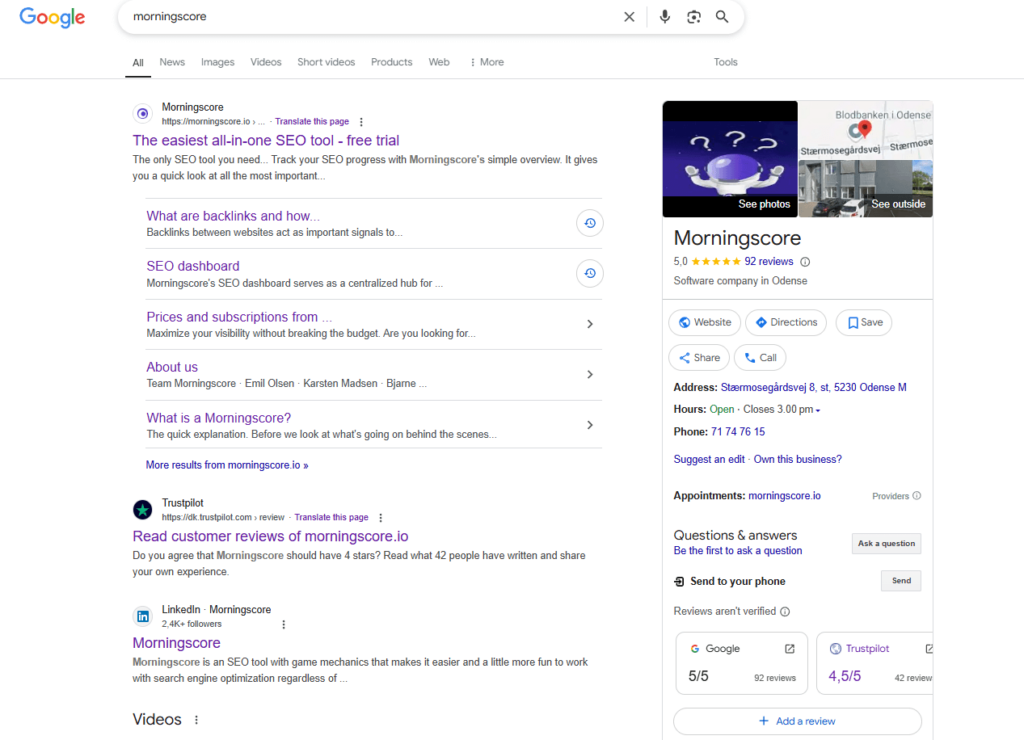
If you operate a local business, having a Google Business profile is crucial. Make sure your address, phone number, business hours, and categories are accurate and consistent across all online listings. Stricter review policies now help prevent fake and incentivized reviews.
An AI-powered Q&A system automatically generates questions and answers. Encourage customers to leave positive reviews, as they impact local search rankings.
15. Track and analyze traffic data
SEO is an ongoing process, not a one-time thing. Tracking performance is essential. Use Google Analytics, Google Search Console, or other SEO-tracking tools to monitor traffic trends, identify top-performing pages, and assess the impact of changes made during your audit. Consistently analyzing data helps you make informed decisions to refine your SEO strategy over time.
16. Schedule regular SEO audits
Performing an SEO audit regularly helps maintain your website’s overall health and search visibility. Systematically checking indexing, technical performance, on-page SEO, and backlinks helps you address any issues before they affect your rankings. Implementing these practices makes sure your site remains competitive and well-optimized.
One practical note: an audit only moves the needle when you act on what you find. Prioritize the highest-impact issues first and work through the list consistently. Small, regular fixes compound into meaningful results over time.

Why are SEO audits important?
An SEO audit identifies problems that prevent pages from appearing in search results. It helps achieve higher rankings, more website traffic, and greater user engagement. Fixing issues improves overall site speed, indexing, and mobile usability.
Search engine algorithms prioritize well-optimized websites that provide a seamless user experience. The April 2026 core update and spam reduction efforts underline the need for authentic, high-quality content and strong E-E-A-T signals. Regular audits allow businesses to stay competitive and adapt to algorithm updates.
A good example is Fenerum, a SaaS company that grew organic traffic by 500% in four months by acting on findings from a Morningscore audit. Fixing technical errors, refreshing content, and building better backlinks all contributed to that outcome. Read more in the Morningscore case studies.
When to perform an SEO audit?
Perform an SEO audit every three to six months or whenever you notice warning signs such as:
- A sudden drop in organic traffic.
- An unusually high bounce rate.
- Lower conversion rates.
- A decline in Google rankings.
If you’re facing any of these issues and haven’t performed an SEO audit in the last six months, it’s a good time to run one.

Regular audits help maintain your website’s health and search visibility.
Types of SEO audits
- Crawlability & indexing audit: Verifies that search engines can access and index the site correctly. It detects crawl errors, blocked pages, and duplicate content issues. It reviews robots.txt, meta robots tags, and canonical tags to verify proper indexing.
- Technical SEO audit: Reviews a website’s technical elements, such as site speed, mobile-friendliness, structured data, and HTTPS security. It checks if search engines can crawl the site easily. Fixing technical issues improves rankings and user experience.
- On-page SEO audit: Identifies areas for improvement on individual pages. It shows what to optimize for better search visibility, reviewing title tags, meta descriptions, headers, and keyword usage. The audit verifies that content is high quality and properly structured.
- Backlink & off-page SEO audit: Analyzes the quality of external links pointing to your site, helping identify harmful or low-quality backlinks. Finding good link building opportunities improves online authority and overall off-page efforts.
- User experience (UX) audit: Evaluates website usability to improve navigation, engagement, and conversions. It checks if the site is mobile-friendly and fast. A great UX reduces bounce rates and increases session duration.
- Local SEO audit (if applicable): Focuses on optimizing the website for local search results. It reviews Google Business profiles, local citations, and NAP (Name, Address, Phone) consistency for better local rankings.
- Analytics & monitoring audit: Tracks and analyzes SEO performance using tools like Google Analytics and Search Console. It checks organic traffic, keyword rankings, and conversion rates, providing insights to refine the SEO strategy.
Which SEO tool is best?
Using an SEO tool is essential for efficiently analyzing and improving your website’s performance. SEO tools provide valuable insights into your site’s health, help identify issues, track rankings, and optimize content across the board.
They save time by automating complex tasks like keyword research, backlink analysis, and technical audits. Google Search Console and Google Analytics 4 now include AI features that support this work. Popular tools include Morningscore.io and Google Search Console, each offering features to support your daily SEO work.
Read our article on the best SEO tools.
Optimize content for LLM
Optimizing content for Large Language Models (LLMs) has become more important. AI tools like ChatGPT affect search behavior, and making your content easy to understand for LLMs increases visibility.
LLM optimization (LLMO) helps content rank in AI-driven responses. However, traditional SEO methods remain important for long-term search success. Combining both strategies helps businesses stay competitive.
Read a ChatGPT ranking checklist here.
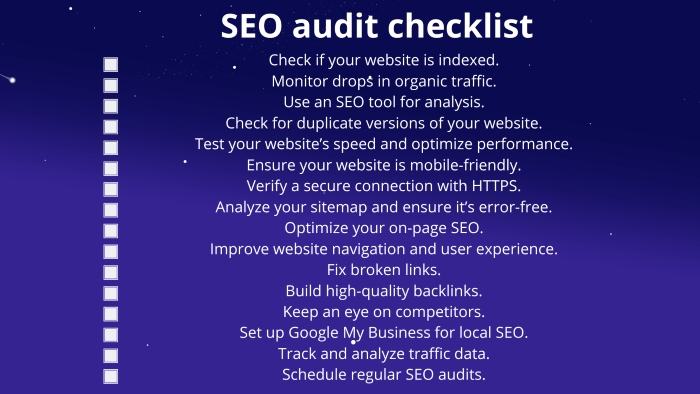
SEO audit checklist
Follow the SEO audit checklist. Perform a complete SEO audit, and improve your rankings in Google.
- Check if your website is indexed.
- Monitor drops in organic traffic.
- Use an SEO tool for analysis.
- Check for duplicate versions of your website.
- Test your website’s speed and optimize performance.
- Make sure your website is mobile-friendly.
- Verify a secure connection with HTTPS.
- Analyze your sitemap and make sure it’s error-free.
- Optimize your on-page SEO.
- Improve website navigation and user experience.
- Fix broken links.
- Build high-quality backlinks.
- Keep an eye on competitors.
- Set up a Google Business Profile for local SEO.
- Track and analyze traffic data.
- Schedule regular SEO audits.
All-in-one SEO tool
Morningscore is an intuitive SEO tool that simplifies website audits by identifying technical issues, broken links, and optimization opportunities. Track keyword rankings, analyze competitors, and improve your site’s SEO health with ease. It is perfect to make sure your website stays optimized and competitive.
FAQ
What is an SEO audit?
An SEO audit is a complete analysis of your website to identify issues that affect its performance in search engine rankings. It covers technical aspects, content quality, backlinks, and user experience.
Why is an SEO audit important?
An SEO audit uncovers issues that harm your rankings. By addressing these, you improve visibility, drive more organic traffic, and make sure your website is optimized for search engines.
How often should I perform an SEO audit?
It’s recommended to perform an SEO audit at least once every 3 to 6 months. If your website undergoes significant changes or sees traffic drops, a more frequent audit is necessary.
What should I check first during an SEO audit?
Start by checking if your website is indexed by Google and if there are any crawl errors. Making sure Google can access and index your site is crucial for SEO success.
What role does on-page SEO play in an SEO audit?
Meta tags, such as title tags and meta descriptions, are essential for SEO. They help search engines understand the content of your pages and improve click-through rates. An audit makes sure they are properly optimized for relevance and length.
How does content quality affect SEO rankings?
Content quality is a major factor in SEO. Search engines prioritize valuable, well-written, and relevant content. An SEO audit helps identify underperforming content that needs updating or optimization to rank higher.
How do I identify and fix crawl errors in an SEO audit?
Crawl errors prevent search engines from accessing your site’s pages. Tools like Google Search Console help identify these errors. Fixing them involves resolving server issues, correcting broken links, or updating robots.txt files.
What’s the impact of keyword optimization in an SEO audit?
An audit checks whether your target keywords are properly integrated into your content, headings, and meta tags. Overuse or underuse of keywords affects your rankings. The audit helps strike the right balance for effective SEO.
What is the significance of backlinks in an SEO audit?
Backlinks are important for SEO. They signal authority and trustworthiness. An SEO audit helps identify bad backlinks that harm your rankings as well as opportunities for acquiring high-quality backlinks to boost credibility.