 Deutsch
 Dansk
Dansk Svenska
 Nederlands
 Español
 Lietuvos
What this SEO checklist covers
- 54 tasks, 10 areas — everything from technical fixes and on-page tweaks to link building and LLM optimization.
- Start with Morningscore, Google Analytics and Search Console. You can’t fix what you can’t see.
- In 2026, content that actually matches what people are searching for beats any single technical fix.
SEO can feel like a moving target with dozens of tasks scattered across technical fixes, content, on-page tweaks, and link building, with no clear order to tackle them in. This checklist fixes that: it’s a complete, structured list of everything that actually moves the needle on your Google rankings.
This is a DIY SEO checklist that’s built so you can run it yourself, without hiring an expensive (and often ineffective) agency or bringing in a dedicated specialist.
Work through it step by step, and you’ll always know exactly what to do next. Just a clear path from where your site stands today to where it should be ranking.
Whether you’re just getting started or tightening up an existing strategy, this checklist covers it all: SEO strategy, technical setup, content, on-page optimization, link building, and more.
How should the checklist be used?
SEO touches a lot of moving parts, and not all of them carry equal weight. This checklist covers all 54, grouped into 10 sub-checklists roughly in the order you’d tackle them, but it’s not a strict sequence. Skip around based on your time, your skill level, and what you’re actually trying to fix.
- SEO plan
- Analysis and monitoring
- Technical SEO checklist
- Content optimization
- On-page SEO checklist
- Link building
- Local SEO checklist
- Extra SEO points
- LLM optimization
- Additional optimization
If you only take one thing from this list: start, and write for the people reading it. Everything else here just makes that work go further.
Who is this DIY SEO checklist for?
You don’t need an agency, a big budget, or a background in SEO to use this checklist. It’s built for anyone who wants to do their own SEO properly, and in the right order:
- Solo marketers and freelancers juggling SEO alongside everything else on their plate
- Small business owners without an in-house SEO specialist
- In-house marketers who want a structured way to self-audit before deciding whether to bring in outside help
- Startups and small teams who want to get SEO right from day one, without agency fees
If that sounds like you, work through the 54 steps below in order. Each one is DIY-friendly and doesn’t assume prior SEO experience.
SEO checklist from A to Z
Save the checklist for later and download the PDF below.
SEO plan
1. Create an SEO strategy and follow up
Before you touch a single page, decide what you’re actually trying to achieve. More traffic to a category, more leads, more visibility. Write it down. In 2026, that plan also needs to account for how AI search tools surface your content, not just Google’s classic results. Then check in monthly: pull up Search Console, see what moved, adjust. SEO its a habit you keep and not a project you finish.
Google’s own guidelines back this up: a long-term, goal-driven approach beats chasing quick wins. Set one clear traffic target and track it.
2. Set up tools
SEO tools make your work much easier. Google Analytics and Search Console cost nothing and tell you a lot. Add a dedicated SEO tool on top, and you’ll catch technical issues long before they tank your rankings.
ℹ️ Use tools to gain insight into traffic and performance. They help you stay ahead of algorithm changes by highlighting areas that need optimization.
3. Competitor analysis
Look at who’s already ranking above you. What keywords are they targeting, where are their backlinks coming from, what content are they publishing? The gaps you find – topics they haven’t covered, questions they haven’t answered – are your opportunities.
ℹ️ Perform analysis using tools like Morningscore. You get a clear picture of competitor performance and an overview of their backlink profile.
Analysis and monitoring
4. Use SEO tools
Free plugins will get you started, but they won’t show you the full picture. A proper SEO platform tracks your rankings, researches keywords, and maps your backlink profile in one place, and tells you exactly what to fix first, not just that something’s wrong.
Use tools for tracking ranks, keyword research, and viewing link profiles. Morningscore is an all-in-one tool that shows your strengths and weaknesses. It identifies problems and gives you guides to solve them. You can even automate large parts of your SEO work by using Morningscore’s automation tools (for Wordpress and Shopify), and get help to understand and analyze your numbers with our MCP.
With hundreds of tools available, it can be hard to choose. Read our honest and personal review of the best SEO tools here.
5. Google Analytics
Google Analytics 4 (GA4) gives you insight into traffic and user behavior on your site. Use it to track sources and conversions to see what drives value. Understanding how users interact with your pages helps you optimize your strategy.
Here’s how to create an account in Google Analytics (GA4).
- Go to Google Analytics and click “Get started today” or log in.
- Create an account: Enter an account name for your business and click “Next.”
- Create a property: Enter a property name, choose your timezone, and currency.
- Business details: Fill out information about your business and click “Create.”
- Data stream: Choose “Web” as your source, enter your URL, and click “Create stream.”
- Tracking code: Copy the Google Tag (G-XXXXXXXXXX) and insert it into your website’s
<head>. - Verify: Go to the “Realtime” report and visit your site to see if activity appears.

6. Search Console
Search Console is where Google tells you, in plain terms, what’s broken and what’s working. Keyword rankings, crawl errors, indexing issues. It’s all here, for free.
Here’s how to create an account in Google Search Console.
- Go to Google Search Console and click “Start now.”
- Add property: Enter your website address and click “Continue.”
- Verify ownership: The easiest way is using Google Analytics. If you do not have that, use a Meta tag or HTML file method.
- Submit sitemap: Find your sitemap at yourdomain.com/sitemap.xml. Go to “Sitemaps” in the menu, enter the address, and click “Submit.”
- Check indexing: View the Indexing report to see if Google has approved your pages. Check “Performance” to see your keyword rankings.
Technical SEO checklist
7. HTTPS
No HTTPS, no trust. Browsers flag your site as unsafe, and Google notices too. It’s been a baseline ranking factor for years. If you haven’t installed an SSL certificate yet, that’s step one before anything else on this list matters.
Check your SSL status with Morningscore’s SSL checker.
8. Crawlability
If Google can’t crawl a page, nothing else on this list matters for it. Double-check your robots.txt isn’t accidentally blocking important pages, and confirm in Search Console that your content is actually reachable. In 2026, this matters for AI systems too as they need clean access to your content just as much as Google does.
9. XML sitemap
An XML sitemap helps search engines find your pages. Submit it via Search Console to ensure all content is discovered. These files provide a structured map of your site for easier crawling. Update your sitemaps regularly to include new content (most CMS’ automatically updates the sitemap once new pages are published).
Check your sitemap status with Morningscore’s sitemap checker.
10. Robots.txt
The robots.txt file controls how search engines crawl your site. Use it to block access to junk pages or private sections. Double-check that it does not accidentally block resources needed for rendering. Check it regularly to avoid visibility issues.
11. Site speed
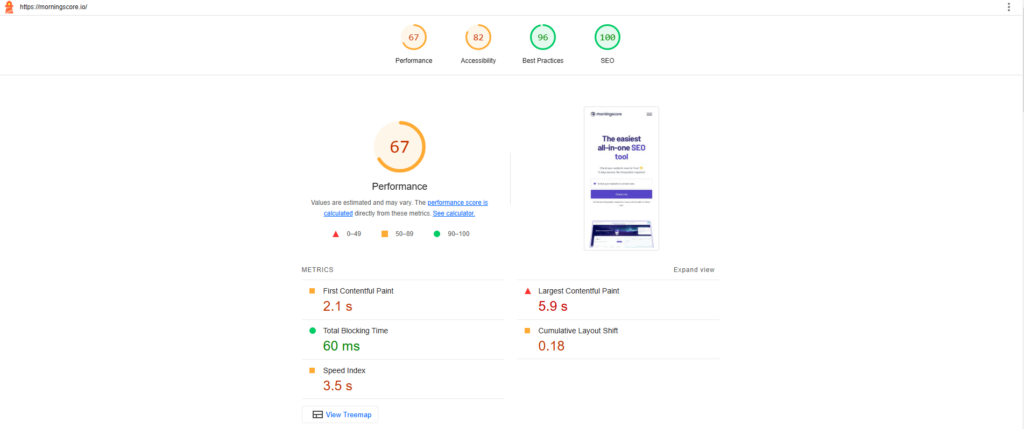
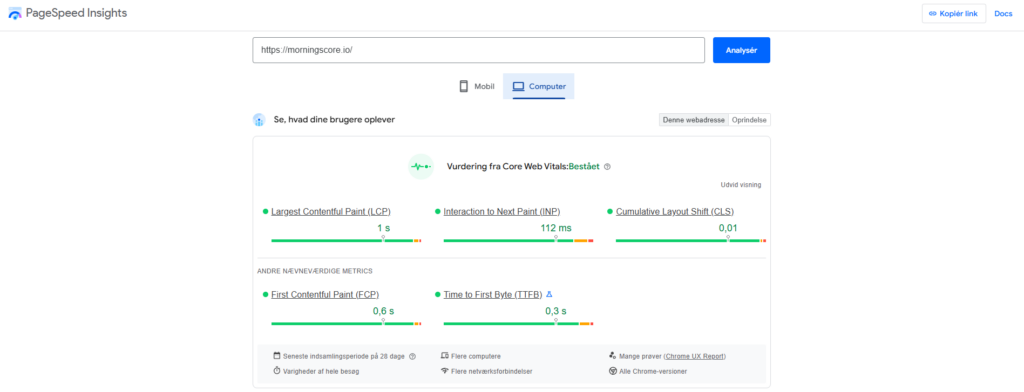
Two seconds. That’s roughly how long you have before visitors start leaving. Run your site through PageSpeed Insights to see what’s slowing you down. Usually unoptimized images or bloated JavaScript. Fix those, add caching, and you’ll cut load times and bounce rates at the same time.
Check your speed with the Morningscore website speed test.
Or use Google PageSpeed Insights for technical details.
12. Mobile friendliness
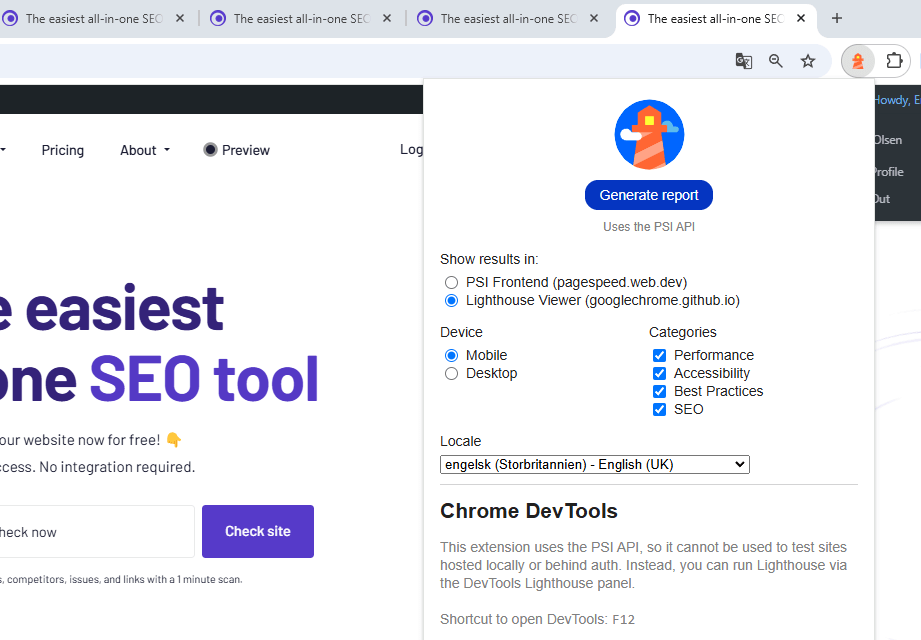
Google indexes your mobile site first, not your desktop one. So if it’s not responsive, that’s the version search engines actually judge. Run Chrome’s Lighthouse tool and see how it looks.
- Download Lighthouse in Chrome.
- Go to the website you want to check.
- Open tools in the top right corner.
- Run the report to check mobile access.
Content optimization
13. Relevance
Relevant content matches search intent and addresses user needs.
Search “pizza” and you might want a recipe, or you might want the nearest place that delivers. Google has to guess which one and it looks at what’s already ranking to figure that out. Do the same before you write: check the top results for your keyword and match what people are actually expecting to find. Miss the intent, and it doesn’t matter how well-written your page is because people will bounce straight back to the search results.
As SEO consultant Dave Davies put it, content is what search engines use to fulfill user intent – which makes this the foundation everything else builds on, not just one item on a checklist. (source)
14. Keywords
Keywords are just the words your audience actually types into Google. Use them where they naturally belong, your headings, your copy, your metadata, and stop the moment it starts sounding forced. Modern algorithms spot keyword stuffing instantly, and so do readers.
15. Keyword research
Before you write a word, find out what people are actually searching for. Look for terms with real search volume that you can realistically compete for. tools like Morningscore will show you both sides of that equation.
Morningscore’s keyword research tool finds new terms to improve your plan.
16. Update content
Old content doesn’t have to stay old. Go back, add new stats, fix anything outdated, and Google will often reward the refresh with a ranking bump. Sometimes bigger than what a brand-new post would get.

17. Long content
Longer content tends to rank better. A lot of top results sit above 1,400 words but that’s a side effect of thoroughness, not a target to hit. Length for its own sake won’t help you. Check what’s already ranking for your keyword: if the top results are short, don’t pad yours out just to be longer. Quality beats quantity.
On-page SEO checklist
18. URL structure
Keep URLs short, descriptive, and under 75 characters
Hyphens between words, no random strings of numbers. “yourwebsite.com/seo-checklist” tells you exactly what’s on the page before you even click. That’s the standard to aim for.
19. Title tag
Your title tag is your headline in the search results, and you’ve got maybe 60 characters before Google cuts it off. Lead with your primary keyword, keep it concise, and don’t be afraid to make it interesting. “SEO Checklist – 54 Steps to Top Rankings” works because it’s clear, not because it’s clever. Stuffing in extra keywords just makes it look like spam.
Use Morningscore’s title tag checker to find issues with your titles.

20. Meta description
Meta descriptions sit right below your title in the search results, and they’re your pitch for the click. Max 160 characters, and Google often shortens further on mobile, so front-load the important part. It’s not a direct ranking factor, but a higher click-through rate signals relevance, and that does matter.
Read more about meta descriptions here.

21. H1 tag
The H1 tag is the main heading. Use only one per page.
The H1 tag defines the primary topic of your page. It should include your main keyword and be clearly visible to users. This tag helps engines and readers understand what they are about to read. A clear H1 improves the structure and accessibility of your content.
22. H2 – H6 Tags
Subheadings organize your text. Use keywords in about 80% of them.
Subheadings aren’t just visual breaks but is important for how both readers and search engines scan your structure. Work keywords into most of them naturally, and your content becomes easier to skim and easier to understand.
Check your headings and structure with the Morningscore H-tag checker.
23. Semantic keywords
Repeating the exact same phrase over and over reads oddly and signals thin optimization. Use related terms and synonyms instead as it keeps the writing natural and helps you rank for the wider cluster of searches around your topic, not just one exact phrase.
24. Internal links
Internal links connect different pages on your own website.
Every internal link is a hand pointing your reader – and search engines – toward another relevant page on your site. It keeps people around longer and spreads authority across your content instead of concentrating it all on one page.

25. Find broken links
Broken links lead to error pages and frustrate your users.
Broken links create a poor experience and can hurt your rankings. They signal to engines that your site might be neglected. Regularly find and fix these by updating the link or using a 301 redirect. This keeps your site healthy and user-friendly.
Use Morningscore’s broken link checker regularly to find and update old links or setup 301 redirects.
26. First 100 words
The beginning of your page is vital for keeping a reader’s attention. Include your primary keyword early to signal relevance to search engines. Set the stage clearly and avoid filler words that might bore the user. A strong intro helps lower your bounce rate.

27. Content length
Aim for depth, but let quality and intent decide the word count.
1,000 words is a reasonable benchmark, not a rule. Write until you’ve actually answered the question and then stop. Padding for word count helps no one – thoroughness does.
28. Grammar
Typos and grammar mistakes quietly undermine your credibility, even if the ideas underneath are solid. Run it through Grammarly or your LLM of choice before you hit publish.
29. Images and alt tags
Alt tags provide text descriptions for your website’s images.
Images should look great but also contribute to your SEO. Alt tags help engines understand what is in a picture. They are also essential for accessibility, helping visually impaired users. Be descriptive and include keywords where it makes sense.
The W3C Web Content Accessibility Guidelines (WCAG 2.2) require descriptive alt text for non-decorative images to ensure content is usable for everyone. Good accessibility practice and good SEO practice overlap here more than most people realize.
Check for missing tags with the Morningscore alt tag checker.

30. Image compression
Keep images under 100 KB to maintain fast loading speeds.
Large images are the most common cause of slow websites. Use tools like TinyPNG to compress files without losing visual quality. This helps you maintain a good user experience on mobile devices. Fast pages are more likely to rank high and keep users happy.
31. Engaging content
Interesting content keeps users on your page for longer. Use a mix of text, images, and videos to hold their attention. Engaging pages are shared more often and attract more natural backlinks. Focus on providing real value that users want to interact with.
32. External links
External links connect your readers to other helpful websites.
Linking out to genuinely authoritative sources isn’t a leak of your own authority — it’s a signal that your content is well-researched. Just be selective: only link to sites that actually add value for your reader.
33. CTA (Call-to-Action)
A CTA tells your users what they should do next.
Every page should have a clear goal, like a newsletter sign-up, sale, or signup. Use action-oriented words to guide your visitors. A well-placed CTA takes your users from just traffic to real business results. Make sure it stands out but fits naturally with the content.
34. Cache service
Caching stores a version of your site to serve it faster to users. This reduces the load on your server and improves speed. Tools like WP Rocket or W3 Total Cache are popular choices for this. A faster site is a major win for both SEO and user satisfaction.
Link building
35. Quality backlinks
Backlinks work like votes of confidence, but not all votes count equally. A handful of links from trusted, relevant sites will do more for your rankings than dozens from low-quality ones, and the wrong kind of link can actually hurt you.
As Wendy Piersall noted: “Google only loves you when everyone else loves you first.” Earning trust from real people and real sites is the only path that lasts. (source)
36. Steal competitors’ backlinks
Analyzing where your competitors get their links can reveal new opportunities. If a site links to them, they might also link to you if your content is better. Use Morningscore’s tools to find the sources. Focus on the most relevant and authoritative sites in your industry.

37. Brand mentions
Brand mentions occur when someone names your business without a link. Google views these as a signal of your authority. You can often reach out to these sites and ask for a link to be added. This is a very effective way to build your link profile with little effort.
38. Broken link building
Find a dead link on a relevant site, and offer your own content as the replacement. You’re helping them fix a problem, and walking away with a new backlink. Everyone wins.
Local SEO checklist
39. Google Business Profile
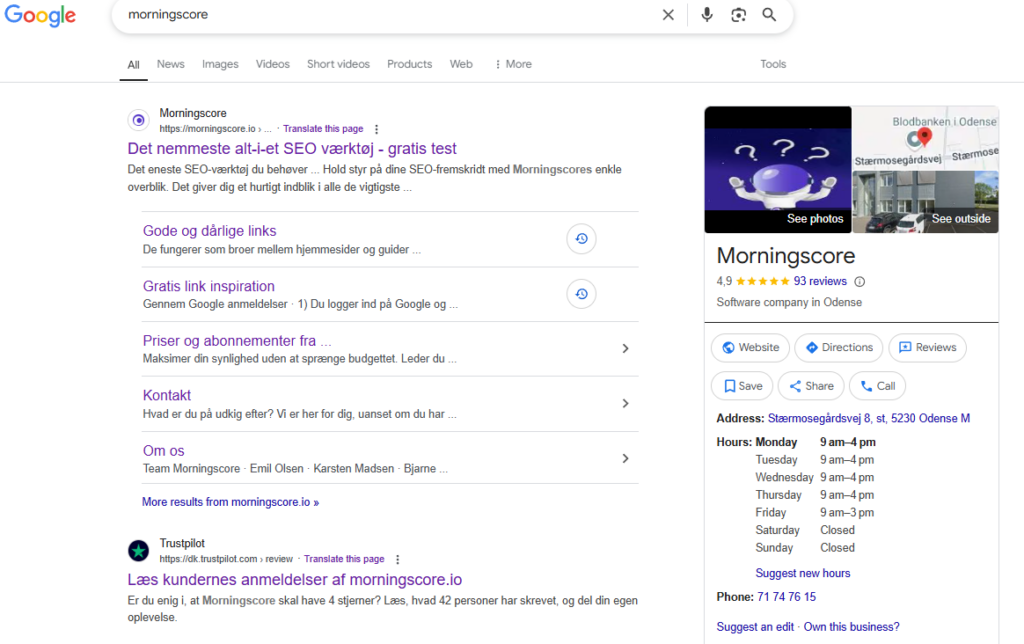
If people can find you on Google Maps, you can find them. Keep your Business Profile up to date – hours, phone number, photos – and respond to reviews. It’s one of the simplest, highest-leverage things you can do for local search. Even though you might not work at a local business, you should make sure to have a Business Profile for your website.
How to Create a Google Business Profile:
- Go to Google Business Profile and click “Start Now.”
- Sign in with your business Google account.
- Business details: Enter your name and physical address.
- Category: Choose the best category for your services.
- Verify: Enter the code Google sends to your address.
- Complete: Add your hours, images, and a description.
40. NAP consistency
NAP stands for Name, Address, and Phone Number. It is vital that this info is the same on your site and every directory. Inconsistent details confuse both users and search engines. Accurate NAP data proves you are a legitimate local business.

41. Local reviews
Positive reviews are a huge factor for local rankings. Encourage your customers to leave feedback on Google and other platforms. Always respond to reviews to show that you care about your customers. This builds a strong reputation that attracts more local business.
Additional SEO Points
42. SEO audit
An SEO audit is a health check for your website. Perform them regularly to find technical bugs or content gaps. Audits show you exactly what is holding your rankings back. This gives you a clear roadmap for what to fix first. Use Morningscores SEO checker to automatically performe the audit and fix the issues either by yourself or with the built in AI.
43. SEO for videos
Videos keep people on your page longer, but only if search engines can actually understand what’s in them. Write clear titles and descriptions, and add transcripts that crawlers can index. As a bonus you can get loads of traffic from Youtube as well if you play your cards right by ranking #1 on Youtube.
44. SEO for voice search
Voice searches sound different. Full questions rather than clipped keywords. Write in a natural, conversational way and answer common questions directly, and you’ve got a real shot at being the answer Google reads aloud.
45. SEO and user experience (UX)
Google increasingly treats a good user experience as a ranking signal, not just a nice-to-have. Clear navigation, a layout that works on any device — a site people enjoy using is a site Google wants to rank.
As Jordan Teicher put it, SEO isn’t about gaming the system anymore — it’s about learning how to play by the rules. In 2026, those rules mostly come down to the experience you actually deliver. (source)
LLM Optimization
LLMO is the optimization of content for AI models and modern search results.
Large Language Model Optimization helps AI systems understand and cite your content. This involves using clear structure and entity recognition. As AI-driven search expands, staying visible to these models becomes essential. Read our guide on LLMO here.
46. Digital PR
Getting featured in the news or on a respected blog does two things at once: it earns you high-quality backlinks, and it builds real credibility with readers as well as with search engines.
47. Strong backlink profile
One or two links from great sites is a start; a diverse profile from many reputable sources is what actually signals long-term authority to Google and to AI models.
48. Entity research
Entities are recognizable things like people, places, or brands. Researching and using these helps AI engines understand your topic’s context. This makes your content more relevant for complex, modern search queries. It moves your SEO beyond just simple keywords into real meaning.
49. Wikipedia pages
Having a Wikipedia page is a massive signal of authority. It is a highly trusted source that both users and AI systems rely on. While hard to obtain, it can greatly boost your online reputation. It cements your status as a notable entity in your industry.
50. Using Reddit and UGC
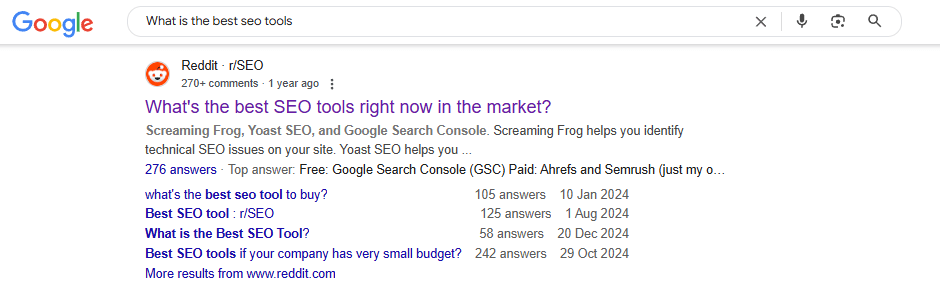
Reddit threads and other user-generated content increasingly show up in search results, because Google treats real discussion as a helpfulness signal. Showing up genuinely in these communities can drive visibility – and often backlinks – you can’t get any other way.
However, Reddit have very strict self-promoting guidelines and you will be banned for self-promotion. Be genuinely helpful in your answers and do not only engage in conversations where you can mention your own business – and do never try to keep it secret that you are related to the business you recommend if you are.
Additional Optimization
51. Core Web Vitals
Core Web Vitals are performance metrics Google uses to judge user experience. They focus on speed, responsiveness, and how stable your layout is while loading. A good score here is essential for ranking in 2026. Use official tools to monitor these and keep your site healthy.
The Three Key Metrics:
- Largest Contentful Paint (LCP): Measures loading performance for the main content. Aim for a score of ≤2.0 seconds for a “good” rating.
- Interaction to Next Paint (INP): Replaced FID in 2024. It measures your site’s responsiveness to any user interaction. Aim for ≤200ms, with ≤150ms being optimal.
- Cumulative Layout Shift (CLS): Measures visual stability. You want a score of <0.1 to prevent content from jumping around as it loads.
Google Tools for Optimization:
- Google PageSpeed Insights: Provides technical details on all Core Web Vitals metrics.
- Google Search Console: Track your real-world performance under the “Core Web Vitals” section.
- Lighthouse: A developer tool for checking performance directly in your browser.
ℹ️ Improving these metrics makes your site faster and more stable, leading to happier users and better search rankings.
52. Internal search optimization
If you have a search bar, make sure it works perfectly. Users should find exactly what they need without friction. A good internal search improves user experience and can reduce your bounce rate. It is an often-overlooked part of a good technical SEO plan.
53. Featured snippets
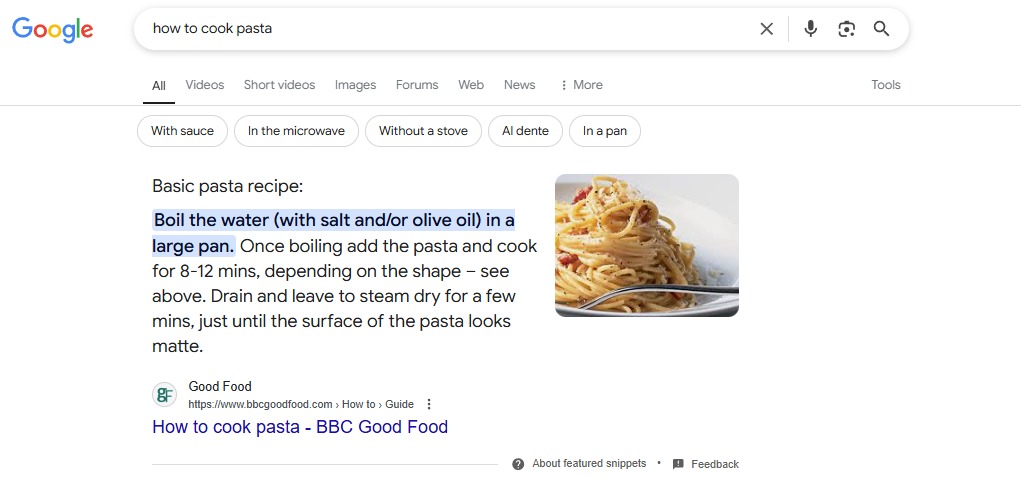
Featured snippets are the “answer boxes” at the top of many search results. Structuring your data with Schema markup increases your chances of appearing there. These snippets provide instant visibility and can drive massive traffic to your pages. Aim to provide clear, direct answers to common user questions.
54. Social signals
Social signals refer to how often your content is shared on social media. While not a direct ranking factor, high engagement drives traffic and builds brand awareness. This traffic can lead to more backlinks and better visibility over time. Share your content actively to reach a wider audience.
FAQ
What is SEO, and why is it important for my website?
SEO stands for Search Engine Optimization. It is the process of making your site more visible on Google. Better rankings lead to more traffic and more potential customers for your business.
How can I quickly improve my website’s SEO?
Start with the basics like fixing technical errors and optimizing your title tags. Ensure your site is fast and works well on mobile devices. Conduct keyword research to ensure you are targeting terms people actually search for.
What is the difference between on-page and off-page SEO?
On-page SEO covers things you control on your own site, like content and headings. Off-page SEO is about outside factors, such as backlinks and brand mentions. Both are essential for building authority and ranking well.
What is an SEO checklist, and why is it important?
An SEO checklist is a structured list of tasks to ensure you do not miss any part of optimization. It helps you stay organized and track your progress. Following a checklist leads to a more comprehensive and successful strategy.
How do you create an SEO strategy?
Begin by setting clear goals and researching your target keywords. Focus on a mix of technical, on-page, and off-page tasks to improve your overall health. Regularly review your data and adjust your plan as needed.
How do you conduct keyword research effectively?
Use professional tools to identify terms that your target audience uses. Look for a balance of high search volume and competition you can actually beat. Target both broad terms and specific long-tail questions.
What should be done to optimize technical SEO?
Ensure your site loads fast, uses HTTPS, and has no crawl errors. Use a clean URL structure and provide a clear sitemap for search engines. Mobile optimization is also a non-negotiable part of technical health.
How do you optimize on-page SEO?
Write high-quality content that satisfies what the user is looking for. Optimize your titles, meta descriptions, and headers with relevant keywords. Make the page easy to navigate and read on any device.
How do you build links and manage off-page SEO?
Earn links from authoritative sites through quality content and outreach. Focus on building real industry partnerships and guest posting on reputable blogs. Off-page SEO is all about establishing your site’s credibility.
How do you monitor and measure SEO performance?
Use Google Analytics and Search Console to track your traffic and rankings. Monitor how your target keywords are performing over time. Tools like Morningscore provide a clear overview of your progress and ROI.
How do you keep your SEO strategy updated and relevant?
Stay informed about the latest algorithm updates and industry trends. Regularly audit your site to find new areas for improvement. Every few months, refresh your strategy to stay ahead of your competitors.