
 Deutsch
 Dansk
Dansk Svenska
 Nederlands
 Español
 Lietuvos
Key Takeaways
- The best keyword research prompts help you generate seed keywords, long-tail ideas, and topic clusters in minutes.
- ChatGPT can sort your keywords by search intent and group them into ready-to-use clusters.
- Always edit the output and combine it with a proper keyword tool that shows search volume.
Are you struggling to rank your website higher on search engines and find the right keyword research prompts?
Imagine being able to streamline your keyword research process and get help identifying the most effective keywords to target. This is where AI and ChatGPT come to the rescue.
SEO skills are important for any business aiming to boost its online presence and organic Google rankings. However, finding the right keywords can be a challenging and time-consuming task, especially if you are not an SEO expert.
ChatGPT, with its advanced natural language processing capabilities, can help you not only identify quality keywords but also save countless hours researching and analyzing them.
With the right prompts, ChatGPT can assist you in generating keyword lists that drive traffic and, ultimately, grow your business. You don’t need to be an SEO expert to get started – all you need is the right guidance on using the right prompts to make ChatGPT deliver high-quality keyword research.
We built Morningscore in Denmark back in 2018 to make these tasks simpler. Our funding round in 2026 helps us keep building better AI SEO tools.
Continue to our guide on the best ChatGPT prompts for keyword research. See the prompts that top SEOs are using to save time and be more effective, and learn how you can use them in your own keyword research process.
Let’s start collecting keyword and topic ideas to help target your efforts and create the right pages with the right content.
Already have your keywords settled? Take a look at the best ChatGPT prompts for creating SEO content.
ChatGPT prompts for keyword research
ChatGPT and other AI tools have certain limitations. One of these limitations, when speaking of keyword research, is that ChatGPT can’t tell you anything about keyword search volume. A regular keyword research tool can, and it should be used as a supplement – not a substitute.
According to Digital Applied, AI-driven keyword research is now the standard for staying competitive in 2026.
The following are prompts that I use myself, but remember that you should always edit content generated by ChatGPT – no matter how good a prompt you have made – to add a personal touch, data, statistics, real-life experiences, and, most importantly, your writing style.
Neil Patel notes that AI has made keyword research more efficient and enjoyable. This matches what we see when prompts are specific enough.
Give the prompts below for keyword research a go:
Everything in green brackets [] are placeholder examples: Replace them with your own to get relevant ChatGPT output.
Seed keyword research prompt ideas
Researching for seed keywords is the first step in the keyword research process. Seed keywords are your main topics or categories that your SEO is going to focus around.
Here are a couple of simple yet great prompts:
Prompt 1: Generate 10 keywords that I can write a targeted blog post about in the [gym] niche
This prompt is an easy one to quickly get some keyword ideas for your main topic and it works without many instructions.
Or
Prompt 2: Give me 10 semantically relevant, but unique topics under the main category of [gym exercises]
Instead of “gym exercises,” you add your own pillar keyword (broad keyword). Test this prompt using different amounts of topics. For example, 10 instead of 30.
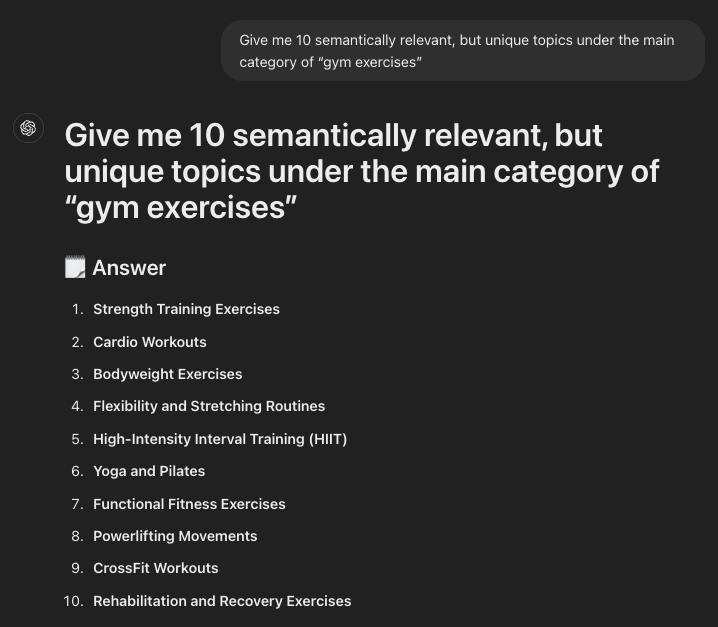
This output gave me clear topics I could work with right away.
Follow up prompt: When you have received the list, by prompting: Give me 10 different keyword variations of [“cardio workouts”] (one of the topics provided in step 1) that address a different search intent
If the keywords/titles are too long, continue to the next prompt:
Reduce each down to 3-5 word-length keywords.
Try 20 or 30 if the topic seems big enough to contain more keywords.
Topic clustering using ChatGPT
Creating topic clusters is an important part of reaching authority in search engines. This is done by grouping related keywords into one bucket and using it to organize your website’s content to cover the full subject and connect all the pages in the cluster using internal links.
Prompt 1: [add list of keywords]. Organize the keywords into relevant keyword clusters.
Add all the keywords from your keyword research or analysis in the brackets.
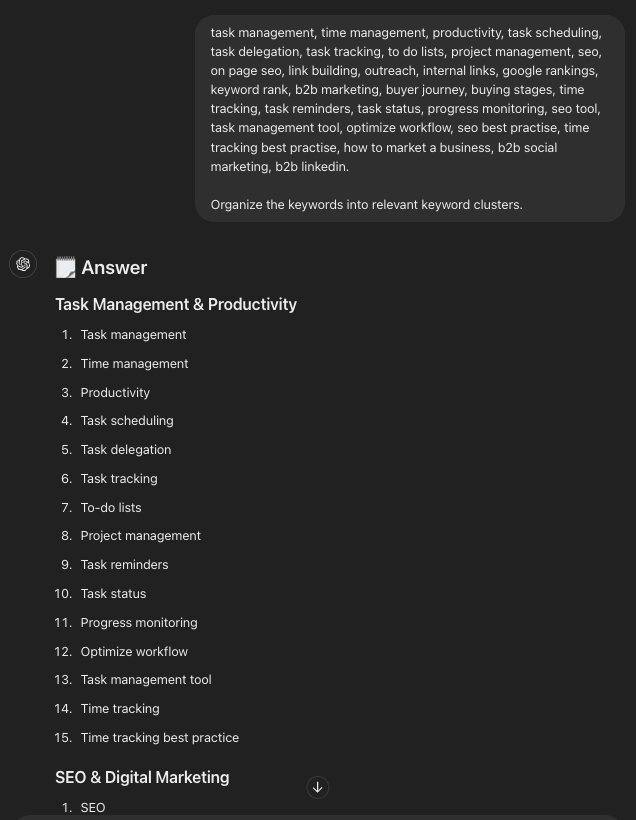
The clusters came out logical and saved me time on manual sorting.
Prompt 2: Create a keyword cluster with relevant keywords for me to target and build landing pages for. I’m selling [sofas, chairs, garden furnitures, dining tables, kitchen tables and carpets].
Replace the products in the brackets with your own product categories.
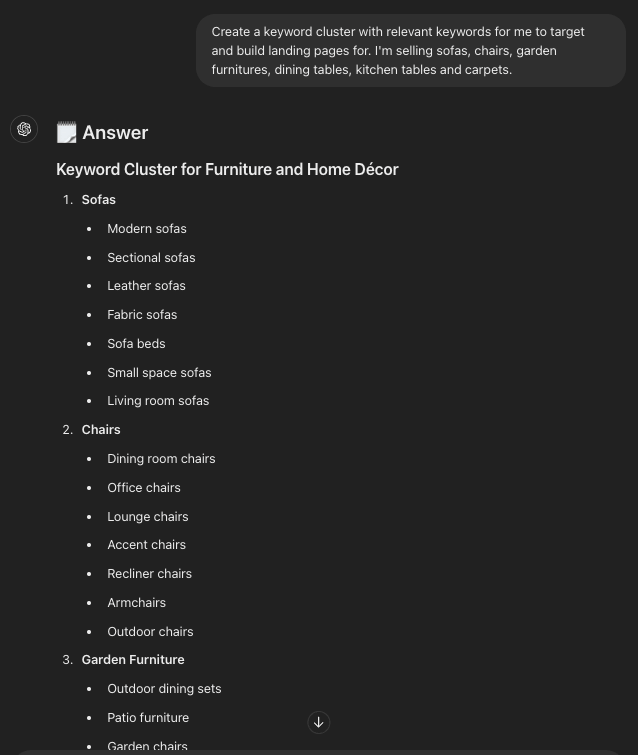
This worked well for e-commerce sites where product lines need clear groups.
Finding long tail keyword research prompts
Long-tail keywords are keywords containing more than a single word. These keywords often have a lower search volume, but higher relevance and a higher conversion rate.
As an added plus, long-tail keywords are also the least competitive keywords compared to high-volume short-tail keywords. This is your gold mine, and here is how you can have ChatGPT identify long-tail keywords for you:
Prompt 1: Using [fitness] as the central seed keyword, identify 15 long-tail keywords that potential customers might use when they look for [training programs, inspiration and gym gear].
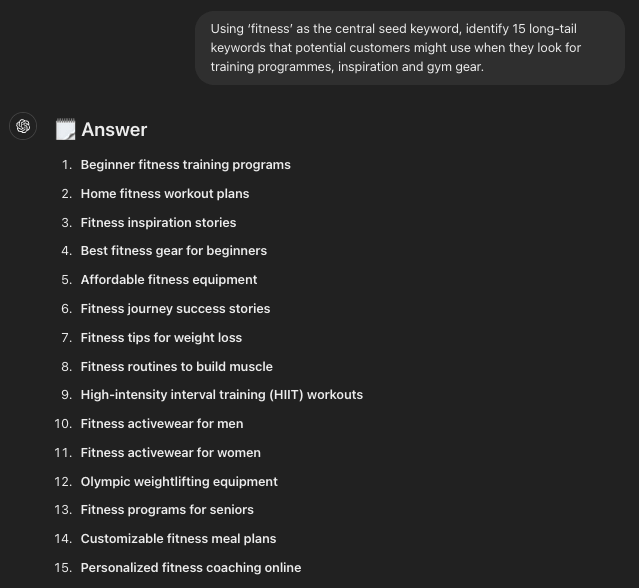
I often follow up by asking for commercial intent to focus the list.
Follow-up prompt: Which three of the 15 long-tail keywords do you think have the most commercial intent, and why?
Another prompt to try with fewer instructions:
Give me 15 long tail keywords related to [fitness] with their search intent. Give me the results in a table.
Long-tail keywords also provide excellent prompt suggestions for tracking your rankings in ChatGPT.
Identify search intent using ChatGPT
Google is at a different stage now than it was 10 years ago when it was all about keywords, keywords, and keywords in your content. Today, Google weighs user search intent higher, and your content needs to target and address the correct search intent to rank for the query.
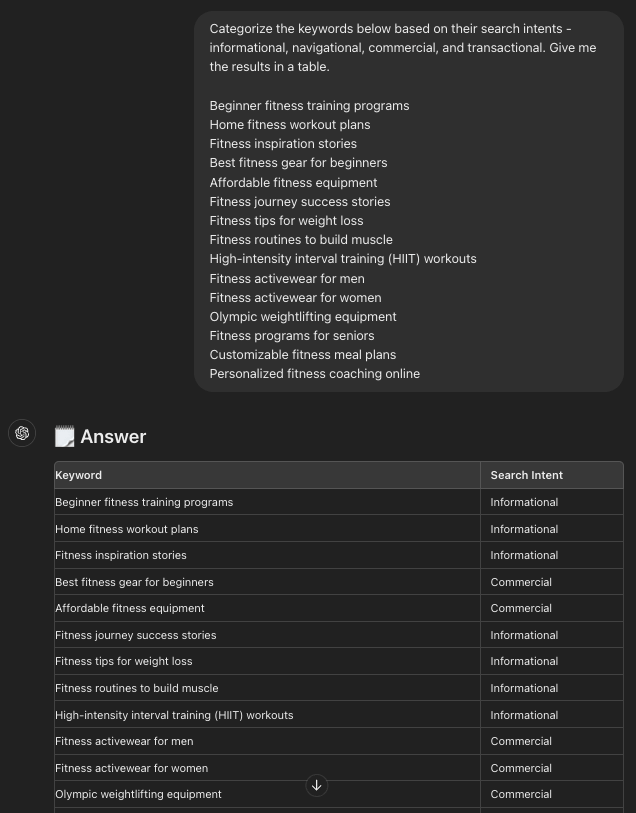
Manually sorting keywords based on search intent is a long and daunting process. With ChatGPT, those days are over, and you can now have ChatGPT sort keyword search intent in a matter of seconds.
When you have a list of keywords from the previous steps or from a previous keyword analysis, you can use this ChatGPT prompt:
Prompt 1: Categorize the keywords below based on their search intents – informational, navigational, commercial, and transactional. Give me the results in a table:
[copy/paste your keywords]
Additional keyword research prompts
The list above is not the only right way of doing keyword research with ChatGPT, and other prompts will work just fine.
Try these best keyword research prompts:
- Generate a list of high-volume keywords for the [industry] niche.
- Identify long-tail keywords related to [main keyword].
- Cluster the following keywords into relevant groups: [list of keywords].
- Provide keyword ideas for a blog post about [topic].
- Analyze the competition for the keyword [specific keyword].
- Find low-competition keywords in the [industry] sector.
- Suggest keywords for an e-commerce store selling [product].
- Generate keyword ideas for a local business in [location].
- List the top-performing keywords for [competitor’s website].
- Identify seasonal keywords for the holiday season in [industry].
- Create a keyword map for a website focusing on [topic].
- Find keyword opportunities for improving search engine ranking for [website].
- Generate long-tail keyword phrases that include [seed keyword].
- Group the following keywords into logical clusters: [list of keywords].
- Analyze the keyword trends for the past year in the [industry] niche.
- Suggest keywords to target for a new blog about [topic].
- Identify the best keywords for PPC campaigns in the [sector].
- Find related keywords for the search term [main keyword].
- Provide keyword suggestions for a YouTube video about [topic].
- Analyze keyword difficulty for ranking on the first page for [specific keyword].
Do you have an awesome prompt or set of prompts that are gold for doing keyword research?
Feel free to drop us a message on our chat with your favorite keyword research prompt!
Frequently Asked Questions
Can ChatGPT replace a dedicated keyword research tool?
No – and it shouldn’t try to. ChatGPT has no access to real-time search volumes, keyword difficulty scores, or competition data. It works best alongside a dedicated keyword research tool that gives you actual metrics. Think of it as a brainstorming layer on top of your regular SEO workflow.
What are the main limits of ChatGPT for keyword research?
The biggest limit is data. ChatGPT works from fixed training data and cannot pull live search volumes or trending queries. This means you cannot rely on it for precise competitive analysis. Always verify keyword ideas with a proper SEO tool before building a strategy around them.
How do I write a good keyword research prompt?
Be specific. The more context you give ChatGPT, the better the output. Instead of “give me keywords about fitness,” try “generate 15 long-tail keywords for beginner runners looking for training plans.” Specificity keeps results focused and saves you a lot of editing time.
Can I use ChatGPT for local SEO keyword research?
Yes, it works well for this. Prompt it with something like “List keywords for a [business type] in [city]” to quickly generate location-specific ideas. This helps local businesses target geographically relevant search queries. Just verify the volumes with a tool that has local data.
What are best practices for using keyword research prompts in ChatGPT?
Always combine ChatGPT output with data from a real SEO tool. Use specific prompts so the results are focused and usable. Edit the output before you use it – ChatGPT will not capture your niche knowledge automatically. A hybrid approach gives you both speed and accuracy.
Does ChatGPT understand search intent?
It makes reasonable guesses based on patterns in its training data. But it does not truly understand user intent unless you explain the context in your prompt. For accurate results, ask ChatGPT explicitly to label keywords as informational, navigational, commercial, or transactional – like in the search intent prompt examples above.