ClickCease SEO MCP - Morningscore

    SEO MCP

    Run your SEO from Claude and ChatGPT. From $69/month.

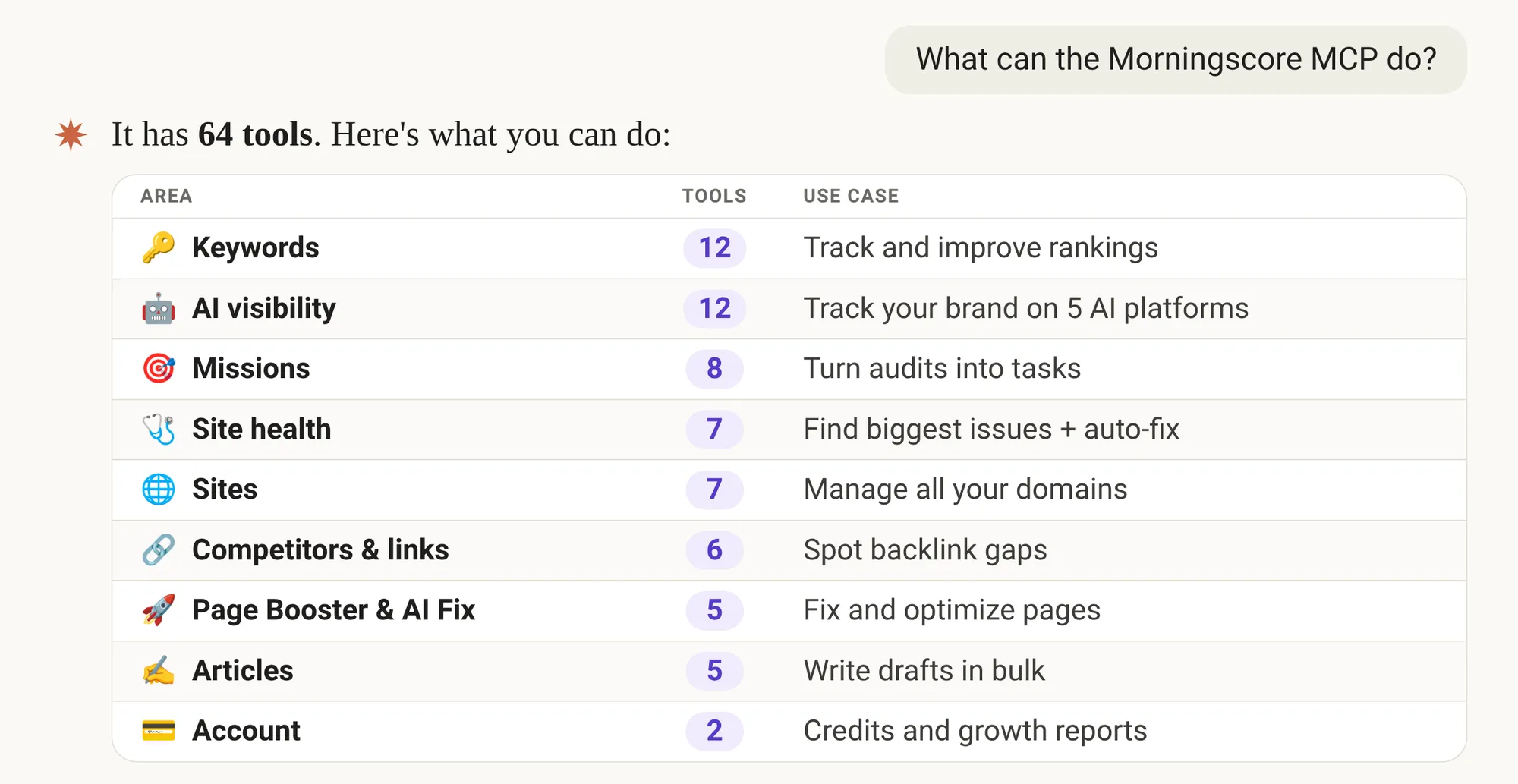
    Connect Morningscore to the AI you already use. Ask about your rankings, AI visibility and website health, then let your AI fix issues, upgrade pages, write articles and plan your next missions. 60+ tools. One connection. No code.

    Try it free for 14 days. No credit card. No strings. Up and running in 60 seconds.

    Works where you work

    Plug Morningscore into the AI you already use

    Claude ChatGPT Cursor Claude Code Lovable + any MCP client with remote servers
    https://mcp.morningscore.io/mcp

    One URL, one sign-in. Nothing to install and no code.

    Read vs. act

    Not just a report.
    The tools to do the work.

    Most SEO MCP servers are read-only. Your AI can look at rankings and backlinks, and then you're back to doing the work yourself. The Morningscore MCP includes 60+ tools that can edit data and start automations, so your AI can go from "here's the problem" to "it's fixed."

    Data-only SEO MCPs Morningscore MCP
    Rankings, keywords, backlinks ✅ ✅
    AI visibility in ChatGPT & Google AI Overviews Sometimes ✅
    Fix website issues ❌ ✅ 1 credit per fix
    Optimize existing pages ❌ ✅ Page Booster
    Write new articles ❌ ✅ 1 credit per article
    Create and check your SEO to-do list ❌ ✅ Missions
    Add keywords, competitors and AI prompts to track ❌ ✅
    Pricing API units, row limits, add-on packs Included in every plan
    Pricing

    Included in every plan.
    No API units. No MCP add-on.

    The MCP and the full API come with every Morningscore plan, from Lite at $69/month. You don't buy unit packs, and there are no row limits per request or "MCP tier" upgrades. AI actions like fixes, articles and Page Booster use the AI credits already in your plan.

    Lite Business Pro Premium
    Price $69/mo $99/mo $159/mo $299/mo
    MCP + API ✅ ✅ ✅ ✅
    AI credits / month 100 1,000 5,000 20,000
    Websites 3 10 30 100
    Keywords tracked daily 100 500 2,000 5,000
    • ✅ What credits buy: 1 website fix = 1 credit · 1 article = 1 credit · Page Booster = 10 credits per page (automatic) or 2 credits per check (manual)
    • ✅ Pay yearly and get 2 months free.
    Start 14-days free trial See all plans →
    Complete SEO and GEO tool

    SEO MCP is one out of many tools included

    Keyword tools
    • Keyword rank tracking
    • Keyword research
    • Keyword suggestions
    • Keyword difficulty
    • Historical positions on keywords
    • Keyword are update daily
    • Keyword grouping
    • Competitor keyword comparison
    Other tools
    • Backlinks monitoring
    • New and lost links
    • Backlinks from competitors
    • Scan websites for links/keywords
    • Website health scan (onsite)
    • Number of scanned pages
    • Intelligent suggestions (missions)
    • SEO task management (missions)
     
    • Email reports
    • PDF reports
    • White label reports
    • Exportable data (CSV)
    • Smart user management
    • Prices from 69$/mo
    What your AI can do

    Everything you can do with our MCP

    📈 Rank tracking

    Daily Google rankings for every tracked keyword, plus position changes, landing pages and competitor overlap. Ask "which keywords are close to page 1?" and get a list, not a spreadsheet.

    🤖 AI visibility (GEO)

    Your GEO Score across 100 prompts, plus the prompts you track in ChatGPT and Google AI Overviews. Ask your AI to suggest new prompts customers would use, add them to tracking, or generate a full GEO Health report with recommendations.

    🩺 Website Health + one-click fixes

    Run a health audit, see your score from 0 to 100 and get problems ranked by impact. Your AI can then generate fixes for titles, meta descriptions, alt text, broken links and more. Fixes go live on WordPress and Shopify through our plugin.

    🚀 Page Booster

    Point your AI at an existing page and Page Booster checks keywords, H1, content, FAQs, E-E-A-T signals, title and meta. You get improved HTML back, and you review it before anything is published.

    ✍️ Articles

    Generate SEO articles from a keyword, one at a time or in batches, written around what your site already covers.

    🔍 Keyword research & content gaps

    Expand a seed keyword, see what your competitors rank for that you don't, and turn the gaps into a content plan.

    🔗 Backlinks & competitors

    Your backlinks, Link Score and new and lost links, plus a side-by-side Link Score comparison with your tracked competitors.

    📊 Google Search Console

    If you've connected Search Console, your AI can pull your real queries, clicks, impressions and CTR, including the long-tail searches no keyword tool shows.

    🎮 Missions: your SEO to-do list, now in chat

    Ask "what should I do this week?" and get your missions, ranked by impact. Your AI can create new missions from what it finds and check whether finished ones are live on your site. Every mission you complete earns XP, so you level up while your SEO grows. 💜

    Prompts to copy

    Tip: start with "Using the Morningscore MCP…" so your AI picks the right tool. Swap in your own domain and go.

    1. Push almost-ranking pages to page 1

    "Using the Morningscore MCP, find my pages ranking in positions 8–30 on Google over the last 90 days. Pick the top 5 opportunities and tell me what the pages above me have that mine are missing."

    2. Fix technical SEO in one go

    "Using the Morningscore MCP, run a health audit on [mysite.com]. Show me the 3 biggest problems in plain English, then list which ones you can fix automatically and what that costs in AI credits. Ask me before you fix anything."

    3. Steal your competitor's best keywords

    "Using the Morningscore MCP, compare [mysite.com] with [competitor.com]. Find keywords they rank top 10 for that I don't, group them by topic and suggest 5 pages I should create."

    4. Show up in ChatGPT

    "Using the Morningscore MCP, check my GEO Score. Suggest 10 prompts a customer in Chicago might ask ChatGPT when looking for a business like mine, and tell me which ones I already appear in."

    5. Upgrade an existing page

    "Using the Morningscore MCP, run Page Booster on [mysite.com/services]. Show me the suggested title, H1 and new FAQ before anything changes."

    6. Get this week's to-do list

    "Using the Morningscore MCP, list my open missions sorted by impact and tell me which three to do first."

    7. Monthly growth review in 5 minutes

    "Using the Morningscore MCP, give me a monthly growth review: SEO Score, keyword movement, new and lost links, Link Score vs. competitors, GEO Score and open missions. End with 3 actions sorted by impact vs. effort."

    8. Write the article

    "Using the Morningscore MCP, write an article targeting 'how much does a roof replacement cost in Texas' and tell me how many AI credits it used."

    Want more? Read 5 ways to use the Morningscore MCP to grow a small business.

    Workflows

    What small teams run with the Morningscore MCP

    • 📅 Monday SEO brief. One prompt turns rankings, traffic value and new issues into a summary you can paste into Slack.
    • 🛠️ Fix-it Friday. Audit, fix and mark done, without opening a dashboard.
    • 🧭 Content plan from gaps. Competitor keywords become a list of pages to write, then articles.
    • 🤖 AI visibility check-in. See which customer prompts mention you in ChatGPT and AI Overviews, and add the ones you're missing.
    • 📊 Agency client reporting. Ask about any of your clients' sites and get answers for the call, not a 40-page PDF.
    • 💻 Vibe-coded sites. Building in Lovable or Cursor? Check SEO while you build, not after launch.
    Setup

    Connected in 60 seconds

    Step 1

    Start your free trial

    14 days, full access, no credit card. Already a customer? Skip ahead.

    Step 2

    Add the Morningscore MCP

    Paste https://mcp.morningscore.io/mcp into your AI's connector settings.

    Step 3

    Sign in and start asking

    Approve access with your Morningscore login (OAuth), or use an API key from your settings.

    How to connect in your AI

    • Claude: Settings → Connectors → Add custom connector → paste the URL → Connect. On Team or Enterprise, an owner adds it first and members connect from their own settings.
    • ChatGPT: Turn on Developer mode (paid ChatGPT plans) → Settings → add a custom MCP server → sign in → enable it in a new chat.
    • Cursor: Settings → MCP → add a remote server → sign in. Or add it to mcp.json.
    • Claude Code: claude mcp add --transport http morningscore https://mcp.morningscore.io/mcp
    • Lovable: Connectors → add MCP server → paste the URL → authorize.

    Need more help? Read the full setup guide with troubleshooting.

    Success stories

    Our growth heroes all have one thing in common: they work tirelessly every single day to achieve top rankings on Google.

    Discover how they’ve tackled their SEO strategies with Morningscore as their preferred partner on the journey.


    Headshot of Jacob Boutrup, Design Lead at Fenerum
    “
    We're seeing more orders, an increased number of booked demos, and significantly enhanced brand awareness.
    ”
    Jacob Boutrup
    Design Lead
    Peter cox fra nordicbar.dk
    “

    We’re definitely seeing more orders related to specific keywords since we started using Morningscore.

    ”
    Peter Cox
    Marketingansvarlig
    Nicolai Russotti fra pulsure.dk
    “

    Our organic traffic is higher than ever before!

    ”
    Nicolai Russotti
    Product Manager
    Jane fra nordthy
    “

    Morningscore has been an invaluable partner in our SEO efforts.

    ”
    Jane Munkholm Kristensen
    E-commerce manager
    GET STARTED

    Get a 14-days free trial

    Your SEO journey awaits you! No credit card required. Full access.
    FAQ

    Have any questions?

    MCP (Model Context Protocol) is an open standard that lets AI assistants like Claude and ChatGPT use tools inside other products. An SEO MCP server connects your AI to live SEO data, so you can ask about rankings, keywords or site health in plain English instead of digging through dashboards. The Morningscore MCP can also act on that data: fix issues, optimize pages, write articles and manage your missions.

    Claude (web, desktop and Claude Code), ChatGPT (with Developer mode on a paid plan), Cursor and Lovable, plus any MCP client that supports remote servers.

    No. The MCP and API are included in every plan, starting at $69/month, and you can try them in the 14-day free trial. AI actions like fixes and articles use the AI credits that come with your plan.

    Fixes and page updates go to your site only through our WordPress plugin or Shopify app. Page Booster changes are drafts you review first, and WordPress keeps a revision of every change. For extra control, tell your AI to ask before taking any action. Most AI clients also ask you to approve tool calls.

    No. Paste one URL into your AI's connector settings and sign in. It takes about a minute.

    The Morningscore MCP only sends data to the AI client you connect. How that client handles your conversations is set by your Claude or ChatGPT account settings.

    Yes. Your AI can work with every website in your account, from 3 sites on Lite to 100 on Premium.

    Yes. It's live for all customers and in active development, so new tools keep arriving. Tell us in the chat what you'd like it to do next.

    Those connectors give your AI data, priced by API units on higher plans. Morningscore's MCP gives your AI data plus the ability to fix, optimize and write, and it's included in every plan. It's built for smaller companies that want results, not another report.