 Deutsch
 Dansk
Dansk Svenska
 Nederlands
 Español
 Lietuvos
Key Takeaways
- Filter your analytics by chatgpt.com referrals to see which pages get AI traffic – those pages are your starting point for finding prompts.
- Use your top landing page titles to guess likely prompts, then test them in a ChatGPT prompt tracker to confirm whether your brand gets mentioned.
- The method is approximate – you’re inferring prompts from traffic patterns, not seeing actual user queries, so expect around a 50% hit rate.
You see in your website analytics tool that you are getting traffic from ChatGPT or other AI chats, and now you would like to know what is happening. To learn how to track traffic from ChatGPT and see what is working, you should use a ChatGPT prompt tracker (test ours for free) to see which prompts mention your company or brand.
But which prompts are actually popular? And which prompts actually give you visibility?
There is unfortunately no perfect answer, since ChatGPT keeps this data secret, but here is a pretty good way to get an idea and find prompts to track.
Methodology Note: This approach uses reverse-engineering from referrer data, which means you’re working with incomplete information. ChatGPT doesn’t pass query parameters or session data in its referrals, so we’re inferring prompts from landing page patterns rather than seeing actual user queries. This introduces approximation into your analysis, but it’s currently the most practical method available to marketers.
How to track traffic from ChatGPT by finding prompts
Note: This trick will only work if you already get some traffic from ChatGPT.
Go to your website analytics tool. For most of you, it is probably Google Analytics. But we use Plausible since it’s so much easier to navigate. And now follow these steps:
If you’re using Google Analytics 4 in 2026, you can now create custom channel groups specifically for AI traffic sources like ChatGPT. This makes filtering and analyzing AI-driven traffic much more accurate than before. The key improvement is GA4’s ability to preserve referrer strings from AI chat interfaces, which wasn’t reliable in Universal Analytics.
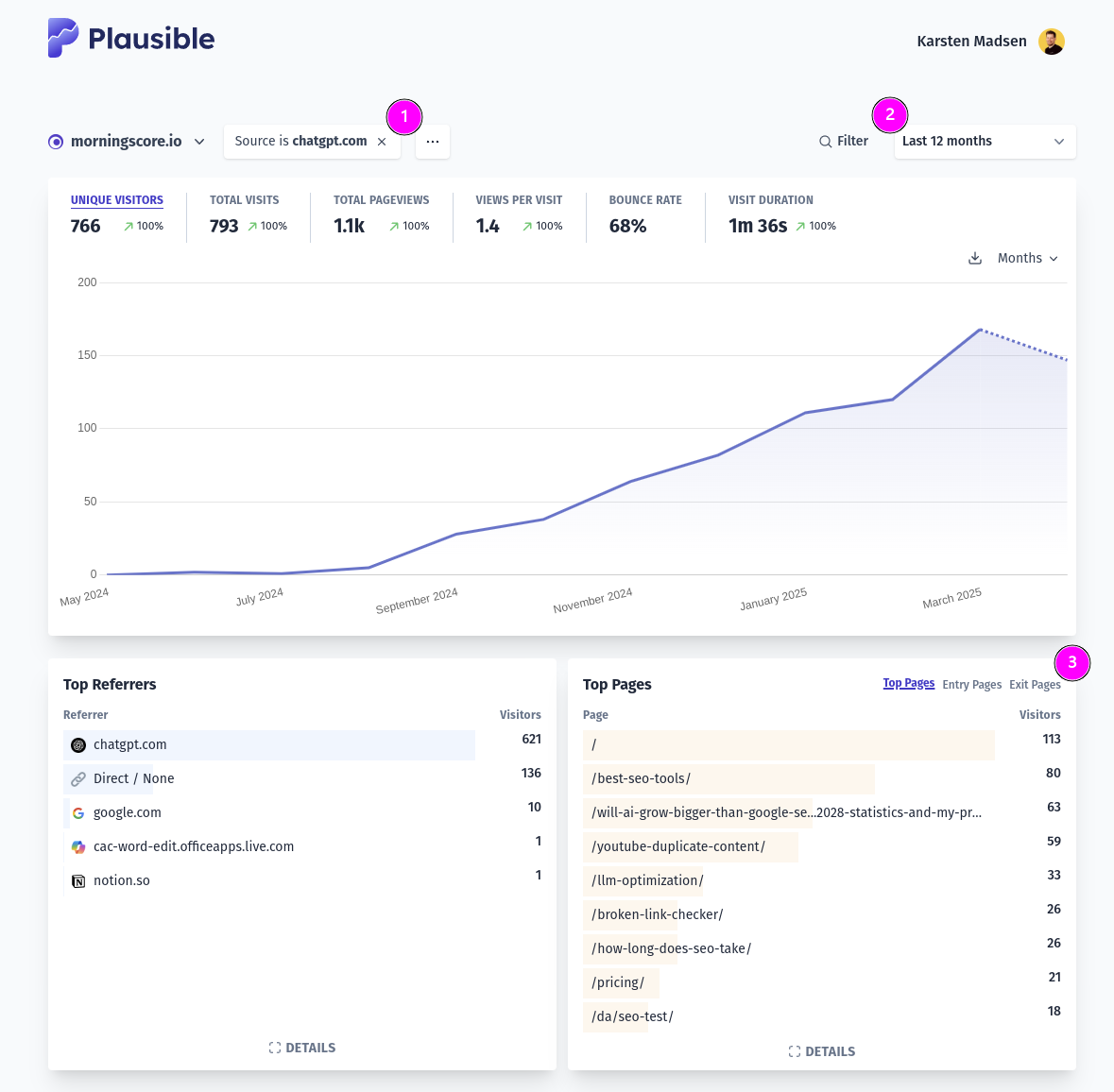
- Filter by “chatgpt.com” or “chat.openai.com” source (ChatGPT sends referrer data through both domains). Expert tip: OpenAI occasionally rotates its referrer domains, so check your “Other” traffic sources monthly for new AI referrer patterns. In our testing, we’ve also seen traffic labeled as “oai.com” and variations with subdomain prefixes.
- Select as long a time period as you have traffic. Since AI traffic patterns are still emerging and highly volatile, longer time periods help you identify consistent trends versus one-off spikes.
- Now explore the top pages.

- If your URLs are clearly labeled as in our example, you can already start guessing prompts. Examples: “Best seo tools” and “Will AI grow bigger than Google search?” This works best if you’ve used keyword-rich URLs in your site structure.
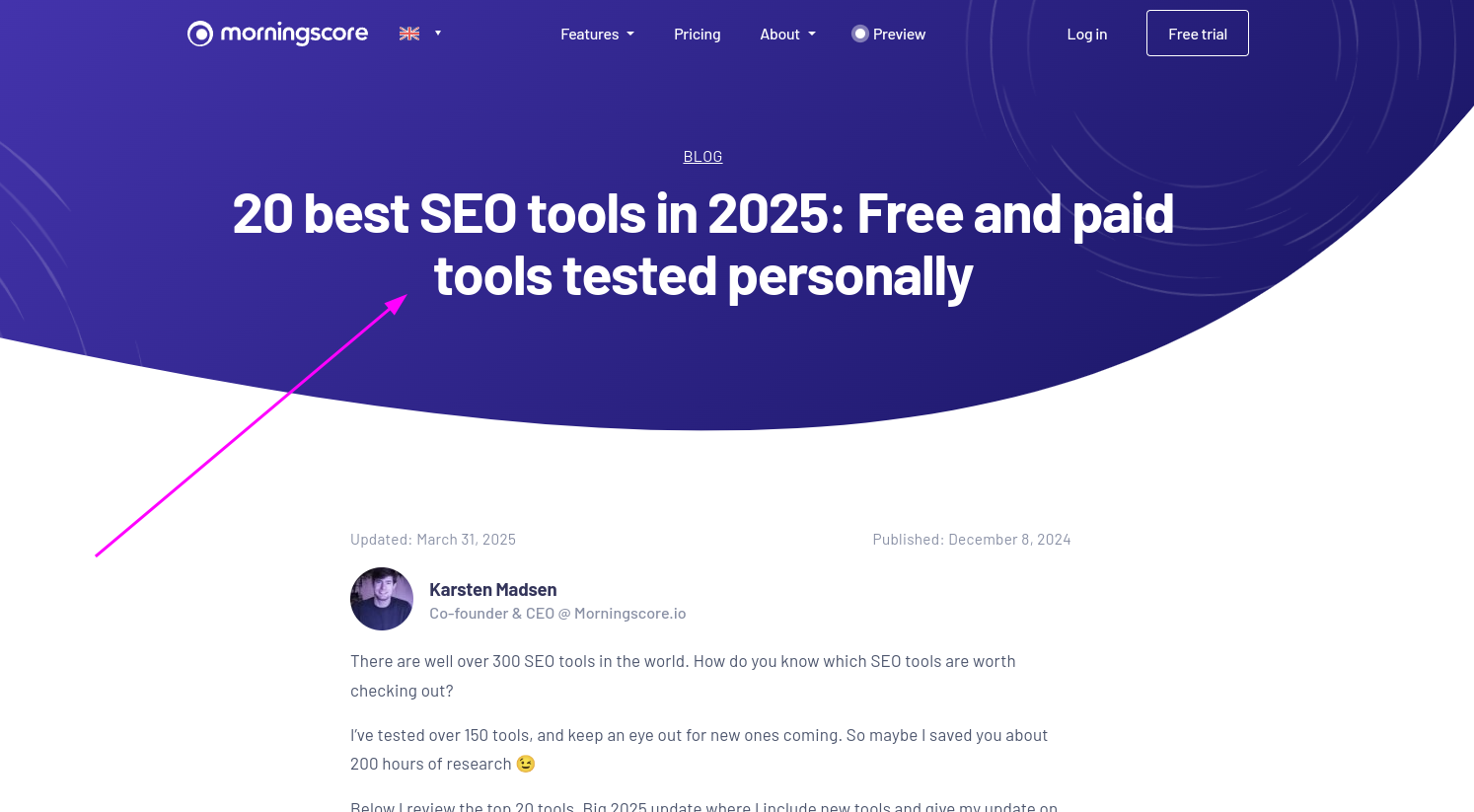
- But to be more thorough, visit all pages and take note of the page title. In this example, I will try variations of “What are the best seo tools in 2026?” Why this works: ChatGPT’s citation algorithm heavily weighs page titles and H1 headers when selecting sources, so your page title often closely matches the user’s prompt intent.
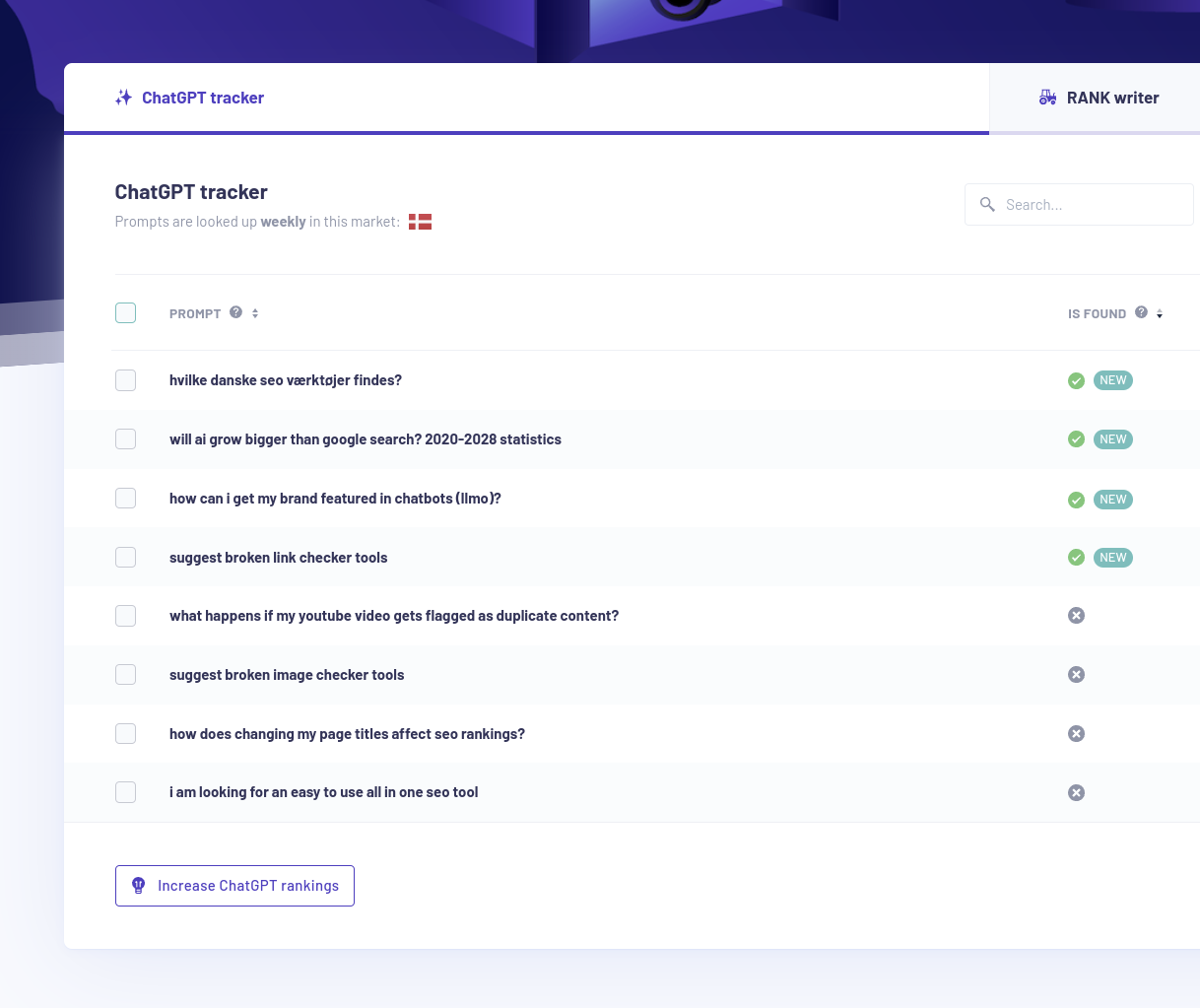
- Now is the time to test our ideas in a prompt visibility tracker -> add all your ideas as prompts:
- In my example above, I successfully found 4 prompts where our brand is mentioned. But I also have 4 misses. This 50% hit rate is actually typical in our experience – ChatGPT’s responses vary based on conversation context and model updates.
- There is also no guarantee your specific chosen prompts have a lot of searches, so this is an approximate game. Reality check: You’re identifying prompts that have already driven traffic, not necessarily the highest-volume prompts in your niche.
Limitation to understand: This method only reveals prompts that successfully led to clicks. If ChatGPT mentions your site but users don’t click through, you won’t see that traffic. This means you’re getting visibility into conversion-driving prompts, which is valuable, but you’re missing the full picture of your AI visibility.
Next steps: How to track traffic from ChatGPT more accurately
Once you have identified the primary pages receiving AI traffic, you can refine your prompt list. Tracking these specific conversations helps you understand how ChatGPT perceives your brand in 2026 and beyond. Cross-reference your landing pages with your prompt tracker results weekly to spot new patterns as they emerge.
In 2026, new specialized tools have emerged for monitoring AI prompt visibility. Tools like SE Visible, Peec AI, Otterly AI, and SEOClarity now offer real-time tracking of prompt mentions and citations. These complement traditional SEO tools like SEMrush and Ahrefs, which have also added AI-specific tracking features this year.
For GA4 users, consider setting up regex filters in Exploration reports to match referrer URLs like ‘chat.openai.com’ for more granular analysis. Enhanced attribution models in GA4 also help you identify the initial AI source in your user journey, giving you better insights into which prompts are driving real engagement. Create a custom segment that isolates ChatGPT referrers and compare their behavior metrics (bounce rate, time on page, conversion rate) against organic search traffic to gauge quality.
Advanced tracking tip: Set up UTM parameters in your content when you share it publicly, and monitor whether ChatGPT preserves these parameters in citations. In our testing, ChatGPT sometimes strips UTM tags but preserves the core URL, which can help you identify specific content pieces being cited even without full referrer data.
Frequently Asked Questions
How do I track traffic from ChatGPT in Google Analytics 4?
To track ChatGPT traffic in GA4, navigate to Reports -> Acquisition -> Traffic acquisition and create a custom segment or filter for AI referrers. You can use regex filters to identify traffic from “chatgpt.com” or “chat.openai.com” domains, or set up specific channel groupings for AI sources. Detailed setup instructions can help you configure these filters correctly. In 2026, GA4’s improved referrer string preservation makes this process more reliable than it was with Universal Analytics.
Why is my ChatGPT referrer data unreliable or missing in GA4?
ChatGPT and other AI platforms often don’t pass traditional referrer headers, or they mask referrer data for privacy reasons. This causes AI traffic to be classified as direct or unknown traffic in your analytics. Browser privacy settings and the technical design of AI platforms compound this problem. Updated steps for GA4 AI tracking can help you navigate these data gaps. You are often working with incomplete data when analyzing AI-driven visits.
Can I accurately determine which prompts users asked ChatGPT before visiting my site?
No, you cannot see the exact prompts users entered – you can only infer them from landing page patterns and titles. Prompt inference is inherently imprecise because ChatGPT doesn’t pass query parameters or session data in referrals. Research shows that while you can identify general prompt themes from traffic patterns, detailed prompt reconstruction remains unreliable due to user variability and lack of granular data. The method described in this article typically achieves about a 50% accuracy rate in identifying prompts that actually mention your brand.
Should I switch to Plausible instead of GA4 for tracking AI traffic?
Plausible offers a simpler interface and stronger privacy protections, but it faces the same referrer data limitations as GA4 when tracking AI traffic. The choice depends on your priorities: if you value privacy-focused analytics and ease of use, Plausible may be worth considering. However, GA4 offers more advanced segmentation and custom reporting features that can be valuable for detailed AI traffic analysis. Both tools require custom event tracking and filters to effectively measure ChatGPT referrals.
What privacy concerns should I consider when tracking website traffic?
Traditional analytics tools like Google Analytics collect extensive user behavior data across sites, raising privacy concerns for both site owners and visitors. Privacy-focused alternatives like Plausible emphasize minimal data collection and don’t track users across websites. In 2026, data privacy regulations continue to evolve, making it important to choose analytics tools that align with your privacy standards and comply with regulations in your target markets.
How can I measure AI referral traffic more effectively?
Combine multiple approaches: create custom segments in GA4, use specialized prompt tracking tools, and manually tag important URLs with UTM parameters. Set up weekly monitoring routines to check for new AI referrer patterns, since OpenAI occasionally changes its referrer domains. Cross-reference your landing page data with prompt tracker results to identify which content ChatGPT cites most frequently, and compare behavior metrics (bounce rate, time on page) between AI traffic and organic search to gauge quality.