
 Deutsch
 Dansk
Dansk Svenska
 Nederlands
 Español
 Lietuvos
Key Takeaways
- Check your Google rankings in Morningscore’s “All Keywords” section to see exactly where your pages rank for specific search terms.
- Rankings in the top 5-10 indicate strong SEO performance, while rankings above 30 suggest targeting less competitive keywords.
- The rank tracker tool provides daily updates on your most important keywords and automatically tracks Google AI Overviews.
- Morningscore displays multiple useful metrics, including rank position, monthly searches, estimated visits, and CPC values.
- Always verify rank data with Google Search Console and track conversions alongside position to measure real business impact.
Monitoring your Google rankings is a vital part of any digital strategy, yet SEO as a discipline is often shrouded in mystery despite its importance and prevalence. If you aren’t already familiar with SEO, it can seem needlessly complicated.
But we at Morningscore believe that everyone can do SEO. Our mission is to make SEO as approachable as possible.
In this article, we will teach you how to find your Google rankings in Morningscore while holding your hand the whole time. We’ll also show you how to verify your ranking data and explain why tracking rankings alone isn’t enough in 2026.
What are Google rank keywords, and why are they ranked?
The first thing you will need to know about SEO is keywords. Keywords are the different words and phrases you type into Google, which is a huge part of SEO. When creating a piece of content, you will often do so with a specific keyword in mind.
When Morningscore shows you your Google rankings, they will be displayed in relation to a keyword. If you want to learn more about keywords, you can read our in-depth article on keywords.
It’s important to know how certain keywords rank on Google, as this can help you make informed decisions on where to improve your SEO content. According to Google’s guide to ranking systems, search evaluates “hundreds of billions of webpages” using multiple ranking signals, which means positions can shift frequently.
Knowing your Google rankings for important keywords is also essential for getting an idea of how your SEO is doing. If your important keywords are consistently ranking in the top 5 or top 10, then you are doing great with your SEO.
If your important keywords are mostly in the 30s or higher, you might not be going about your SEO efforts the right way, or you may be focusing on a market that is too oversaturated. In that case, looking for less competitive keywords might be a good strategy.
How to view your Google rankings in Morningscore
Viewing your keyword rankings is easy to do in Morningscore, and I will show you how in this guide. If you follow along step by step, you will learn how to check your keyword rankings in Morningscore, but also how to navigate and use various other features in the tool.
Making an account to check Google rank keywords
If you don’t have a Morningscore subscription, don’t worry. I will show you how to set up a free 14-day trial for Morningscore without requiring any credit card information.
Just type your information into the text field below:
Now enter your email address into the next text field, and then wait for a moment while Morningscore scans your entire page.
Accessing your keyword overview
After creating your Morningscore account, you will need to wait a bit while Morningscore scans your website. Once the scan is complete, you will be redirected to the “Overview” page in Morningscore. From here, you can see a quick overview of all the different functions in Morningscore.
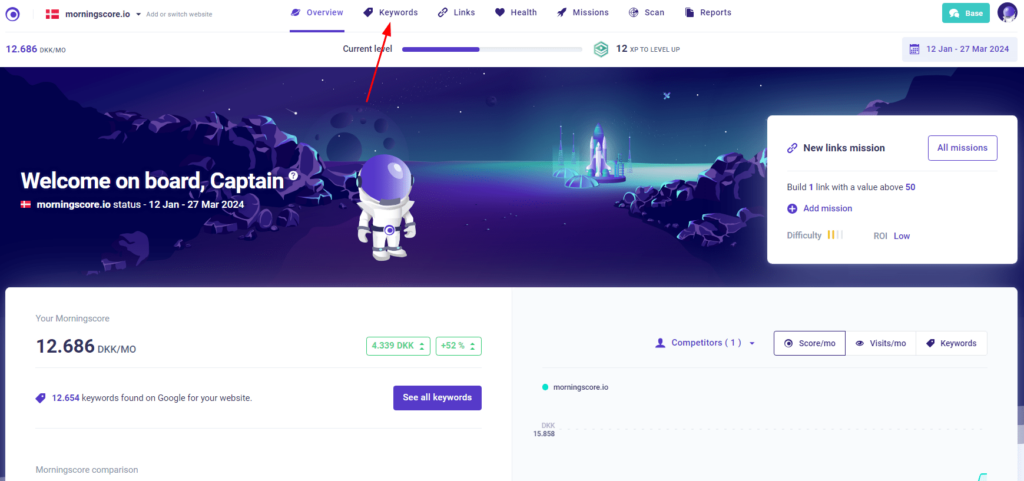
At the top of the page, in the header, there are many different features you can choose from. All of these features are very useful, but for now, we will be going to the “Keywords” section. If you are curious about the other features of Morningscore, feel free to play around with the tool or read our comprehensive introduction to Morningscore’s functions before continuing this guide on Google rankings.
If you are ready to move on, then click on the keywords tab, as pictured below:
Finding your Google rankings in the tool
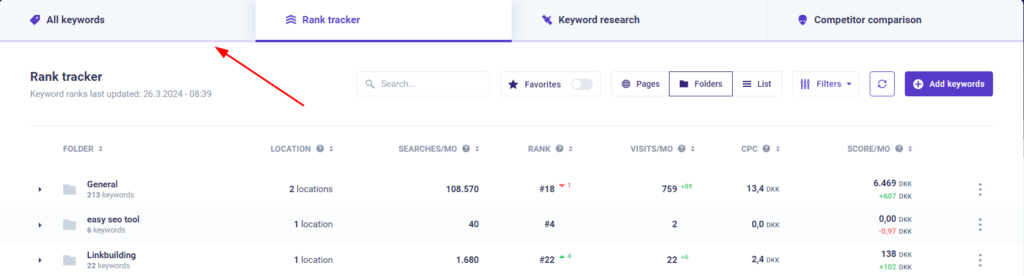
Once you have navigated to the keywords section, you will see our “Rank tracker” tool. The rank tracker is a very useful tool where you can choose specific keywords of interest to be updated every day. This can be useful for many different purposes, some of which I will cover later. Before looking at the rank tracker, we are going to look at the Google rankings of all your keywords. To do this, we will go to the “All keywords” tab, as indicated in the picture below:
Now that we are in the “All keywords” tab, there are many interesting metrics to look at. While it might seem daunting at first, it is easy to understand once you know how it works, so I will go through all the different metrics on this page now. If you look at the picture below, you can see numbers corresponding to the different elements I will be mentioning. I will go through the elements one by one:
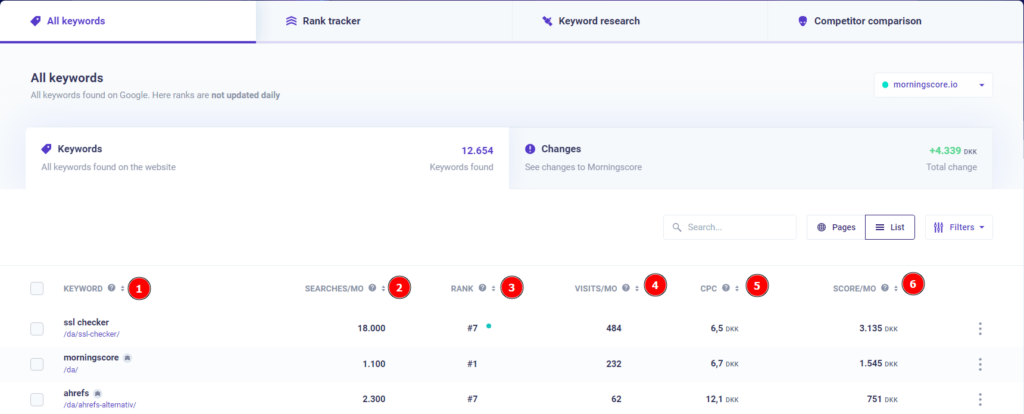
Screenshot: anonymized example from Morningscore Rank Tracker. Verify notable ranking changes using Google Search Console About.
1. Keywords
Here you can see the specific keyword you are ranking for, as well as which specific page is ranking for that keyword (look at the purple text under the keyword).
2. Searches/Mo
This field shows an approximate number of searches this keyword will get each month. It isn’t possible to know exactly how many searches something will get in the future, so this is an approximation based on earlier search volumes.
3. Rank
This is the keyword ranking, which shows how your pages rank for that specific keyword. Congratulations! You now know where to find the rankings for your keywords. But if you want to know more about keywords in Morningscore, you can keep reading for more information.
4. Visits/Mo
This is an approximate number of visits your site will get from this keyword each month. This is again an approximation because this data isn’t available publicly. We instead calculate it by looking at the total number of searches per month and your rank on the keyword in question.
5. CPC
This point shows you how attractive the keyword generally is when it comes to paid ads. The value you see here is how much you would pay for each click if you chose to pay for Google ads to rank for this keyword.
6. Score/Mo
This is how much the keyword currently adds to your Morningscore. The Morningscore is a metric we use to show you the total value of all your SEO work combined. To put a value on your SEO work, we look at your CPC and your visits for each keyword to find out how much the same amount of clicks would have cost you in paid advertising.
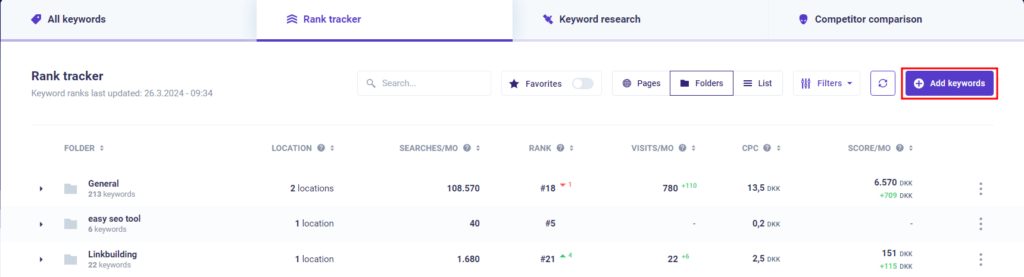
And those are all the points in the “All keywords” screen. Now you know how to check your Google rankings for any of your keywords using Morningscore. If you want to know more about your keywords and how they rank on Google, then it’s a good idea to make use of the rank tracker tool in the keyword section I mentioned earlier. Using this tool provides multiple benefits and it’s easy to add new keywords to it; just press the “Add keywords” button in the rank tracker section, as shown below.
Benefits of tracking your Google rankings
If you want to get more information about your keywords, then using the rank tracker on important keywords is a good way to do it. The Google ranks of the keywords you choose to track will be updated daily; that way, you will always be up to date on how your most important keywords are performing. When adding keywords to the rank tracker, you will automatically also track Google AI Overviews.
By default, Morningscore shows you national data for your keywords in the country your page is registered for. Using our local rank tracker, it’s possible to track keywords in custom regions, which allows your rankings to better fit your area of operations if you do SEO locally. You can choose what region you want to track your keywords for when adding them to the rank tracker.
If you have tracked a keyword, you will also be able to view your ranking history for that keyword. This will show you how your Google rank on that keyword has changed over time, which is a great tool if you want to compare your SEO progress and see potential highs and lows in your keyword’s performance. According to Ahrefs SEO research, top-ranking pages often take months to reach their position, so tracking history helps you measure long-term progress and set realistic expectations.
Another function of the rank tracker is the ability to view who else ranks for your important keywords. You can do this by using Morningscore’s SERP checker. If you click on the three dots on the right-hand side of the specific tracked keyword and then click “See all ranks” in the dropdown menu that opens up, you can see what other specific pages also rank for that keyword.
How we validate rank data
Rank data in Morningscore should be cross-checked against Google Search Console performance exports and business analytics to verify traffic and revenue impact for key ranking changes.
Verification tip: Export your Rank Tracker CSV and Search Console Top Queries export for the same 30-day range.
Understanding ranking factors and optimization
While tracking your Google rank keywords is essential, it’s equally important to understand what influences those rankings. Google uses hundreds of ranking signals, and according to SEMrush’s analysis of ranking factors, these fall into several key categories: content quality, backlinks, technical SEO, and freshness.
When you’re working to improve your rankings, focus on creating helpful content that serves your audience first. Google’s helpful content guidance emphasizes people-first content over content created purely for search engines. This aligns with what SEO expert Naeem Abbas observes: “SEO in 2026 is no longer about chasing algorithms. Monitoring rankings alone is insufficient; brands must build real expertise, product quality, and brand reputation to succeed.”
Technical fundamentals also matter significantly. Following Google’s SEO Starter Guide for basics like crawlability, site structure, and mobile optimization gives you a solid foundation. As Kaspar Szymanski from SearchBrothers (former Google Search Quality team) notes, “Sustainable SEO gains depend on trust, crawlable data, and meeting user needs – not chasing the latest novelty.”
Closing words
Thank you for reading this guide to checking the Google rankings of your keywords. SEO is not a field where progress happens overnight. It can often take days to see progress in your keyword rankings. Because of this, it’s important to mention that you aren’t an SEO expert yet just because you have read this article. But you have taken an important first step by seeking out knowledge about keyword rankings yourself. We have plenty more articles if you want to learn further.
Remember that as Tom Demers from WordStream points out, “Measuring SEO results will become harder, pushing marketers to focus on real outcomes like leads and revenue rather than just rankings or traffic.” Weekly monitoring of your top pages, queries, and conversions is essential for understanding true SEO performance.
I hope you have acquired new knowledge about Google rankings and are ready to start practicing SEO for yourself. If you have any more questions about keyword rankings in SEO, you can read some commonly asked questions below:
Frequently Asked Questions
How can I improve my Google rankings?
To improve your Google rankings, focus on creating high-quality, relevant content that serves your audience first, while optimizing on-page SEO elements like titles and meta descriptions. Improving site speed, earning quality backlinks, and ensuring mobile-friendliness are also crucial factors. Regularly updating your content every 3-6 months and using targeted keywords naturally throughout your pages will help maintain and boost your rankings. Google’s SEO Starter Guide provides comprehensive tips on these fundamentals.
How does Google determine keyword rankings?
Google ranks keywords based on relevance, content quality, user experience, backlinks, and hundreds of other ranking signals combined through complex algorithms. According to Google’s ranking systems guide, search evaluates “hundreds of billions of webpages” using factors like keyword usage, page authority, and user engagement metrics. User intent matching is particularly important – Google tries to understand what users are really looking for and surfaces content that best answers their needs.
What are the best keywords to rank for on Google?
The best keywords are those with high search volume, low competition, and high relevance to your content or business. Using keyword research tools like Google Keyword Planner or our own keyword difficulty checker can help identify these opportunities. Long-tail keywords often convert better and face less competition, making them excellent targets for newer websites or competitive markets.
How often should I check my Google rank keywords?
For your most important keywords, daily tracking using a tool like Morningscore’s rank tracker helps you catch significant changes quickly and understand ranking fluctuations. However, you should evaluate the overall performance trends on a weekly or monthly basis rather than obsessing over daily movements, as rankings naturally fluctuate. Always verify rank changes with real traffic and conversion data in Google Search Console and Google Analytics to understand the actual business impact.
Is keyword stuffing still penalized by Google?
Yes, keyword stuffing can penalize your site and significantly harm your rankings in 2026. Google’s algorithms are sophisticated enough to recognize unnatural keyword usage, and quality content with natural language is far more effective than forcing keywords into your text. Focus on writing helpful, user-friendly content where relevant keywords appear naturally, following Google’s helpful content guidance for best results.
Should I stop doing SEO after reaching the first page?
No, SEO is an ongoing process that requires continuous optimization and monitoring even after achieving first-page rankings. Rankings fluctuate due to algorithm updates, new competition, and changing user behavior, so maintaining your position requires consistent effort. According to Moz’s Beginner’s Guide to SEO, sustainable SEO success comes from treating it as a long-term investment rather than a one-time achievement.