
 Deutsch
 Dansk
Dansk Svenska
 Nederlands
 Español
 Lietuvos
Key Takeaways
- A good link comes from reputable websites and boosts rankings, while a bad link originates from spammy sites and can harm your SEO.
- Evaluate link quality using factors like domain authority, traffic, content freshness, relevance, and link placement on the page.
- Remove harmful backlinks by contacting site owners or using Google’s Disavow Links Tool to protect your rankings.
- Monitor lost backlinks regularly and reclaim valuable ones to maintain your site’s authority and prevent traffic loss.
In the vast expanse of the internet, links are the currency of connectivity. They serve as bridges between websites, guiding users through the digital realm with nothing more than a click.
However, not all links are created equal. In the intricate web ecosystem, there exist both good and bad links, each with its own implications for website owners, marketers, and users alike.
In this blog post, we’ll delve into the world of links, exploring what makes them good or bad, how they impact website performance and search engine rankings, and crucially, how you can identify and leverage them to enhance your online presence.
What Are Good Links?
Good links are backlinks from other websites that Google believes provide real value and therefore boost your rankings.
According to Moz’s authoritative guide on backlinks, high-quality links are editorially earned, contextually relevant, and placed in-content on authoritative pages. These links signal to search engines that your content is trustworthy and worth ranking.
Because of the way value flows between pages, good backlinks will mostly improve the rankings for the specific page they are linking to – but also spread the effect throughout your whole website and improve your overall authority.
Search Engine Land emphasizes that quality backlinks come from sites with relevant content, established authority, and genuine editorial intent – not manipulative link schemes.
What Are Bad Links?
Bad links are low-value spam links that Google sees as dangerous. While a few bad links won’t have any effect, having many bad links can really hurt your rankings.
Google’s official disavow documentation explains that unnatural links are practices that attempt to manipulate PageRank, including buying or selling links, excessive link exchanges, automated link building, and keyword-stuffed anchor text in distributed content. These violate Google’s guidelines and can trigger manual actions or ranking demotion.
These links are low value links from spammy sites that link to many other domains, backlinks from non-relevant sites, bought links or links acquired by Black hat SEO methods. Some of these simply do not deliver any value even though the domain shows to have a high Linkscore and some of them might even earn you a Google penalty.
An easy way to determine whether a link is good or bad is to think whether it justifies the time and energy invested to build it.
⚠️ Real-World Risk: Empact Partners details how modern penalties occur when sites use manipulative link practices. Historical cases like Interflora, which purchased roughly 60,000 backlinks in a year before being removed from organic results, show that even major brands can experience severe visibility drops for high-value keywords. These penalties are often difficult and take months to recover from.
Our Link Audit Methodology: How We Evaluate Every Backlink
Over hundreds of client audits, we’ve refined a systematic approach to link evaluation that combines Google’s guidance with industry-standard metrics. This methodology is what we use internally and teach to our clients.
Here’s the exact process we follow, backed by Majestic’s link quality assessment guide and updated disavow guidance for 2026:
Step 1: Export & Combine Data Sources
We always start by exporting backlink data from Google Search Console – this is your canonical list of links as seen by Google. Then we cross-reference with a paid index like Ahrefs or SEMrush to catch links Google may not have indexed yet.
Combining these sources creates a comprehensive, deduplicated list. In our experience, Google Search Console shows 60-80% of what commercial tools find, so using both gives you the complete picture.
Step 2: Score Each Referring Domain
For every domain in your backlink profile, we evaluate six key dimensions:
- Topical relevance: Does the linking site cover topics related to your industry?
- Authority metrics: We flag domains with Trust Flow < 10 (per Majestic) or Spam Score > 50% (per Moz Link Explorer) as candidates for removal
- Visible organic traffic: Sites with zero traffic are often defunct or never had real visitors
- Link placement: In-content links pass more value than footer or sitewide links – we use Screaming Frog to detect placement patterns
- Anchor text naturalness: Over-optimized, keyword-stuffed anchors are red flags
- Link growth pattern: Sudden spikes in acquisition often indicate purchased or automated links
Step 3: Categorize Risk & Prioritize Action
We sort links into High, Medium, and Low risk buckets. High-risk links get priority outreach for removal. We document every removal attempt with screenshots and timestamped emails.
Only after exhaustive outreach do we add persistent toxic domains to a disavow file in Google’s required help format.
Step 4: Maintain an Evidence Pack
If you’re dealing with a manual penalty, documentation is everything. We keep CSV exports, screenshots of landing pages with the link, outreach logs with dates, and version history of the disavow file.
Search Engine Land’s penalty guide shows how this approach works: teams must remove high percentages of spammy links Crawford and disavow the rest. Well-documented sites often regain a significant portion of pre-penalty traffic within weeks after submitting a reconsideration request.
Step 5: Combine Link Cleanup with Site Improvements
In our experience, link cleanup alone rarely restores full performance. John E Lincoln’s penalty recovery guide demonstrates this perfectly: combined cleanup and content improvements are essential to restore visibility. For example, some sites see major recovery in conversions only after fixing both their link profile and their site’s user experience.
The lesson: pair link remediation with content quality and user experience fixes to fully recover business metrics.
How To Know If A Link Is Good Or Bad? – Quick Link Evaluation Template
We are aware that there are a lot of things to look for when you are trying to determine if a link is good or bad. And it’s not always easy to remember to check them all when you are just starting with link building.
That is why we made this checklist based on Majestic’s evaluation framework and Moz’s quality criteria. It will help you estimate the value of a link or better said determine if it is a good link or a bad link.
| Good link | Bad link | |
| DR/DA/Linkscore (Pick only one and stick to it.) | High (DR > 30, DA > 20, or equivalent) | Low (DR < 20, DA < 10) |
| Trust Flow / Spam Score (Majestic Trust Flow or Moz Spam Score) | Trust Flow > 10, Spam Score < 30% | Trust Flow < 10, Spam Score > 50% |
| Total traffic (How much traffic is the site that links to you receiving?) | High (visible organic traffic in Ahrefs/SEMrush) | Low or zero traffic |
| Freshness of site (Check the date of blog articles or use the wayback machine) | Content is regularly updated and maintained | Content is outdated and not maintained |
| Site relevance/topic (Does the content match yours?) | Content is relevant and topically aligned | Content is irrelevant or off-topic |
| Relevant keyword in URL | Yes | No |
| Relevant keyword in title | Yes | No |
| Relevant keyword in meta description | Yes | No |
| Depth of the page with your backlink (How many clicks do you need to reach from the other website’s home page to the page where your backlink is placed?) | Less than 3 clicks | More than 3 clicks |
| Link to text ratio | No more than 1 backlink per 500 words | More than 1 backlink per 500 words |
| Trustworthiness estimate (Does it look like a site you would be proud to have your name on?) | Yes | No |
| Location of link on the page (Placement in content body vs. footer/sidebar) | In-content, editorial placement | Footer, sidebar, or sitewide |
| Reciprocal link (Do you link to this website also?) | No (or editorially justified) | Yes (excessive reciprocal linking) |
Now, there is no clear formula to which of these factors and in which percentage make up a good or a bad link. But it is safe to say that the more checks you have on the red side, for example, the more likely it is to be a bad link.
According to Search Engine Land’s quality backlinks guide, you should evaluate link value by relevance, placement, authority, anchor text, and potential referral traffic – not just a single metric.
How Do I Remove Bad Inbound Links?
To remove bad inbound links you need to disavow them through the Disavow Links Tool. Disavowing links will not remove them from Google’s index – but Google will treat them as links that do not provide any value.
⚠️ Important Caution from Google: Google explicitly states that “most sites do not need to use the Disavow Links Tool” because Google’s systems are able to assess and ignore spammy links in many cases. The tool is intended mainly for advanced users dealing with manual actions or large numbers of artificial links.
Disavowing links without exhaustive removal attempts and documentation may be unnecessary and could even harm your rankings if done incorrectly.
Now, we know it sounds scary, but it actually isn’t really needed unless you have a huge amount of bad links. However, in case you find that you absolutely need it, we will cover it anyway.
So, not all backlinks are good for your backlink profile. Someone in your team might place a link on a spammy website, or even that some sketchy website links to you without you having done anything. The problem here is that Google cannot tell how you got this link, so you may get penalized for something you did not have any influence over.
For this reason alone, you should regularly check your link profile to weed out the bad links.
You will notice a Google penalty by a sharp fall in your site rankings and being aware of what your link profile is made of is the first step in solving this potential problem. But, unless you have been buying many links or used some Black hat SEO methods, chances are that most of your links are good and no cause for concern.
So, let’s say you did a good job with your backlink analysis and now have a list of what you feel are really bad links that you would like removed.
What you do first is contact the website owner of the domain where a particular backlink is and ask them to either remove the backlink in question or set it to nofollow. If your request is ignored you can use Google’s Disavow Links tool and add the link (or list of links) you want ignored. The link won’t be removed from the website, it will just be ignored by the spiders in the future.
Our Removal & Disavow Workflow (Step-by-Step)
This is the exact process we follow when cleaning up toxic backlink profiles for clients:
1. Manual outreach first: Contact webmasters via email, contact forms, or WHOIS data. Request link removal or nofollow attribution. Keep timestamped logs of every request.
2. Document everything: Take screenshots of the linking page, save email correspondence, and log response (or non-response) with dates. This evidence is critical if you need to file a reconsideration request.
3. Wait 7-14 days: Give site owners reasonable time to respond. Ignite Digital recommends these modern safeguards and follow-up steps before moving to disavow.
4. Prepare disavow file: Use Google’s specified .txt format. List domains (domain:example.com) or individual URLs. Upload via Google’s Disavow Links Tool in Search Console.
5. Submit reconsideration (if under manual action): If you have a manual penalty notice in Search Console, submit a reconsideration request detailing your removal efforts, outreach logs, and disavow actions.
In PageOptimizer Pro’s recovery checklist, this documented approach helps restore traffic faster than typical penalty timelines by providing clear evidence of remediation to Google.
What Is A Lost Backlink?
Lost Backlinks are links that no longer exist in both Google’s database and your SEO tool’s database. You can lose links for reasons such as moved or deleted pages or URLs.
Every once in a while, you will lose a link. While that is fine on a small scale, when you start losing many links, this can be quite dangerous. Your rankings can suddenly tank, and you might lose tons of traffic from potential customers.
Whatever the reason, you need to stay on top and react as soon as you notice a lost link.
Morningscore’s link data is updated on a daily basis and will make it easier to discover lost links as soon as they appear.
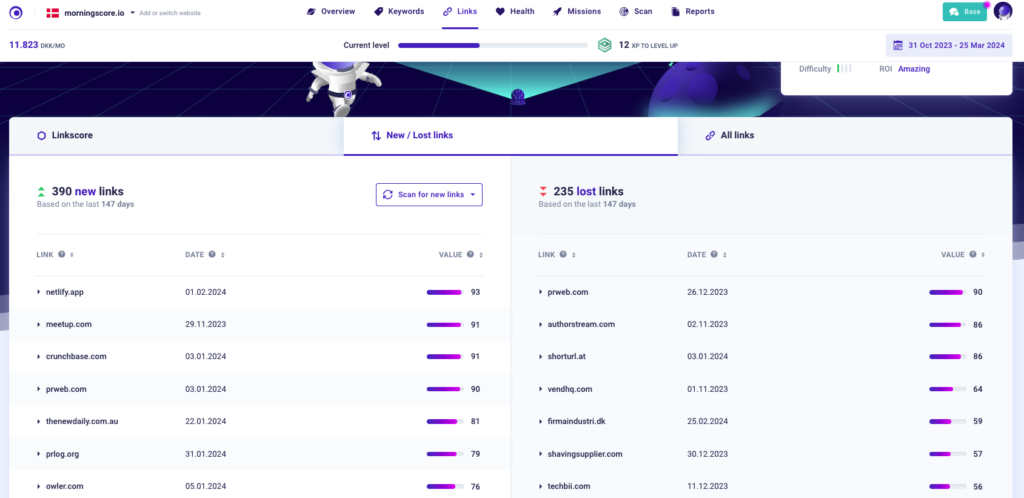
First determine if the link is valuable enough to get back. Dofollow links from high value domains, especially if they are editorial, are almost always worth your time.
Link acquisition is a process that takes a lot of time. You probably put a lot of effort into getting each link in your link profile, so why would you just let one slip right out of your hands? Even better, link reclamation has a very high chance of success, so it is a no-brainer when deciding what to focus on.
The link reclamation process depends highly on figuring out where the problem lies. After doing that, you can either fix the problem on your side or contact the website owner to update their web page or the link itself.
Successful Link Building: Real Results from Quality-First Strategies
To balance the penalty stories, it’s important to see what quality link building actually achieves. LinkPanda’s client case studies and Sky SEO Digital’s 2026 strategies show multiple examples of clients doubling referring domains and achieving multi-hundred percent organic traffic increases through content-led, editorial link acquisition.
The common thread: guest contributions on relevant, high-authority sites, data-driven content that naturally earns links, and digital PR campaigns that secure editorial placements. No shortcuts, no purchased links – just valuable content that others want to reference.
According to Moz’s guide to link building, modern link building should prioritize relationships, content quality, and genuine value exchange over volume or manipulation.
Final words
By now I hope you understand the difference between good and bad links, and what type of links you should be looking for in the future. Remember that Google’s own guidance emphasizes that most sites don’t need aggressive disavow strategies – focus instead on earning quality, editorial links through great content.
If you would like to learn more about backlinks themselves, I suggest you check out this article.
FAQ
How does the age of a website influence the quality of its links?
The age of a website can indirectly influence link quality. Older websites are often seen as more credible if they have consistently published relevant, high-quality content. This established trust can make links from such sites more valuable.
Majestic’s evaluation framework includes “historical data” as one signal of link authority – domains with long Trust Flow histories tend to be more stable. However, age alone doesn’t guarantee quality; a 10-year-old abandoned site is worse than a 1-year-old authoritative publication.
What specific tools or software are recommended for link evaluation and backlink analysis?
For professional backlink analysis, we recommend starting with Google Search Console (free) as your canonical source, then supplementing with commercial tools like Ahrefs or SEMrush for deeper backlink indexes and anchor text analysis.
Use Moz Link Explorer for Spam Score metrics and Majestic for Trust Flow/Citation Flow to validate quality. For site-level analysis, Screaming Frog helps identify link placement patterns and sitewide links. If you’re dealing with a penalty, LinkResearchTools offers advanced disavow workflows.
How do good and bad links affect user experience on a website?
Good links enhance user experience by providing additional relevant information and resources, increasing the value of the content. When users can follow links to authoritative, related content, they stay engaged longer and trust your site more.
Conversely, bad links – especially broken links or those leading to low-quality, irrelevant, or malicious sites – detract from user experience significantly. Users who click expecting valuable information but land on spam sites or error pages lose trust in your site. This impacts not just SEO but also conversion rates and brand reputation, as recent recovery studies demonstrate when sites fix their UX and technical link issues together.
Will disavowing links always fix ranking drops?
No, disavowing links alone rarely fixes ranking problems completely. Fly High Media’s 2025 penalty guidance shows that even with successful removal and disavow actions, traffic recovery depends on the underlying site quality.
More importantly, modern analysis of Google penalties demonstrates that business-metric restoration requires combining link cleanup with content improvements, technical fixes, and UX optimization. Google also reminds us that ranking drops have many causes – poor content, technical issues, or algorithm updates – so don’t assume every traffic loss is link-related.
Should I use nofollow or sponsored attributes for paid links?
Yes, you should always use the rel=”sponsored” attribute for paid links to maintain transparency with Google. According to Google’s official documentation, the sponsored attribute explicitly tells search engines that a link is part of an advertisement or paid placement. While Google now treats nofollow as a “hint” rather than a directive, using rel=”sponsored” for paid links and rel=”ugc” for user-generated content helps you avoid potential penalties for attempting to manipulate PageRank. Yoast’s link attribute guide confirms this is the recommended best practice for maintaining SEO compliance in 2026.
How many bad links are too many before I need to disavow?
There’s no specific number threshold, but if bad links represent more than 10-15% of your total backlink profile, or if you’ve received a manual action notice in Google Search Console, you should consider cleanup and disavow actions. Remember that Google explicitly states most sites don’t need the disavow tool because their algorithms already ignore low-quality links. Focus on removing genuinely toxic patterns – like hundreds of links from obvious spam networks or private blog networks (PBNs) – rather than worrying about occasional low-quality links. Quality matters more than quantity when evaluating risk.
Is it true that all low Domain Authority links are bad links?
No, this is one of the most common toxic link myths. A good link from a relevant, low-DA site can be more valuable than a manipulative link from a high-DA site. According to industry experts debunking disavow myths, Domain Authority is a third-party metric, not a Google ranking factor. A local news site, industry blog, or niche community forum might have low DA but provide perfectly legitimate, contextually relevant links. Evaluate links based on relevance, editorial intent, traffic, and trustworthiness – not just authority scores. Over-disavowing based solely on DA can actually harm your SEO efforts.
Can you give real examples of good links vs bad links?
Good link example: An in-content editorial link from a well-known industry publication like Search Engine Land, embedded naturally in an article about SEO strategies, using descriptive anchor text. Bad link example: A footer link from a foreign-language site with zero organic traffic, stuffed with keyword-rich anchor text, linking to hundreds of unrelated domains. According to Hike SEO’s toxic backlink guide, bad links typically come from link farms, PBNs, or sites with spammy patterns like excessive outbound links and no real content. The key difference is editorial intent and contextual relevance.
Do nofollow links count as bad links?
No, nofollow links are not bad links – they’re simply links with a rel=”nofollow” attribute that tells search engines not to pass PageRank. According to SE Ranking’s analysis, Google now treats nofollow as a “hint” and may still use these links for discovery and ranking if they’re from relevant, authoritative sources. Nofollow links from sites like Wikipedia, major news outlets, or social media platforms can still drive referral traffic and build brand awareness. A natural backlink profile includes a healthy mix of both dofollow and nofollow links – having only dofollow links can actually look unnatural and manipulative.
Should I disavow all links from sites with low traffic?
No, low traffic alone doesn’t make a link toxic or worth disavowing. Many legitimate smaller sites, new publications, or niche communities have low traffic but provide perfectly valid, contextually relevant links. According to SEMrush’s toxic link guidelines, you should evaluate the full context: is the site topically relevant? Does it have genuine content? Is the link editorially placed? Zero traffic combined with other red flags – like spam content, broken design, or being part of a link network – indicates a problem. But a quality local blog or industry resource with modest traffic shouldn’t be disavowed. Focus your disavow efforts on clear spam patterns, not every low-traffic link.