
 Deutsch
 Dansk
Dansk Svenska
 Nederlands
 Español
 Lietuvos
Key Takeaways
- Good product page SEO combines optimized URLs, titles, images, descriptions, and schema – all working together to rank and convert.
- Focus your effort on the 20% of products that drive 80% of your revenue first.
- Add real reviews, FAQs, and structured data to build trust and improve your visibility in search results.
- Use canonical tags on product variants to avoid duplicate content hurting your rankings.
For ecommerce businesses, there is one extra focus in SEO compared to regular websites. They depend on selling products online. Hence, SEO on product pages plays a rather crucial role, and if you are not paying attention to your product pages, you are missing out on revenue.
Good product pages are important for webshops. This is where people buy your products. You want to make sure that your product pages are well-optimized for a smooth user experience but also for SEO.
Product page SEO is the real art of commercial storytelling. This is where you can stand out.
In this post, I’ll take you through how to do ecommerce SEO on product pages and also touch on the don’ts.
So, let’s get started.
Product page SEO can be tricky
Search engines look at individual pages on their own. But they also pay attention to the rest of the website. Your pages affect each other in good and bad ways. You can’t just focus on your product pages alone.
You need to optimize your entire webshop, including products, categories, the homepage, and guides. Optimize your product pages, but without losing track of the bigger picture.
The tricky part with SEO on product pages is that they often compete with your category pages for keywords. We don’t want that. It’s easy to end up with keyword cannibalization.
An ecommerce shop is often a medium or big website. You can’t handle every single issue on all pages. And you are not supposed to, either.
Focus on the products that drive traffic and sales. Often, 80% of ecommerce revenue comes from 20% of the products and categories. Focus on them first.
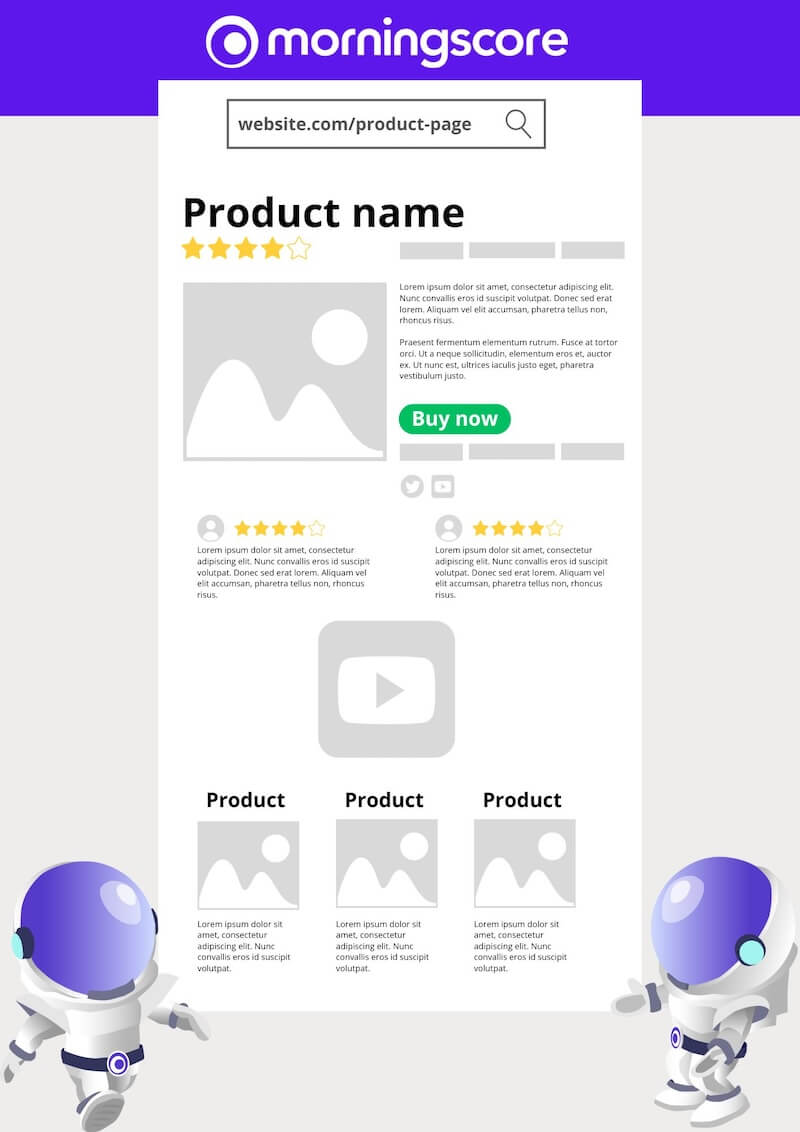
Create clear and descriptive URLs
Starting from the beginning with the URLs.
An optimized URL helps users understand what the page is about. It shows what to expect when they click. Search engines read the URL too and compare it to the content.
A proper URL for a product page is structured, easy to understand, contains the keyword, and is as short as possible without hiding what the page is about.
Simple ecommerce URL structure example: https://yourdomain.com/category/product-name/
Big ecommerce URL structure example: https://yourdomain.com/women/category/under-category/product-name/
Check if you have non SEO-friendly URLs on your product pages below.
Google’s SEO Starter Guide stresses using clear URL structures on product pages.
Include breadcrumbs
As an ecommerce owner, you should use breadcrumbs for product pages. They improve user experience, site structure, and SEO performance.
Breadcrumbs show a clear path. Users can easily go back to category pages. This reduces confusion and encourages them to browse more. The structure helps organize large product ranges.
From an SEO perspective, breadcrumbs often include relevant keywords. They add context and show hierarchy. This improves visibility in search results.
They also create additional internal links. This distributes page authority and improves overall SEO. Breadcrumbs can reduce bounce rates by letting users navigate back easily.
Match product names with titles and H1

It’s important to align your keywords with the rest of your website. This is especially true for category pages to prevent internal competition.
On product pages, you should focus on traffic from users searching for the exact product. Let your category pages handle users who are earlier in the buying process.
Target your product pages for the product name and use the product name in the URL, title, meta description, H1, etc.
Create universal templates for your product pages to automatically add the product name to the H1, title, and fields for other important product specifications such as SKUs, measurements, size guides, etc.
Match the user’s search and intent.
For example, if you sell an LG TV with the name “OLED21A34BE OLED 55″ Smart Ultra HD OLED,” add “TV” at the end because this is what a user is actually looking for.
Add relevant and helpful content and product attributes
Take advantage of additional helpful content and attributes. This helps both SEO and conversions.
Helpful content can attract links and increase authority.
You can add features, animations, and more to stand out. Here are some examples.
Calculators: Depending on your product, you can create useful calculators. If you sell food supplements, you can create one that shows how much the user needs a day based on activity and food intake.
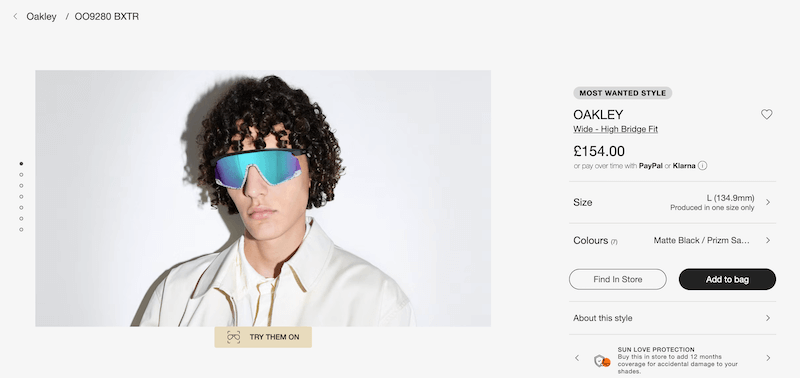
Augmented reality (AR): More companies are starting to use AR on their product pages. It lets users virtually place furniture in their own home or try on sunglasses and jewelry from the couch. Example below with “try them on” feature to see yourself wearing the sunglasses.
Size/fitting assistant: If you sell clothes online, product returns can be an issue. A fitting assistant based on customer measurements and past orders can help.
Environmental impact: If your customers care about sustainability, you can show calculations of the environmental impact of your products when it makes sense.
It doesn’t always have to be complicated. Small features can help. Recipe sites sometimes have a mode that keeps the screen on while cooking.
For makeup products, it is important to describe variants and skin tones so users can choose the right one.
Optimize product images
Before we talk about image optimization, we need to address the images themselves.
Images on your product pages need to be high quality. You should showcase your product in action and not just with a standard shot.
If you sell outdoor boots, show a normal product photo, but also show the boots on real people in the woods or mountains. Example of outdoor boots in an outdoor environment.
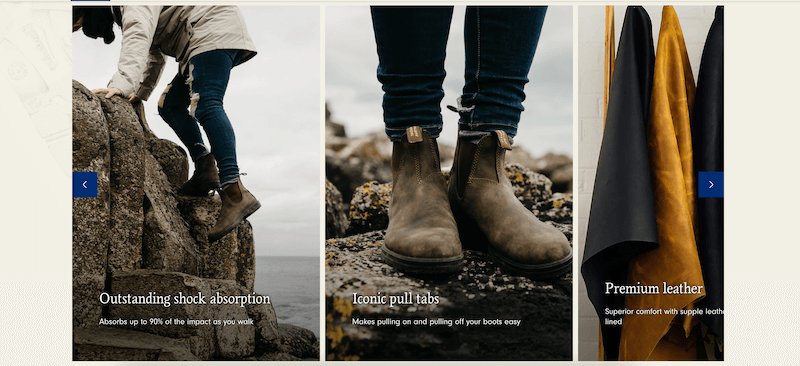
You want to create an image in the visitor’s head of how the product could be used.
Use high-quality images.
Best practices for image optimization for ecommerce:
- Include the product name in the image file name
- Use the right format. WebP is worth mentioning, but you can also use JPG
- Show the image in the right size by saving the image in the dimensions it is meant to be on the site (pixels)
- Compress image file sizes using tinypng.com to prevent slow page load
- Include your images in your XML sitemap
- Use descriptive alt tags and optimize for screen readers. Keep in mind that this should make sense for blind people and not just Google bots
Product descriptions that sell
The product description is one of the most important parts of product page SEO as well as your sales.
A good product description sells the product. But what is a good product description?
First of all, a good product description is not a copy-paste from the manufacturer’s website, catalog, or other sources.
Do not focus too much on classic SEO content here. Be direct about the product, the features, and the advantages. Cut content that wastes time and removes focus from the purchase. Product description example.
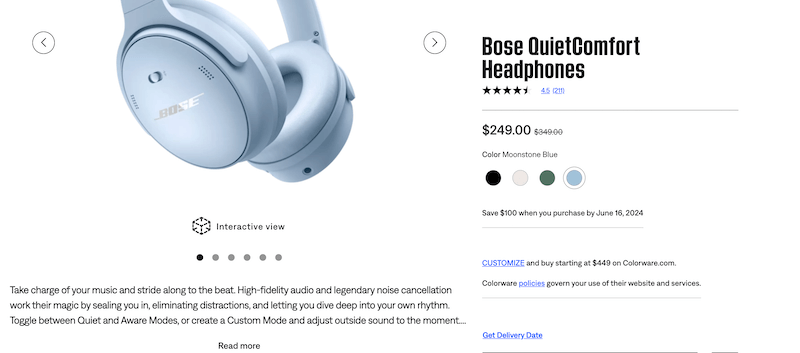
Checklist for ecommerce product descriptions:
- Keep it simple and easy: Too many buttons, too much text, discounts, and pop-ups can be annoying, disturb the user, and ultimately lead to abandonment. Do not overwhelm the users.
- Keep it unique: If you have products with different variables that have their own landing page, you might end up having duplicate content. Make sure to write unique product descriptions for all variables or set up canonicals on the duplicated pages.
- Highlight important content: What can the visitor use the product for? How can they use it? What are the specific advantages of that product vs. similar products? Does it have any special attributes worth mentioning, like t-shirts made of non-stain material? Is anything included, or even more importantly, what is not included? Is it compatible with other things?
- List a few important specifications: Make sure that the user knows what they are buying by listing product attributes, size, color, weight, length, max weight, or other important details.
Add a “You might also like” snippet
You are not supposed to stuff anything down your visitors’ throats. What you do want is to help your visitors buy.
Including related products is a smart and simple way to retain users who are not ready to buy the product they are looking at. It helps them find the right product.
On top of that, it is also a good way of upselling. Example of related products.
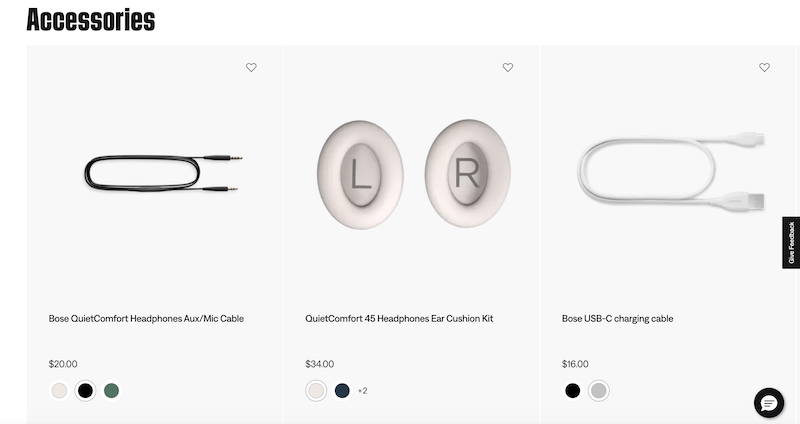
Showing related products adds internal links to other products and improves their SEO performance.
To get the full potential, you can add both a “related products” slider and an “others also bought” slider.
Add video demonstrations and guides
One of the most underrated features on product pages is the use of videos. It takes a little effort, so many ecommerce businesses skip it. This is one area where you can gain an advantage.
Videos help conversions, create trust, and increase rankings. Starting a video requires active interaction from the user, which sends positive signals to Google.
Make video creation standard for new products. It does not need to be a professional studio production. A simple setup with your smartphone works fine.
What to showcase in a product video:
- Get into details about the product and talk about features, materials, etc.
- Record guides for the product. If it’s a tent, show how easy it is to assemble in 60 seconds, for example
- Show the unboxing: What’s in the package? What’s included?
The most important part is that the video is useful and answers what the user needs to know.
Add real product reviews
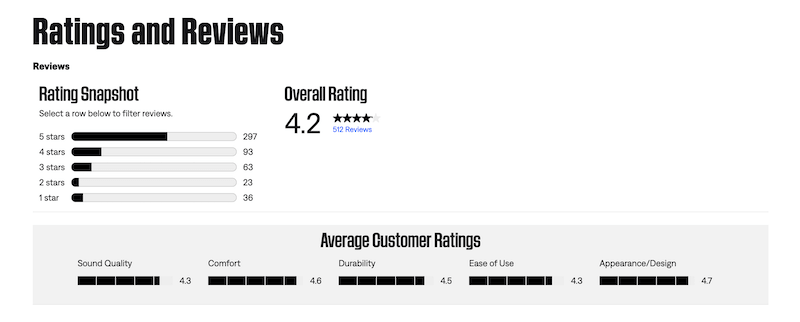
Customer reviews and ratings build trust. Showing good reviews and high ratings on your product page can increase the chance that customers buy.
It is also important to answer negative reviews in a professional way. Responding shows that you value customer opinions.
Encourage customers to leave reviews. Follow-up emails or small incentives can help you get more responses.
A mix of reviews gives an honest picture of your product.
This can also reduce product returns. Honest reviews help set the right expectations.
These reviews also give you real feedback. You may need to adjust stock or speak with the manufacturer about quality or features.
Add product schema
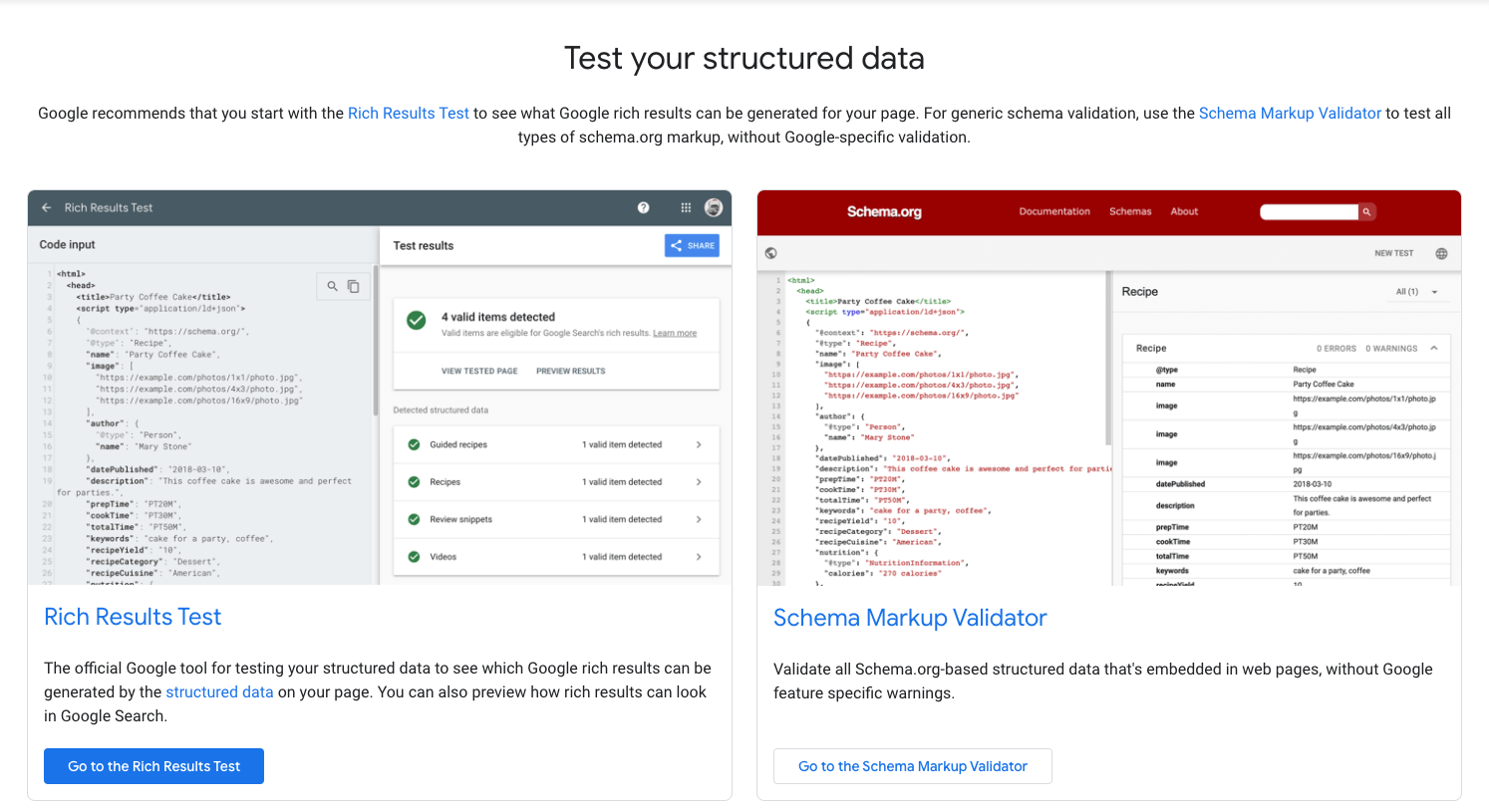
Adding product schema can improve how your pages appear in search results and increase click-through rates.
For product schema, include the product name, price, stock, condition, and other important details.
Schema is not a direct ranking factor, but it helps Google understand your pages better. This can lead to better rankings indirectly.
Structured data increases your chances of rich snippets. Adding customer reviews to the schema may also show ratings directly in search.
Include FAQs and schema
FAQs are a good way to add useful content. They create more context around the product and answer questions from a user perspective.
Depending on what you sell, it can be as simple as “what’s included” and what exactly comes with the product – for example, whether batteries are included with a flashlight.
An FAQ removes doubts that could stop a purchase. Think of it as your 24/7 service assistant.
FAQs also let you add more internal links, improve user experience, and include extra keywords.
Make sure to add FAQ schema. This helps Google understand the content and increases the chance of getting featured snippets.
Canonicalize products that are in multiple categories
It’s crucial to manage product variants correctly to avoid duplicate content issues.
Your product pages should normally be self-referring with the canonical tag. There are exceptions.
If you have variants of the same product with their own landing pages, such as different colors or sizes, you need to handle them carefully.
Having multiple nearly identical pages can hurt rankings for both. It is often better to consolidate to one strong page.
You can create unique product variants. To do so, it’s important to:
- Use URL parameters such as /product?color=black and /product?color=white to clarify the site structure for users as well as search engines
- Use canonical tags. Choose one of the variants to be the main product and refer to that with a canonical from all other product variants
You should carefully consider if it even makes sense to have different URLs for product variants. You shouldn’t use separate URLs if:
- Users’ search behavior isn’t targeted toward specific variants of the product
- You don’t want to have the variants on your category pages
- There is no gain in Google Shopping from having multiple variants instead of one landing page with an optional color/size picker
9 things NOT to do on your product page
Hopefully, you are doing all the “dos” from above to optimize your product pages. Now, let’s look at the don’ts for ecommerce products:
- Don’t use content from the manufacturer
- Don’t duplicate content by using the same content for multiple products (unless you add the correct canonical)
- Don’t use low-quality images
- Don’t forget CTAs (calls-to-action)
- Don’t use stock images
- Don’t provide false information or leave out important things
- Don’t forget to optimize for mobile users. Most ecommerce purchases happen on mobile devices
- Don’t forget about your audience. Google doesn’t buy anything from you – focus on users.
- Don’t use too much time on niche and low-volume keywords (use energy on your category pages instead)
FAQ for product page SEO
Can I automate my SEO product content production with AI?
Basically, yes. You can automate content creation using AI and add new products with all textual content within minutes. It’s not recommendable to outsource all content work to AI, though. You need content made for people by people.
Product pages are ultimately about selling the product, so you need to use psychological selling points, know the product, its key features, etc. You can use AI tools, but use them for inspiration, rephrasing, idea generation, and outlines, while writing your own quality content.
How to handle out-of-stock products for SEO?
Handling out-of-stock products is a matter of both user experience and SEO. You need to have a strategy to handle product pages that are out of stock.
If the product is temporarily out of stock, you should keep the product page live and put on an “out of stock” button instead of a buy button, let people sign up to get a notification when it’s back in stock, and recommend a similar product in stock in the meantime.
If the product is permanently discontinued, you can keep the page live if the search demand is high, but make sure to be clear about the product status and show similar product options. If the search demand is low, you should redirect the page to another relevant page (most likely the category page).
This approach follows Google’s guidance on the transparent handling of out-of-stock items.
Roundup

Mastering product page SEO for ecommerce can make a big difference for your online store. The strategies in this guide can help your pages get more visibility and drive more sales.
Start with clear URLs and add breadcrumbs for better navigation. Make sure product names match titles and H1 tags. Add relevant content and product attributes.
Optimized images and good product descriptions make your products more appealing. Related products and video demonstrations can increase engagement.
Real reviews and product schema build trust and improve rankings. FAQs and schema markup add value.
Canonical tags on products in multiple categories help avoid duplicate content problems. Avoid common mistakes like neglecting mobile users.
Case studies show one targeted approach delivered a 62% organic traffic increase within three months.
By following these points, you can create product pages that work well in search and give customers a good shopping experience.
Frequently Asked Questions
Should I noindex or keep product pages indexed?
Valuable product pages should generally be indexed to attract organic traffic. However, pages with thin or duplicate content might be better set to noindex to prevent SEO issues. Differentiating or consolidating similar pages helps maintain a healthy site structure and avoids cannibalization (WebmasterWorld).
Why is page load speed important for product page SEO?
Page load speed is a critical ranking factor because faster pages provide a better user experience. Slow pages increase bounce rates and reduce conversions, while optimized speeds can lead to higher rankings. Tools like Google PageSpeed Insights can help you identify and fix issues (Moz).
How do I prevent keyword cannibalization on product pages?
You should target product pages for specific product names and let category pages handle broader search terms. This strategy stops your own pages from competing against each other for the same keywords. Using proper internal linking helps define this structure clearly for search engines.
Is keyword stuffing effective for SEO on product pages?
No, overloading pages with keywords violates search engine guidelines and can lead to penalties. Keywords should be integrated naturally within high-quality, relevant content that helps the user. This approach ensures a seamless user experience and avoids spam penalties (Google Search Central).
Do more reviews automatically improve product page rankings?
The quality and schema markup of reviews are often more impactful than just the quantity. Implementing review schema allows search engines to display rich snippets, which increases visibility in search results. Honest reviews also build trust and help customers make informed purchase decisions (WebmasterWorld).